WizLeads


TL;DR
Email list cleaning is ordered removal: free steps first, paid verification on the smallest file, a re-check before every batch. In 1,000 real-estate decision-maker emails sourced from Apollo, WizLeads flagged 212 as catch-all, so one verifier pass does not settle a cold list. No step can confirm or remove spam traps, or prove a mailbox exists. The eight steps below run in cost order.
What email list cleaning does, and what it cannot
Email list cleaning is the work of removing addresses that will bounce, draw complaints or waste a send before they reach your sequencer. Your sending tool sets the stakes: Instantly, by default, pauses a campaign once bounces pass 5% after 200 sends. Email hygiene, also called email list hygiene, is the habit behind it: clean every batch, then feed every bounce and opt-out back into one suppression file.
A one-off clean is a single pass over an old file, and that file starts to decay the day the pass ends. The same phrase also names inbox security, which is a different subject and not covered here.
A cold list is harder than a newsletter list. Nobody on it opted in, so the cleaning that matters keeps dead and risky addresses away from your sending domains. A newsletter can sunset quiet readers on a calendar. A cold list needs a check just before each send, because lists decay as people change jobs.
Cleaning also has two limits. The first is spam traps. Spamhaus's sender guidelines say that list validation does not clean spam traps and is no replacement for permission. Verification catches dead addresses while they still bounce, not traps that look like healthy inboxes, so no step here confirms or removes one.
Spamhaus adds three points that shape how you clean. Carry your suppression list across when you move to new infrastructure, because old inactive addresses are where recycled traps sit. Mailboxes inactive for more than 12 months can be repurposed as traps, a point Spamhaus takes from M3AAWG's trap guidance. And purchased, rented or harvested lists are the most common source of trap hits.
If you do hit a trap, the fix sits upstream. Spamhaus says to audit how the address entered your list, find the segment or collection method behind it, and remove that source entirely. That is a sourcing decision, and no cleaning step can make it for you.
The second limit is proof. A verifier reports what a mail server said at one moment, and a free checker that stops at syntax and domain only shows that an address looks valid. Treat every verdict as a prediction that ages.
The limit you are cleaning for
No mailbox provider publishes a bounce threshold. The limits you can read come from the platform you send through and from blocklist operators. Instantly's help centre says it pauses a campaign when the bounce rate passes 5%, and only after the campaign has sent 200 emails. The setting is on by default, and you can change the threshold or switch the feature off.
A resumed campaign is not auto-paused for high bounces again for 7 days. That leaves the checks in steps 5 and 7 as your real safety net.
Spamhaus names a similar line. Its guidelines list an overall bounce rate under 5% as a requirement and recommend suppressing hard bounces immediately. Spamhaus runs blocklists and is not a mailbox provider, so read that as a blocklist operator's rule, not a rule from Gmail or Outlook.
The same guidelines are written for permission-based mail, and their first requirement is confirmed opt-in. A cold list cannot meet that, so staying under 5% does not make a cold send compliant with them. Your sequencer may set a different number, so find yours before the first send.
Aim well under the line. The bounces that trip a pause have already landed on your domains by the time it fires. That is why the steps below spend their effort before the first send.
How to Clean an Email List in 8 Steps
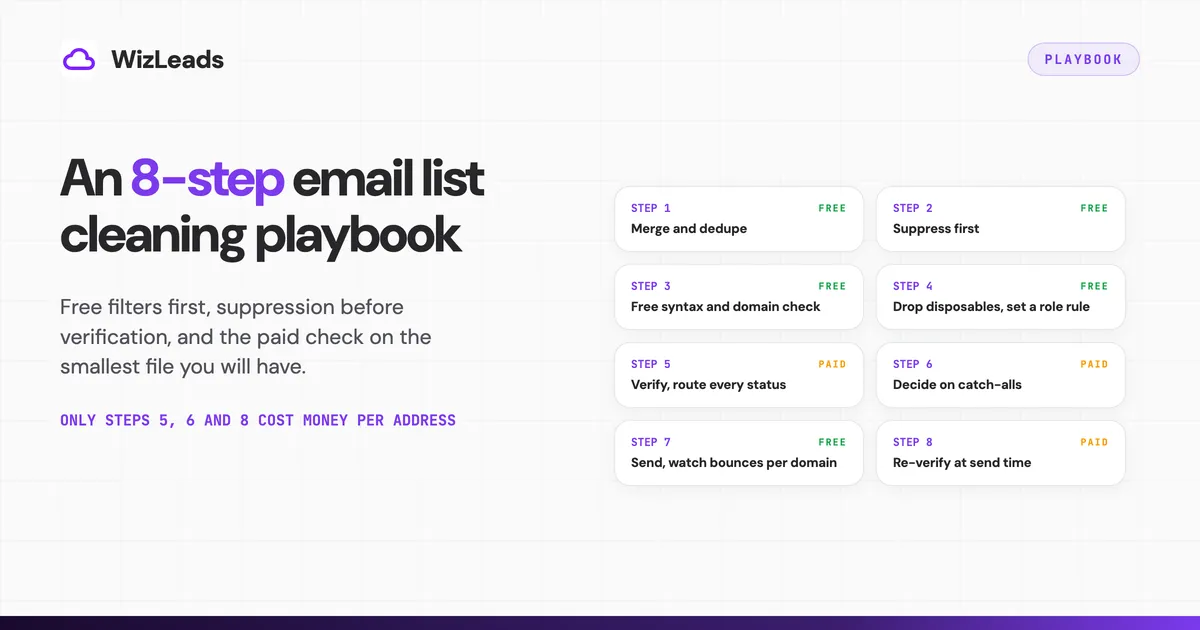
Each step opens with what it removes and what it costs. Here is how to clean email list exports in cost order: free filters first, suppression before verification, and the paid check on the smallest file you will have. Only steps 5, 6 and 8 can cost money per address.
Work in one spreadsheet or CSV from start to finish. Give each row a source, a status and the date of its last check, and add a column for the step that removed it. That column turns a vague "the list got smaller" into a record you can read when a campaign bounces.
1. Merge and dedupe every source
Removes: repeat rows, and anyone already in a live sequence. Costs: nothing.
Pull every export into one file, lowercase the addresses, trim spaces and keep one row per address. Then match the file against every campaign that is still sending. The same prospect often arrives from a Sales Navigator scrape, an Apollo export and an event list. Two sequences to one person in the same week is an easy way to earn a spam complaint.
Do this in your own file. A verifier sees only the file you upload, while your master file is the one place that sees across uploads, live campaigns and suppression.
2. Suppress before you verify
Removes: people you must not or should not mail. Costs: nothing, and it shrinks the paid step.
Run the merged file against your suppression list. That means unsubscribes, past hard bounces, spam complainers, current customers, open deals and anyone a client asked you to leave alone. Every address you suppress here is one you do not pay to verify in step 5.
Opt-outs also carry a legal clock. The FTC's CAN-SPAM compliance guide says you must honor an opt-out request within 10 business days, and it adds that the law makes no exception for business-to-business email.
Your sequencer may keep suppression inside one campaign. Instantly stops all follow-ups to a bounced lead automatically. Adding that lead to the workspace blocklist, so no future campaign mails it, is a separate step its help centre marks as optional.
Export bounces and unsubscribes after every campaign and fold them into one master suppression file. Give each row a reason and a date, so you can tell a hard bounce from a client request later. Keep the file when you move to new sending infrastructure, as the Spamhaus guidance above advises.
3. Run a free email list cleaner for syntax and domains
Removes: malformed addresses, typos, dead domains and domains with no mail server. Costs: nothing.
A free email list cleaner handles this layer. emaillistcleaner.org checks syntax and confirms that the domain is set up to accept email. It also flags disposable and role-based addresses and removes duplicates.
The tool says only the domain parts of your addresses are sent anywhere, to Google's DNS service. Jitbit offers a similar free cleaner. Keep the original export untouched and work on a copy, so you can see what each pass removed.
This layer has a clear end. The emaillistcleaner.org page says that when it reports an address looks valid, "it means just that, that it looks valid." Use a free cleaner to shrink the file at no cost. Treat what passes as looks valid, and verify it in step 5.
4. Drop disposables and set a rule for role addresses
Removes: disposable inboxes always, role inboxes by rule. Costs: nothing.
Disposable addresses go, every time. Role addresses such as info@ and sales@ are a judgement call. At a small company the info@ inbox may be the only way in. At a larger one it often lands in a shared queue that nobody owns.
The free cleaner from step 3 can flag both kinds, so this step is a decision about the flagged rows.
Decide once per campaign and apply the rule to the whole file. A rule applied row by row drifts, and the next person who runs the list will not know what you chose. Write the rule at the top of the file.
5. Verify what is left, then route every status
Removes: confirmed invalid addresses. Costs: your verifier's rate, on the smallest file you will have.
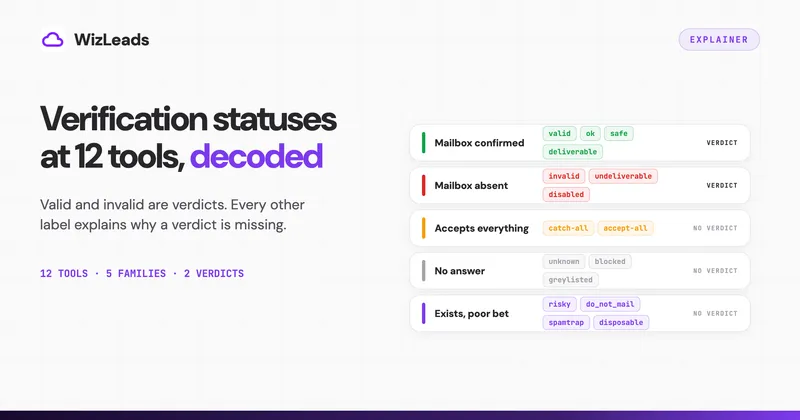
Upload the file that survived steps 1 to 4 to a verifier such as WizLeads' email verifier. Verify in batches sized to a send, not the whole list at once, so no verdict sits idle before use. Every verifier returns its own labels, and our guide to email verification status meanings maps them tool by tool. For routing, the labels collapse into five families with one action each:
| Status family | What to do with it |
|---|---|
| Valid | Send soon, because the verdict ages |
| Invalid | Suppress permanently |
| Unknown | Re-run in a later pass before you discard it |
| Catch-all | Apply your step 6 policy |
| Risky | Split by reason: disposable goes, role follows your step 4 rule |
Unknown means the tool could not decide at that moment. A mail server that gave no answer once may give one later, so a second pass costs little and saves addresses you would otherwise lose.
What you pay for varies by status and by vendor, and on a messy list it changes the total. Some vendors do not charge for unknown results and others do, and catch-all billing splits again. Check yours before you upload. WizLeads, for example, charges 0.5 credits for every email it processes, whatever the result.
A valid verdict is a prediction for that moment. It does not tell you the address is free of spam traps, and it does not promise the address still works next month.
6. Decide what happens to catch-alls
Removes: whatever your catch-all policy rejects. Costs: depends on whether your verifier resolves catch-alls and how it bills them.
This slice can be too large to wave through and too large to throw away without thought. Take the 1,000 real-estate decision-maker emails from Apollo behind our email verification benchmark. WizLeads flagged 212 of them as catch-all (21.2%) and 159 as sitting behind a secure email gateway (15.9%). Both counts come from WizLeads' own classifier, because no independent source gives the true makeup of that list.
You have three options:
- Resolve them with a verifier that returns a valid or invalid verdict on catch-all addresses, then route those results like any other. Check how it bills the ones it cannot resolve.
- Segment them into a small, separate send on infrastructure you can afford to risk. Send it after the clean batches, and track its bounces on their own so they cannot hide inside a good campaign's average.
- Drop them, and accept a smaller list.
The right choice depends on how large the slice is and what a burned domain costs you. If catch-alls run near one in five, as they did in that list, dropping all of them gives up a lot of reach. If they are a small share, dropping them costs little.
7. Send, watch bounces per domain, and feed suppression
Removes: hard bounces, complainers, unsubscribes and wrong-person replies, as they happen. Costs: nothing.
Watch bounce rate per campaign, because sequencer pauses act on campaigns. Also watch it per sending domain, because that is where reputation damage lands. Know your sequencer's pause setting and where your numbers sit against it.
Small campaigns need your own watch most. Instantly's check waits for 200 sent emails, so a campaign that sends fewer never meets it. Look at the bounce count by hand after the first sends.
Stop a send when one domain's bounces climb, and do not wait for the automatic pause. Find the cause first. It may be a stale source, a skipped step or a verifier that kept too many catch-alls. Fix that, then resume with a smaller batch.
Every hard bounce goes to the suppression file at once, which is also what the Spamhaus guidelines recommend. Add unsubscribes and wrong-person replies the same day. A suppression file that lags a week behind sends the same mistake twice.
8. Retire old lists and re-verify before every batch
Removes: people who have left since your last check. Costs: another verification pass per batch.
Lists decay as people change jobs, so a verdict from last month is already older than it looks. Verify each batch just before it enters a sequence, and ignore the date you built the list. When a batch waits in a queue, re-verify it before it goes. The shorter the gap between check and send, the more the verdict tells you.
Retire old lists on purpose. Mailboxes inactive for more than 12 months can be repurposed as spam traps, as Spamhaus notes, and verification cannot spot a recycled trap. A list that has sat for more than a year is a rebuild.
Re-source it, then run all eight steps again. Re-verifying an old file only tells you which addresses still accept mail.
Record the date of each pass in the file name or in a column. One look at that column tells you how old a check is before anyone sends.
Warm lists: same hygiene, different signal
For people who replied, booked a call or bought, email hygiene shifts from verification toward engagement. Judge them by replies, meetings and purchases. Pick a quiet period after which a contact moves to a slower track or off the list, and set it once. Re-verify any address you have not mailed for a while before you send, because the same decay applies.
Where WizLeads fits
WizLeads' Verify Email returns one of four statuses: valid, invalid, unknown or error. It also returns a catch-all flag, set to yes, no or unknown, and the mail provider behind the address. That gives step 6 a labelled group to route instead of a guess.
Billing is 0.5 credits for every email processed, whatever the result, so unknowns cost the same as valid addresses. The $39 Freelancer plan holds 10,000 credits a month, which is 20,000 verifications.
In the same benchmark, bounce rate is bounces divided by the addresses each tool kept. WizLeads kept 852 with 5 bounces (0.59%) and rejected 148. NeverBounce (0.56%, after rejecting 289) and DeBounce (0.15%, after rejecting 330) bounced less, and both rejected more addresses.
LeadMagic reached 0.85% and MillionVerifier 0.99%. ZeroBounce kept 888 addresses, and 33 of them bounced (3.72%). Of the five tools under 1%, WizLeads rejected the fewest.
FAQ
Is there a free email list cleaner available?
Yes. Free cleaners such as emaillistcleaner.org check syntax, confirm that the domain can accept email, flag disposable and role-based addresses, and remove duplicates. emaillistcleaner.org does not confirm that a mailbox exists, and its own page says a valid result means only that the address looks valid. For a cold list, use a free cleaner to shrink the file, then verify what passes.