WizLeads


TL;DR
Instantly checks leads inside the app for 0.25 credits each, so 1,000 leads use 250 credits. You can run it on upload, on leads already in a campaign, or from the Leads section. Instantly skips Invalid and Risky leads by default and pauses a campaign above 5% bounces by default. Verify before import when you want one rule set across tools, a lower cost at volume, or catch-all flags in your file.
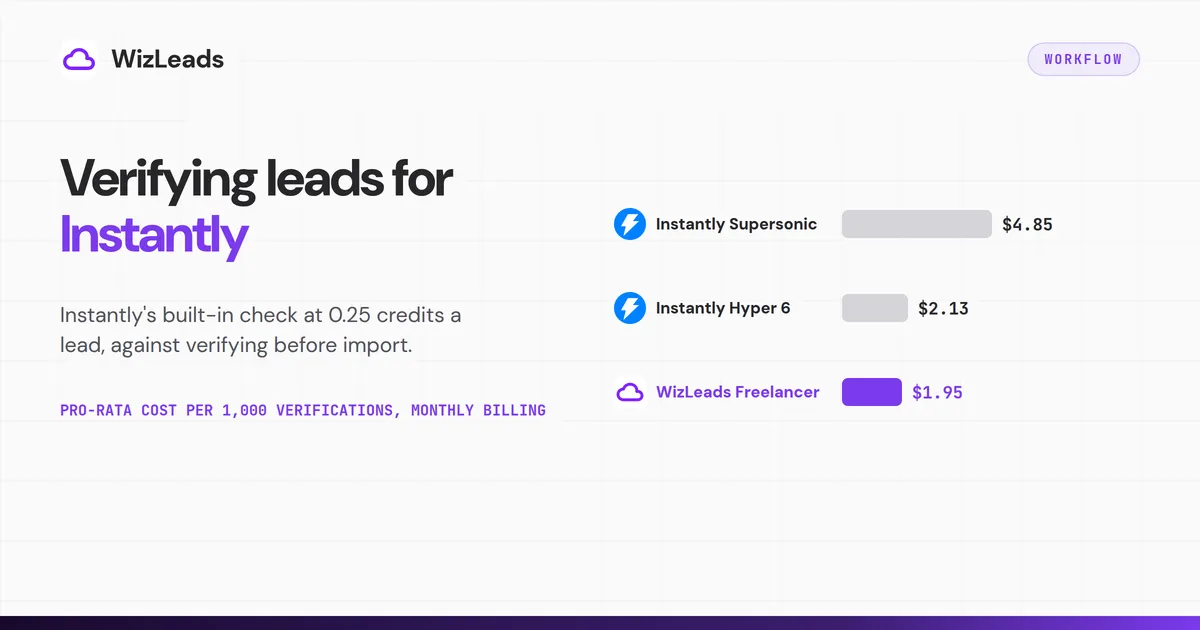
Instantly's built-in check costs 0.25 credits per lead. On the Supersonic plan ($97 a month for 5,000 credits), that is a pro-rata $4.85 per 1,000 leads, or $48.50 of the plan for a 10,000-lead list. That is enough for a small list you mail this week. An outside verifier fits when the list is large, feeds more than one tool, or needs catch-all handling before import.
How Instantly email verification works
Instantly's How to Verify Leads help article lists three places to run a check:
- The "Verify leads" checkbox when you add leads to a campaign. The CSV import article words it as using credits at 0.25 per lead, and the unchecked state skips verification.
- The "Verify leads" action on leads already inside a campaign.
- The Leads section: pick a campaign or list, open Enrich & AI, then Verification, then Validate Email.
If Enrich & AI disappears after you select leads, they came from Lead Finder (formerly SuperSearch). The help article says those leads are already verified.
Instantly's product page describes the method in plain terms: a syntax test, a lookup of the domain's mail servers, and a probe of the mailbox itself, followed by labels for disposable, catch-all and otherwise risky addresses. That is the vendor's description of its method. Run a small batch and read the statuses before you trust it with a full list.
While a batch runs, the lead's status reads "In verification queue". When the batch finishes, the status updates to Verified, Invalid or Risky. The table shows what each does by default.
| Status | What Instantly does by default |
|---|---|
| Verified | The lead stays in the send list |
| Invalid | The lead is not contacted |
| Risky | The lead is not contacted unless you enable risky emails on the campaign |
| Skipped | Set by BounceShield, a separate layer after verification, and also by your blocklist, AI lead filtering or a per-company send limit |
The API shows more states. Instantly's API v2 reference gives a lead's verification_status eight values: Not verified, Verified, Pending, Pending Verification Job, Invalid, Risky, Catch All and Job Change. The reference marks the field read-only. Through the API, you cannot write a verdict from another tool into it.
The API also has a single-address endpoint, POST /api/v2/email-verification. It returns verified, invalid or pending, plus a catch-all flag. If an address takes longer than 10 seconds, the response is pending. You poll for the result, or you pass a webhook URL.
What Instantly verification costs
Instantly's credit system article prices lead verification at 0.25 credits per lead verified. Credits are sold as plans, billed monthly or annually.
The table turns every tier in that article into a cost per 1,000 verifications. Growth, Supersonic and Hyper match the pricing page's monthly toggle, which shows Hyper as "From $197" for 10,000 to 200,000 credits. The other tiers are not on the pricing page's cards.
| Credits plan (monthly) | Price per month | Credits | Verifications it covers | Pro-rata cost per 1,000 |
|---|---|---|---|---|
| Nano | $9 | 150 | 600 | $15.00 |
| Growth | $47 | 1,500 | 6,000 | $7.83 |
| Growth 2 | $77 | 2,000 | 8,000 | $9.63 |
| Supersonic | $97 | 5,000 | 20,000 | $4.85 |
| Supersonic 2 | $147 | 7,500 | 30,000 | $4.90 |
| Hyper | $197 | 10,000 | 40,000 | $4.93 |
| Hyper 2 | $300 | 20,000 | 80,000 | $3.75 |
| Hyper 3 | $500 | 45,000 | 180,000 | $2.78 |
| Hyper 4 | $997 | 100,000 | 400,000 | $2.49 |
| Hyper 5 | $1,400 | 150,000 | 600,000 | $2.33 |
| Hyper 6 | $1,700 | 200,000 | 800,000 | $2.13 |
These are pro-rata unit costs, not bills. Instantly sells the plan, not the fraction, and the math assumes every credit goes to verification. Per 1,000 verifications the ladder does not fall steadily: Growth 2 costs more than Growth, and Hyper more than Supersonic.
The pricing page's yearly toggle shows lower monthly prices, billed annually. Growth is $37.60 (20% below monthly). Supersonic is $87.30 and Hyper is $177.30 (both 10% below).
Pro-rata, that is $6.27, $4.37 and $4.43 per 1,000 verifications. These are unit costs too.
Three details matter when you budget credits for verification:
- Credits are shared. The same article prices a work email at 1 to 2 credits, an AI Reply Agent reply at 5, and a Website Visitors profile at 3. Verification draws from the same balance.
- Credits expire. Unused credits on monthly plans expire 2 months after purchase. On annual plans they expire after 1 year.
- A 10,000-lead list needs 2,500 credits. That is 10,000 times 0.25, so compare leads times 0.25 with your balance before you tick the box. On monthly billing, Growth holds 1,500 a month and Growth 2 holds 2,000, so the smallest single plan that covers the list in one month is Supersonic, at $97. Its pro-rata share for the 2,500 credits you use is $48.50, or $43.65 at Supersonic's yearly price of $87.30 a month. Yearly billing can change the plan you need: the help article's table says annual plans get all credits upfront, 18,000 a year on Growth, while the pricing page's yearly cards still say "Instantly Credits Monthly".
Where Instantly's own pages disagree
Instantly's pages give different figures for free credits and for Supersonic's price, and label one price table in a way its own numbers do not match. All three affect a verification budget.
Free credits. The product page says "You can start for free with 25 credits and no credit card required." The verification help article says a free trial gives 100 free credits to test verification. The free trial article lists 100 free credits for a 14-day trial, with the note "Limited Lead Finder Results". Check your own balance before you plan a test around either number.
Supersonic's price. On the pricing page, the Credits tab lists Supersonic at $97 a month. A bundle breakdown further down the same page lists "Supersonic Credits" at $197 a month. This guide uses $97 because the Credits tab and the help article's table both show it. Confirm the figure at checkout.
Monthly or annual. The help article's credit table sits under a heading that offers 10% off for paying annually with all credits upfront, while the pricing page's yearly cards describe the credits as monthly. The prices under it match the pricing page's monthly toggle, and the yearly toggle shows lower ones. Check the billing period at checkout.
What Instantly does with risky, invalid and catch-all leads
The help article says, "Invalid and Risky leads will not be contacted by default." The override is a campaign setting: Settings, then Advanced settings, then Sending rules. Tick "Enable risky emails" under Allow risky emails, and the campaign sends to leads Instantly labelled Risky.
Catch-all checking is part of the same service. Instantly's catch-all article says the check is built into lead verification, needs no separate setup, and carries no extra charge beyond the 0.25 credits per lead.
Instantly attaches large numbers to the feature. The article says "about 50%" of emails come back Risky, Catch-All or Unknown from standard tools. It says the check can recover 300 to 400 additional contacts for every 1,000 leads.
The product page promises to "Recover up to 40% leads". These are Instantly's claims about its own feature, and the pages give no method for them.
A second layer sits after verification. Instantly's BounceShield article says it skips recipients that Instantly's own send logs mark as high risk.
It is on by default for all campaigns, and skipped leads show the status Skipped. You turn it off in the same Allow risky emails area with "Disable BounceProtect". The article's own advice: "Verify leads before upload AND keep BounceShield enabled for maximum protection."
Verification does not remove every bounce. Instantly's bounce article says catch-all domains "accept all emails initially but reject them later". It also says an address behind a security gateway "may bounce even though the recipient's email address is valid".
Instantly's bounce protection is an adjustable default
Instantly pauses a campaign above 5% bounces by default, after 200 sends. You can change the threshold or turn the pause off. Instantly's high-bounce auto-pause article says the feature is enabled by default for all users and that a campaign must send at least 200 emails before the check runs.
A paused campaign shows a "Bounces" error. The threshold is edited in Preferences; Instantly's campaign error troubleshooting guide puts the off switch in the Outreach Preferences section, under "Automatically pause campaigns with high bounce rates". After you resume a paused campaign, it will not pause for high bounces again for 7 days.
The same guide describes the trigger as a bounce rate "typically above 5%". It tells you to verify your leads before you resume, with Instantly's built-in tool or an external one.
A campaign with fewer than 200 sends is never checked, so a small catch-all segment can pile up bounces without pausing. And because anyone with access can change the threshold or switch the pause off, it protects an account only while its settings stay as they are. Whatever the default does, your Instantly bounce rate is worth reading yourself.
When to verify before import
The built-in check is one click and bills from credits you may already hold. There are three reasons to move verification upstream anyway.
One policy across tools. If the same list feeds another sequencer or a CRM, one verifier gives every tool the same verdicts and the same definition of risky. Instantly's statuses apply only inside Instantly.
Cost per check. Supersonic is the comparison here because it is the smallest single plan that covers a 10,000-lead list in one month on monthly billing. Its pro-rata cost is $4.85 per 1,000 verifications on monthly billing and $4.37 on the yearly toggle. WizLeads' bulk verification takes 0.5 credits per email processed. The Freelancer plan is $39 for 10,000 credits, which covers 20,000 verifications, or $1.95 per 1,000 pro-rata. Supersonic works out to about 2.5 times that on monthly billing (4.85 / 1.95 = 2.49) and about 2.2 times on yearly (4.365 / 1.95 = 2.24). On a 10,000-lead list, that is $19.50 against $48.50.
A larger job gives a second pair. For 100,000 leads in a month, Instantly needs 25,000 credits. The smallest monthly plan that holds them is Hyper 3, at $500 for 45,000 credits, which is $277.78 pro-rata. At the top of Instantly's ladder, Hyper 6 comes to $2.13 per 1,000, and WizLeads' Agency plan to $1.24.
WizLeads needs 50,000 credits for the same job. Its Agency plan is $99 for 40,000, so the smallest monthly plan that holds them is Cartel, at $199 for 100,000 credits, which is $99.50 pro-rata. All of these are pro-rata unit costs. WizLeads credits also pay for scraping and enrichment, and Instantly credits also pay for work emails and AI agents, so the caveat runs both ways.
Flags before the list exists in Instantly. An outside verifier lets you split catch-all and gateway-protected addresses into their own file before upload. You also see the invalid share of a list before any of it counts against your plan's uploaded-contact limit.
How to verify upstream with a batch call
The batch route uses WizLeads' verify-email-batch endpoint. Five steps:
- Prepare a CSV with one column of email addresses.
- POST the file to
https://api.wizleads.io/email/verify-email-batchas multipart form data, with your API key in thex-api-keyheader. The fields aretask_name,column_mapping(for example{"email":"email_column"}) andfile. - Read the response. It returns a
task_id, the number ofrowsandcredits_blocked. The API documentation's example is 500 rows blocking 250 credits, which is 0.5 per row, held up front. - Poll the task with
GET /tasks/{task_id}. The result file is available only when the task reaches a terminal state: Done, Aborted or Failed. - Mind the rate limit. The API allows 10 calls per second across all endpoints and returns 429 above that. Excessive calls may lead to a 1 hour ban on the user and the IP. One batch call stays far under it, but a loop of single-address calls can reach it.
For a handful of addresses, GET /email/verify-email?email=... returns status, provider and catchall for one address.
Billing is the same on both routes: 0.5 credits per email processed, regardless of the result. A 10,000-lead job is 5,000 credits, or $19.50 pro-rata on the Freelancer plan.
Mapping results into Instantly's import
Instantly's verification_status is read-only in the API reference, so you cannot write an outside verdict into it that way. The file you import is the filter. Split the verified CSV by result before upload, and carry extra signals along as custom variables.
| WizLeads result | What to do in Instantly |
|---|---|
status valid, catchall NO | Import to your main campaign file |
status valid, catchall YES | Import to a separate campaign |
status invalid | Do not import |
status unknown or error, or catchall UNKNOWN | Hold, re-check later, keep out of the main campaign |
provider starting SEG_ (the API documentation's example is SEG_Mimecast) | Keep as a custom variable so gateway-protected leads show in reports |
This table is suggested handling, not an Instantly or WizLeads rule. The field names come from the single-address route. Before you build filters, open the downloaded batch CSV and match its headers against them.
Instantly's CSV import article sets the file rules those columns must follow:
- Column names start with a capital letter, run to 20 characters at most, and cannot repeat.
- One upload takes at most 50 variables.
- Remove Boolean true or false values and use text instead. On the single-address route,
catchallcomes back as YES, NO or UNKNOWN, which is text. - Files should be UTF-8, and the email column is mandatory.
Leave the duplicate check on. It is on by default and stops you from uploading leads that already sit in another campaign or list.
If you verified upstream, untick "Verify leads" on the import. Ticking it buys a second opinion at 0.25 credits per lead, on top of what you already paid.
What to do with catch-all and risky addresses
Keep them out of the main campaign. Send them from their own campaign, with a small share of your volume. If Instantly labels any of them Risky, tick "Enable risky emails" under Allow risky emails for that campaign only. Leave BounceShield on: the leads it skips are ones Instantly's own send logs mark as high risk.
If the domains reject late, as Instantly's bounce article says they can, the bounces land on a small campaign and not on the one carrying your volume. For how a verifier can resolve catch-all domains before import, see the catch-all guide.
Watch that segment by hand. A segment under 200 sends will not pause itself, so read its bounces after the first few dozen sends.
Re-verify any list you have not mailed in a while before it goes back in. An address that passed months ago can fail today.
Where WizLeads fits
WizLeads verification costs 0.5 credits per email processed, whatever the result. The same endpoint also checks whether a domain is catch-all. The free tier is 500 credits once, which is 1,000 verifications, enough to test a real list before you pay.
In an April 2026 six-tool test of 1,000 real-estate decision-maker emails sourced from Apollo, WizLeads kept 852 as valid. Five of those bounced (0.59%), and it rejected 148. WizLeads flagged 212 of the 1,000 as catch-all (21.2%).
The test did not include Instantly's verifier, so it says nothing about how the two compare. The six-tool send test on 1,000 Apollo addresses has the method and the full table.
Which route to pick
Pick the built-in check when the list is small, Instantly is the only tool that touches it, and you mail it this week. Tick "Verify leads" on upload and leave the auto-pause on.
Pick upstream verification when the list is large, feeds more than one tool, or holds many catch-all addresses. Verify the file, split it by result, untick "Verify leads" on import, and send catch-alls from their own campaign.