WizLeads


TL;DR
- What it is: an undeliverable message is an email the receiving server refused or your sending server gave up on. The notice holds a reply code, an enhanced code and text.
- Who fixes it: the text beside the code tells you. We sort the codes from Google's, Microsoft's and Yahoo's pages and the RFCs into four groups: a wrong address, a mailbox that cannot take mail now, a server that refused you, and a server that told you to slow down. Only the first group points at the address.
- What to do: read all three parts, suppress dead addresses, fix SPF, DKIM and DMARC when a 5.7.x names authentication, and read the text on other 5.7.x refusals, because some are the recipient's policy. When a 4.7.x names your IP or domain, treat it as a reputation warning.
An undeliverable message is an email that the receiving server refused or that your sending server gave up on. The notice that comes back carries a reply code, an enhanced code such as 5.1.1 and a line of text. A 5 at the start is permanent and a 4 is temporary. RFC 3463 says each of the 12 useful reply codes is overloaded, so read all three parts.
When we searched "undeliverable", most results were about parcels. This guide is about email only. Microsoft calls the notice an NDR, short for non delivery report. Gmail sends it from Mail Delivery Subsystem, with a subject that is often "Delivery Status Notification (Failure)". The undeliverable email meaning is the same in all three, and the useful part is the code inside.
Below we show where to find the code, how to read it, and what to do about the common ones, in Google's, Microsoft's and Yahoo's own words and the RFCs'.
What an undeliverable message looks like in Gmail, Outlook and Yahoo
| Where | Who sends it | What to look for |
|---|---|---|
| Gmail | "Mail Delivery Subsystem (mailer-daemon@googlemail.com)" | Subject often "Delivery Status Notification (Failure)". Check Inbox and Spam. |
| Outlook.com | postmaster@outlook.com, postmaster@microsoft.com or service.microsoft.com | A section named something like "Diagnostic information for administrators". |
| Exchange Online | The server named as the generating server | Either the latest layout (Cause, Fix-it owner indicator, How to fix it, More info for email admins, Message hops) or the older User information and Diagnostic information for administrators blocks. |
| Yahoo | "MAILER-DAEMON" or "Mail Delivery Subsystem" | A subject similar to "Failed Delivery". |
Sources: Google's Fix bounced or rejected emails page, Microsoft's failed-delivery page for Outlook.com postmaster messages, Yahoo's Sender Hub, and Microsoft's Exchange Online NDR reference, which holds the worked sample below.
`` Generating server: alpineskihouse.com ronald@contoso.com mail.contoso.com #<exchange.contoso.com #5.7.1 smtp;530 5.7.1 Client was not authenticated> #SMTP# ``
The reply code is 530 and the enhanced code is 5.7.1. The two sets of digits do not have to match.
How to read the code in an undeliverable message
Every notice has three parts. The reply code is three digits, such as 550. The enhanced status code has three numbers, such as 5.1.1. The text is the receiving server's own explanation. Google's About SMTP error messages page lays them out this way.
A reply code alone settles little. RFC 5321 defines 550 as "mailbox unavailable (e.g., mailbox not found, no access, or command rejected for policy reasons)". That covers a dead address, a block and a policy refusal. The enhanced code narrows it, and its first digit is the class. RFC 3463 calls 4.XXX.XXX a persistent transient failure and 5.XXX.XXX a permanent one, "not likely to be resolved by resending the message in the current form". Google says errors starting with 4 are temporary and "No action is needed, the sender will try again". It says errors starting with 5 need action. RFC 5321 adds that "Even some "permanent" error conditions can be corrected", for example after a typo is fixed.
In Exchange Online notices, the Generating server field misleads people. Microsoft says it is "the name of the SMTP mail server that created the NDR". It is also the server that rejected the message only "if no remote server is listed beneath the sender's email address". Microsoft's own format and sample put the rejected recipient's address on that line, not the sender's, so look for a server name under the recipient's address. In the sample above, alpineskihouse.com generated the notice and mail.contoso.com, the remote server listed under ronald@contoso.com, refused the mail. If the remote server accepts a message and rejects it later, the remote server value is empty.
Microsoft's walkthrough of that same sample then says "Even though bigfish.com generated the NDR, mail.contoso.com actually rejected the message." The sample shows alpineskihouse.com, so one page names two generating servers for one notice. Trust the fields over the prose.
Undeliverable email error codes and the fix for each
The tables group each email undeliverable code by who holds the fix. Google's rows come from its Gmail SMTP error reference. Microsoft's NDR table lists enhanced codes, so a reply code appears only where a Microsoft page shows one.
The address is wrong
| Code | What the server says | Who fixes it, and the address |
|---|---|---|
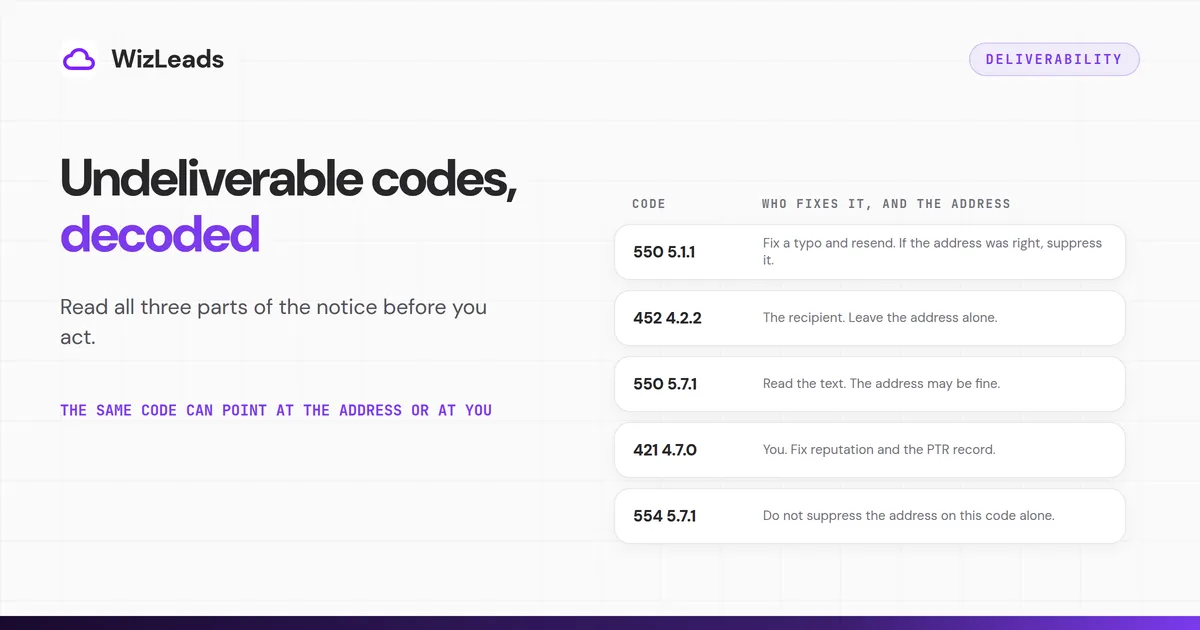
| 550 5.1.1 | Google: "The email account that you tried to reach does not exist. Please double-check the recipient's email address for typos or unnecessary spaces." Microsoft: "Bad destination mailbox address", which also covers a moved mailbox and a stale Outlook recipient cache. | You. Fix a typo and resend. If the address was right, suppress it. In Outlook, clear the Auto-Complete entry. |
| 553 5.1.2 | Google: "We weren't able to find the recipient domain." RFC 3463 says X.1.2 means the part right of the "@" is invalid. | You. Check the domain spelling, then suppress. |
| 5.1.10 | Microsoft, "Recipient not found": "SMTP address lookup didn't find the recipient's | You. Correct it and use Send Again on the Report tab, or suppress. |
| 550 5.4.1 | Microsoft's Directory Based Edge Blocking page shows "550 5.4.1 Recipient address rejected: Access denied". Its NDR table says "The recipient's address doesn't exist." | You. Suppress after reading the text. |
| 550 5.5.0 | Microsoft: an @hotmail.com or @outlook.com address "wasn't found by SMTP address lookup". "Similar to 550 5.1.10." | You. Treat it like 5.1.10. |
| 550 5.2.1 | Google: "The email account that you tried to reach is inactive." | Nobody on your side. Suppress. |
| Yahoo, 553 or 554 | "The Yahoo account that you're trying to send to does not exist." "You should not retry delivery of the message. It will never complete successfully." | Yahoo: "You should remove the email address from your mailing list." |
Sources: Google's Gmail SMTP error reference, Microsoft's NDR reference, its 5.1.10 page and its Directory Based Edge Blocking page, and Yahoo's SMTP error codes page.
Some 5.1.x codes point at you. Google's 553 5.1.7 is about your sender address. Microsoft's 5.1.8, "Access denied, bad outbound sender", means the account was blocked for sending too much spam, usually because it was hacked. Its 5.1.0, "Sender denied", despite the name, is a recipient lookup that failed on a message saved and replied to offline: check the address and send again. Two codes also have a second row. Microsoft's other 5.4.1 is "Relay Access Denied", a server or DNS misconfiguration, so it says nothing about the mailbox. Google's other 550 5.2.1 says the recipient is "receiving email at a rate that prevents additional messages from being delivered". Read the text before you suppress.
Senders reach the same view on 5.4.1. In an r/Emailmarketing thread, one reply calls it a dead or disabled mailbox when Gmail returns the same result, says Microsoft uses its own code where others use 5.1.1, and hard bounces it after one retry.
The mailbox cannot take it right now
| Code | What the server says | Who fixes it, and the address |
|---|---|---|
| 452 4.2.2 | Google: "The recipient's inbox is out of storage space." | The recipient. Leave the address alone. |
| 450 4.2.1 | Google: "The user you are trying to contact is receiving email too quickly. Please resend your message at a later time." | Wait, then resend. |
| 552 5.2.2 | Google: "The recipient's inbox is out of storage space and inactive." | The recipient. It is a 5, so park the address. |
RFC 3463 says X.2.2 "should be used as a persistent transient failure". One full mailbox is a warning. If the same address returns it on every send, treat it as a dead contact.
The server refused you
| Code | What the server says | Who fixes it, and the address |
|---|---|---|
| 550 5.7.1 | Google, five of its 20 rows: a policy that "prohibits the email that you sent", "likely unsolicited email", "very low reputation of the sending IP address", "very low reputation of the sending domain", and "This email has been rate limited." Microsoft, three rows: Delivery not authorized, Unable to relay, Client was not authenticated. | Read the text. Microsoft: "Typically, you can't fix the problem yourself." The address may be fine. |
| 550 5.7.26, 5.7.27, 5.7.30, 5.7.40 | Google: the sender is unauthenticated, failed SPF, failed DKIM, or has no DMARC record or policy. | You. Fix SPF, DKIM and DMARC. |
| 5.7.23, 5.7.509 | Microsoft: an SPF violation, and a sending domain that "does not pass DMARC verification and has a DMARC policy of reject". | You. |
| 5.7.511, 5.7.501 | Microsoft: "Access denied, banned sender", because "The IP that you're trying to send from was banned". Or the sending account was banned for spam activity. | You. For a banned IP, email delist@microsoft.com with the full NDR code and IP. |
| 5.7.513 | Microsoft: the recipient domain "added your sending IP address to its custom block list". | The recipient's admin. Contact the recipient. |
| 550; 5.7.515 | Microsoft, Outlook.com only: domains sending over 5,000 emails a day that fail SPF, DKIM or DMARC. | You. It does not apply to Microsoft 365 tenants. |
Sources: Google's Gmail SMTP error reference, Microsoft's NDR reference and 5.7.1 page, and Microsoft's Tech Community post on Outlook.com's requirements for high-volume senders.
RFC 3463 explains why this group is hard to read. It says security and policy status issues "are assumed to be under the control of either or both the sender and recipient". So a 5.7.x code cannot name who must act. The text must.
Microsoft's 5.7.515 post also contradicts itself. One line says "we have made a decision to reject messages that don't pass". Another says non-compliant messages "will first be routed to Junk". We go with reject, because the update states it.
The server told you to slow down
| Code | What the server says | Who fixes it, and the address |
|---|---|---|
| 421 4.7.0 | Google: "email sent from your IP address has been temporarily rate limited", for "very low reputation of the sending IP address". A second row says the sending IP has no PTR record. | You. Fix reputation and the PTR record. |
| 421 4.7.28 | Google: "an unusual rate of unsolicited email originating from your DKIM domain", with the same temporary rate limit. | You. Slow down. |
| 421, 451 | Yahoo: "Emails from your mail server have been generating complaints from Yahoo users." Also "included characteristics of spam". | You. Yahoo says you may retry later. |
Google contradicts itself on 4xx. Its About SMTP error messages page says "No action is needed, the sender will try again", and that 4 errors are typically about the receiving server. Its own error reference lists rate limits caused by your IP or domain under 421. It also files "This email has been rate limited." under a permanent 550 5.7.1. One cause appears in both classes. Leave a mailbox-side 4xx alone. When a 4.7.x names your IP or domain, slow down and fix reputation while the server retries.
550 5.1.1: the mailbox does not exist
RFC 3463 defines X.1.1 as "Bad destination mailbox address": the mailbox "does not exist", so the part left of the "@" is invalid. Microsoft's 5.1.x page says "the wrong email address is the most common issue that causes 5.1.x errors". In a cold campaign nobody can ask the person for the right address. Suppress it.
554 5.7.1: a permanent policy refusal
Google's reference has no 554 5.7.1 row. Its 554 rows are 5.4.6, 5.6.0 and 5.7.0, and its 5.7.1 rows are all 550. Microsoft's 5.7.1 page is titled for "550 5.7.1" and says it applies to 5.7.0 through 5.7.999. Yahoo uses 554 for an invalid address and for a failed DMARC or DKIM check alike.
So read the code from its two halves, as our reading of two RFCs. RFC 5321 gives 554 as "Transaction failed". RFC 3463 gives X.7.1 as "Delivery not authorized, message refused", which "can be the result of per-host or per-recipient filtering". That is a permanent policy refusal. It says nothing about whether the mailbox exists. Do not suppress the address on this code alone.
Undeliverable after a delay
A 4xx deferral can still end as a final notice. RFC 5321 tells senders that "the retry interval SHOULD be at least 30 minutes" and that "the give-up time generally needs to be at least 4-5 days".
RFC 3463 names the end state X.4.7, "Delivery time expired". It adds that "the code for the actual problem found when delivery was attempted should be returned" instead, when it is known. Microsoft's version is 4.4.7, "Message expired", and it "usually indicates an issue on the receiving server". Outlook.com's help page reads a plain "Undeliverable" error the same way. Its fixes are to make sure the recipient address is valid and to reduce the number of recipients.
Mail Delivery Subsystem notices for mail you never sent
People type "mail delivery failed" into search after one of these arrives. Often they sent nothing. RFC 5321 says a server that accepted a message and cannot deliver it "MUST construct an "undeliverable mail" notification message" and send it to the sender address on the envelope. If a spammer forged your address, the notice comes to you.
Google says so on its page about spoofed Gmail addresses. Your address might be spoofed if you get bounce messages for emails that look like they came from your account. Because the mail is created outside Gmail, "Gmail isn't able to stop the spammers". Google tells you to report these messages as spam. In an r/GMail thread, people describe notices for obvious scam mail they never sent, with the failed address shown as theirs at @google.com. A reply answers that "This appears to be email spoofing."
Microsoft calls the same thing backscatter, "a useless NDR about a message you didn't send". It tells you to check Sent Items for messages you did not send. If the folder is clean, ignore the notice. Microsoft says a backscatter NDR does not mean your account was compromised. Microsoft's Outlook.com postmaster help page also warns that the postmaster message itself can be spoofed, so check it is really from the postmaster before you act on anything in it.
Why cold lists hit more of these
A cold list holds addresses nobody has confirmed, so receiving servers meet many they do not know. Gmail answers an unknown recipient with 550 5.1.1. Microsoft 365 domains set to Authoritative reject "emails for unknown recipients", and Directory Based Edge Blocking returns the 550 5.4.1 before filtering starts. Yahoo says a server sending to a large number of invalid recipients "may be configured as an "open relay"", and that it doesn't accept email from open relays.
A verification result is a cheaper place to meet a 5.1.1 than a bounce. An email verifier that returns valid, invalid, unknown or error answers the question before you send.
A catch-all domain works the other way. It accepts every address, so the refusal you would get from an ordinary server never arrives at the door. The server has already said yes. If it cannot deliver later, RFC 5321 says it MUST send you a notice. That is how an undeliverable email arrives after a send that looked accepted. Our guide on how verifiers treat catch-all domains covers what to do with those addresses.
A fix order for undeliverable emails
- Suppress an address on 550 5.1.1, 553 5.1.2, 5.1.10, 550 5.4.1 or Yahoo's "does not exist", after you read the text. Codes 5.1.7 and 5.1.8 are about you.
- For a mailbox-side 4xx such as 4.2.1 or 4.2.2, wait. The server retries. For a 4.7.x that names your IP or domain, slow down and fix reputation. When a 4xx turns final, as in 4.4.7, check the receiving server and the address.
- For 5.7.26, 5.7.27, 5.7.30, 5.7.40, 5.7.23, 5.7.509 and 550; 5.7.515, fix SPF, DKIM and DMARC. The address is fine.
- For 5.7.1 and 554 5.7.1, read the text. Fix your domain or IP if it names them. Ask the recipient's admin if it names a recipient policy.
- Verify the list before the next send, so fewer 5.1.x notices arrive. Our guide to bounce back emails covers the bounce types and repeat sends.
Where WizLeads fits
WizLeads' Verify Email returns a status of valid, invalid, unknown or error, and a catchall flag of YES, NO or UNKNOWN. WizLeads classifies catch-all emails as valid or invalid. It costs 0.5 credits per email and bills every email processed, whatever the result. It cannot fix SPF, DKIM or DMARC, so steps 3 and 4 stay with you.
FAQ
What does it mean when mail comes back undeliverable?
It means the receiving server refused your message, or your sending server gave up before it arrived. The notice carries a reply code, an enhanced code and text. A 5 at the start is permanent and a 4 is temporary. Read the text before you act, because the same code can point at the address or at you.