WizLeads


TL;DR
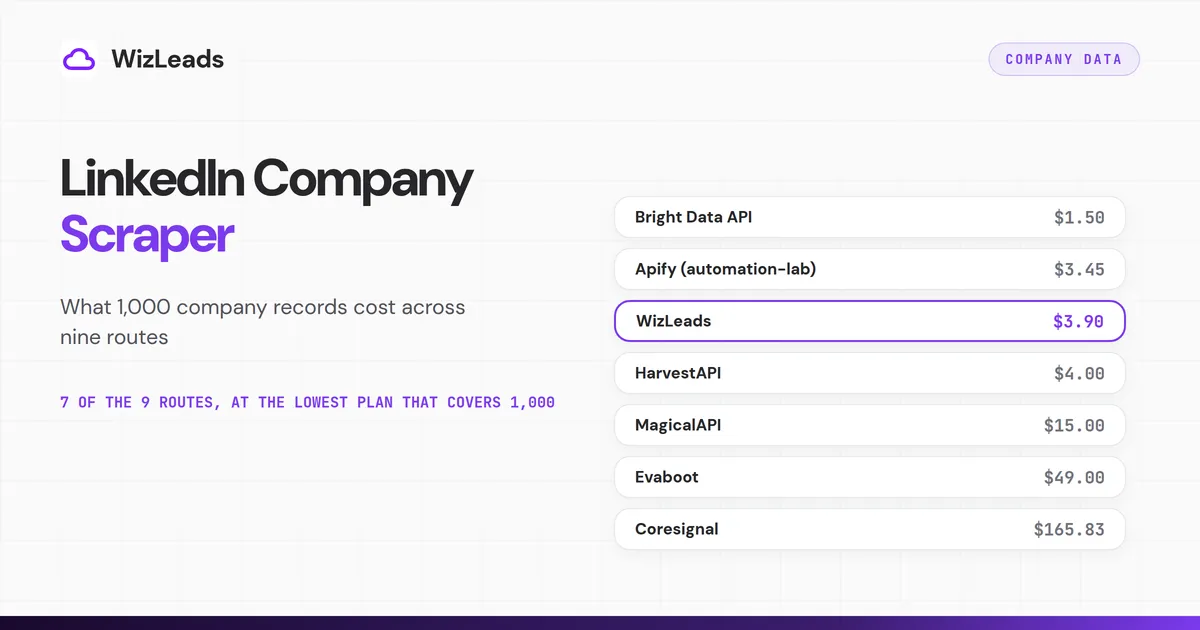
LinkedIn's help page says an account search shows up to 1,000 results across 40 pages, so search-based routes stop there. Across nine routes, 1,000 company records cost between $1.50 and $250 at the lowest plan that covers them. Bright Data's scraper API sits at the low end, and its company dataset sits at the high end because of a $250 minimum order.
- Bright Data: $1.50 per 1,000 on its scraper API, plus 5,000 free records a month. It fits a list of company URLs.
- Apify: $3.45 per 1,000 on automation-lab's actor at the Free tier, $4.00 on HarvestAPI's. Both prices fall on higher Apify tiers.
- WizLeads: $3.90 per 1,000 with a connected account, $7.80 account-less. It runs Sales Navigator searches.
- HarvestAPI: $4.00 per 1,000 on its own API, down to $2.00 on the largest package.
- MagicalAPI: $15.00 per 1,000 on the $30 monthly Pro plan.
- Evaboot: $49 for 1,000 companies. It needs your own Sales Navigator seat.
- Coresignal: $165.83 per 1,000 on Starter, pro-rata, for multi-source records.
A company record is rarely the end of the job. You join it to a CRM account, an email pattern or a list of people, usually on the website domain. The price of that record depends on the route. Nine routes on seven sites publish one.
This post covers what a LinkedIn company page returns, the 1,000-result cap and what 1,000 records cost. Some routes are a LinkedIn company page scraper you point at URLs, and some work like a LinkedIn company API you call from code. They run from the lowest cost per 1,000 to the highest. Each section uses the same four lines: how it runs, the meter, 1,000 companies and limits.
What a LinkedIn company page returns
LinkedIn's Pages FAQ lists specialties, size, website URL and industry among the details on a Page. LinkedIn's help page on editing a Page says a Page super admin edits its details, such as the website URL and description. So the website in a scraped record is whatever an admin typed. It can point at a careers site or a campaign page instead of the corporate domain. The Apify section below shows an example.
Some Pages hold little. The Pages FAQ says LinkedIn can create a placeholder Listing Page that a company can claim. A scraper can only return what the Page holds, so keep an empty field empty and do not fill it with a guess.
Industry comes from a fixed list. LinkedIn's Industry Codes V2 reference on Microsoft Learn holds 434 active codes and 53 deprecated ones. That makes industry a clean filter for firmographic data, though a blunt label.
Most routes below return a few dozen fields at most, and each section says how many its vendor lists. When you scrape LinkedIn company data, the route changes the price far more than it changes the fields. Coresignal is the exception, with a much longer field list.
The 1,000-result cap on account search
LinkedIn's help page on search results says you can view up to 2,500 lead results across 100 pages, or 1,000 account results across 40 pages. Each page holds 25 results, which is where 1,000 comes from. Evaboot's pricing FAQ repeats the same ceiling and calls it LinkedIn's own.
The cap belongs to search results. If you scrape LinkedIn companies from a search, you hit it. Two routes below start from a Sales Navigator company search, WizLeads and Evaboot, so each stops at 1,000 results per search. The other routes take company URLs or names you already hold, so the cap does not limit how many records they return.
To go past it by hand, split one search into several narrower ones that each return fewer than 1,000 results. Run each, then merge the files on the numeric company ID so a company that shows up twice counts once.
LinkedIn's page on account filters lists annual revenue, company headcount, headcount growth, headquarters location down to postal code, industry and number of followers. Headquarters region or revenue band is a good first cut. That page also says an industry filter includes child industries, so two industry splits can overlap.
What 1,000 company records cost across nine routes
The routes are ordered by the cost of 1,000 company records at the lowest plan or package that covers them, in each vendor's own meter. A plan charges its full monthly price whether or not you use every credit. Free allowances sit in each section, outside the cost column. Where one site sells two routes, it sits where its cheapest route sits.
| Route | Meter, as the vendor words it | Plan that covers 1,000 | Cost for 1,000 |
|---|---|---|---|
| Bright Data, Company Scraper API | "$1.5/1K record" | Pay as you go | $1.50 |
| Apify, automation-lab actor | Per company by tier, plus a start fee per run | Free tier | $3.45 plus $0.005 |
| WizLeads, company search | 1 credit a result, 2 account-less | Freelancer, $39 | $3.90 connected, $7.80 account-less |
| Apify, HarvestAPI actor | Per company by tier | Free or Bronze tier | $4.00 |
| HarvestAPI, own API | Per company by top-up package | Starter, $20 | $4.00 |
| MagicalAPI | 150 credits per request | Pro, $30 a month | $15.00 |
| Evaboot | "Company: 1 credit" | Scale, $49 | $49.00 |
| Coresignal | 10 credits for a Core record | Starter, $199 | $165.83 |
| Bright Data, company dataset | Up to $0.0025 per record | $250 minimum order | $250.00 |
The prices come from each vendor's own pages: Bright Data's API and dataset pages, the two Apify listings, WizLeads' API page and Sales Navigator scraper page, HarvestAPI's pricing section, and the MagicalAPI, Evaboot and Coresignal pricing pages. At the lowest plan that covers 1,000 records, Bright Data's API costs the least of the nine. Bright Data's 5,000 free records a month and Apify's Free plan each cover 1,000 records at no charge.
The seven vendors, from lowest to highest cost per 1,000
Bright Data
Bright Data sells two products for this job, a live scraper API and a ready-made dataset.
How it runs: You send company page URLs to the Company Scraper API, and Bright Data collects them on its side. The page lists fields such as company ID, name, about, industry, specialties, locations, country, company size, followers, website and founded date.
Meter: Pay as you go is $1.5 per 1,000 records, and Bright Data says it bills only successful records. Scale is $499 a month with 384,000 records included, and extra records cost $1.3 per 1,000.
1,000 companies: $1.50 on pay as you go. The page also lists 5,000 free records a month with no card, so a first run of 1,000 can cost nothing. The next step after the free records is pay as you go.
Limits: The dataset is a different purchase. Its own page lists 36 fields, 30.3M+ records and a price of up to $0.0025 per record, with a $250 minimum order. The minimum buys 100,000 records at $2.50 per 1,000, so a dataset order for 1,000 companies still costs $250.
Apify
Apify's store has several company actors. Two come up for this job: automation-lab's company actor and HarvestAPI's own actor on Apify. Prices follow your Apify tier. Apify's pricing page maps Starter to Bronze, Scale to Silver and Business to Gold.
How it runs: You give either actor a list of company URLs or names. Both run on Apify's side, and the listings say they need no cookies or account.
Meter: Per 1,000 companies, automation-lab charges $3.45 on Free, $3.00 on Bronze, $2.34 on Silver, $1.80 on Gold, $1.20 on Platinum and $0.84 on Diamond, plus a $0.005 start fee per run. HarvestAPI's actor charges $4.00 on Free and Bronze, $3.00 on Silver, $2.50 on Gold, $1.50 on Platinum and $1.20 on Diamond.
The listing headers show the Gold price, $1.80 and $2.50, and HarvestAPI's listing description still says $4 per 1,000 companies, its Free price. Those are tiers of one ladder.
1,000 companies: $3.45 plus the start fee on automation-lab, $4.00 on HarvestAPI's actor. Apify's pricing page lists $5 of prepaid usage a month on the Free plan, which covers 1,000 companies on either actor. The next step is the Starter plan, which brings automation-lab to $3.00.
Limits: automation-lab's listing says up to 18 fields, and says the actor does not extract employees, posts or personal contact details. Its FAQ adds that not all companies fill out every field. The sample record for Netflix on HarvestAPI's Apify listing shows the pattern. The website is jobs.netflix.com with campaign parameters attached. The specialities list holds one entry that reads like a tagline. The employeeCount is 16,985, beside a range that starts at 10,001.
WizLeads
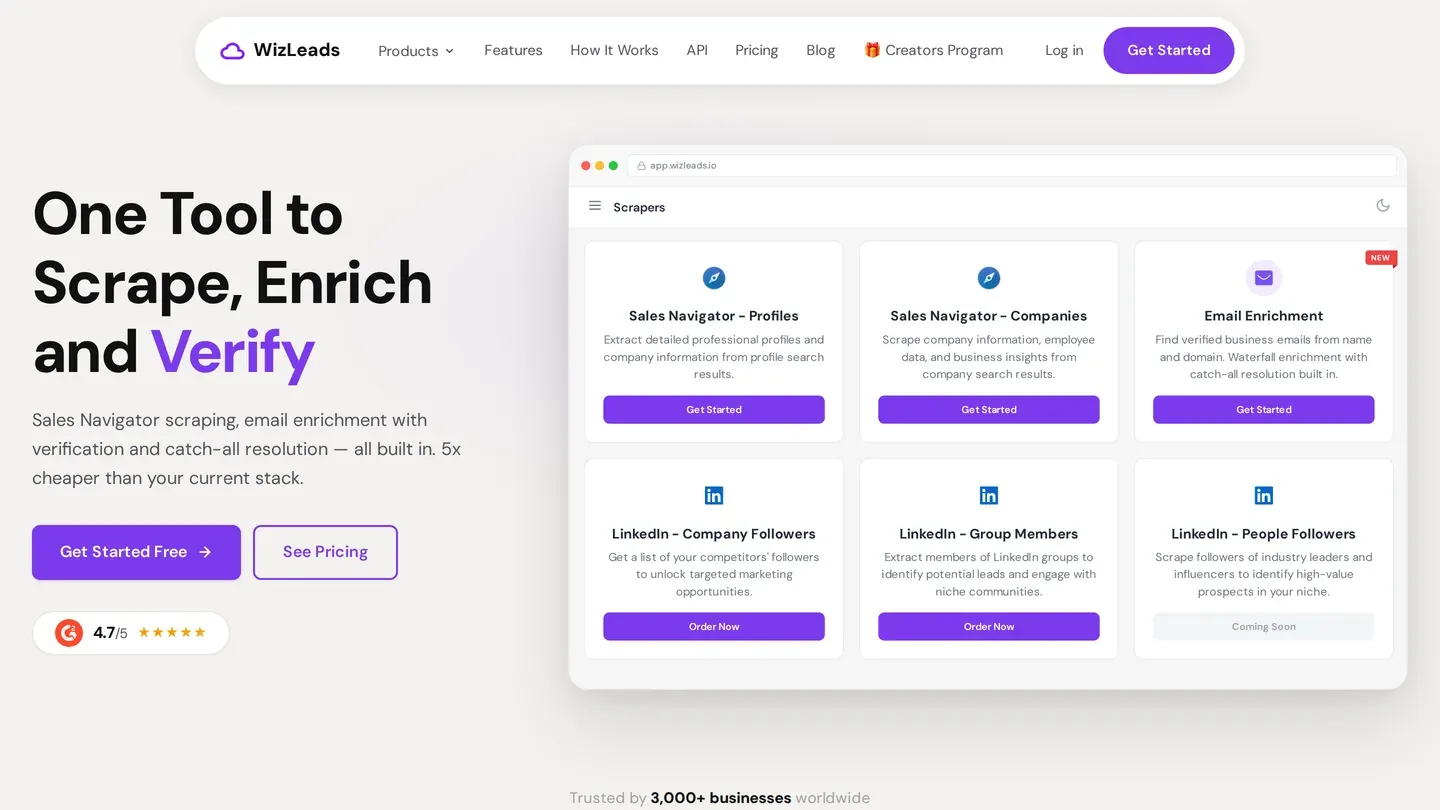
WizLeads runs company search inside its Sales Navigator scraper, and the same product also scrapes people searches.
How it runs: You paste a Sales Navigator company search URL, so building one takes Sales Navigator access. Connected mode runs on your own LinkedIn account, and LinkedIn's help page on prohibited software says members who use scraping tools risk having their accounts restricted or shut down. Account-less mode runs without your account or a seat.
Meter: WizLeads' API page lists company search at 1 credit per result, and 2 credits per result in account-less mode. Enrich Company, which takes a company URL, costs 3 credits per company and charges only for inputs that return data.
1,000 companies: The Freelancer plan is $39 a month for 10,000 credits. That makes 1,000 companies $3.90 connected and $7.80 account-less. On Agency, $99 for 40,000 credits, the same two figures are $2.48 and $4.95. Enrich Company by URL works out at $11.70 per 1,000 on Freelancer. New accounts get 500 credits once, enough for 500 companies connected or 250 account-less, and Freelancer is the next step.
Limits: The company export has 19 columns, including company ID, website, employee count, specialties and revenue range. A column is filled only when LinkedIn holds the value. A company search returns company fields only, because email enrichment in a task is limited to people searches. Without splitting, a company search stops at 1,000 results. Smart Link Splitting, on the Agency plan and above, checks the result count and splits the search into chunks under the cap, so you never lose results.
HarvestAPI
HarvestAPI also sells company data through its own API, priced by top-up package. That ladder is separate from the Apify tiers above, and the two share only their $4.00 starting price.
How it runs: It is a hosted API you pay for with credits, with no subscription. The pricing section calls it pay-as-you-go.
Meter: A company costs $0.004 on the Free and Starter packages, $0.0032 on Basic ($80), $0.0023 on Pro ($280) and $0.002 on Business ($780). The page shows a usage discount of 19% on Basic, 42% on Pro and 50% on Business.
1,000 companies: $4.00 on Starter, $3.20 on Basic, $2.30 on Pro and $2.00 on Business. Free comes with $1 of credits, too little to cover 1,000 companies, so Starter at $20 is the first package that does.
Limits: The pricing section says credits expire, so size a package to the work you have. The page lists a separate rate for company search, which this post leaves out because it returns a different record.
MagicalAPI
MagicalAPI sells a LinkedIn Company Scraper as one of its APIs, and its pricing page meters it in credits per request.
How it runs: Per its company product page, one request takes one LinkedIn company page URL.
Meter: The pricing page lists 150 credits per request for the Company Scraper. On the monthly toggle, Basic is $10 for 90,000 credits and Pro is $30 for 300,000. The yearly toggle lowers them to $7 and $20 a month.
1,000 companies: 150,000 credits, which Pro covers with room for 2,000 companies a month. That is $15.00 per 1,000 on monthly billing and $10.00 on yearly. Basic covers 600 companies a month, so it falls short. The pricing page lists a free plan and a free trial of 2,000 credits, about 13 company requests, and the company product page offers a 7-day API trial. Pro is the next step for 1,000 companies.
Limits: The product page shows a sample response with fields such as name, tagline, employees, followers, website, industry, size, headquarters, founding year, specialties and locations. The page labels the sample fictional, so read it as a field list only.
Evaboot
Evaboot is a Sales Navigator exporter that also exports company lists, and its pricing page puts a company at 1 credit.
How it runs: Evaboot exports the results of your own Sales Navigator searches, so you need an active Sales Navigator seat. A company search is an account search, so the 1,000 cap applies. Its FAQ says to split by headcount, geography or industry.
Meter: The pricing page lists "Company: 1 credit". Starter is $9 for 100 credits and Grow is $29 for 400. Scale starts at $49 for 1,000 credits, with stops at $99 for 3,000, $149 for 6,000 and $299 for 15,000. Credits roll over.
1,000 companies: $49 at the 1,000-credit stop of Scale. At the larger stops the pro-rata cost is $33.00, $24.83 and $19.93 per 1,000.
Limits: The FAQ says a lead with no email still costs 1 credit, and so does an account. The Sales Navigator seat is a cost on top of the Evaboot plan.
Coresignal
Coresignal sells company records for credits, and a record costs more credits as it carries more data bundles. Its pricing page lists the rates.
How it runs: Coresignal sells multi-source company data through an API, so a record is not a copy of one LinkedIn Page. Its pricing docs say company data spans over 600 fields across 5 bundles.
Meter: A Core record costs 10 credits, and a full record with all five bundles costs 20. On the monthly toggle, Mini is $49 for 2,500 credits, Starter $199 for 12,000, Pro $499 for 35,000 and Growth $1,000 for 150,000. Premium is $1,500 for 1,000,000.
1,000 companies: 1,000 Core records need 10,000 credits. Mini covers only 250. Starter covers 1,200, which is $165.83 per 1,000 pro-rata. Pro works out at $142.57 and Growth at $66.67. Full records double each figure, so Starter is $331.67 per 1,000. The page lists a 7-day free trial with 2,000 credits, enough for 200 Core records, and Starter is the next step for 1,000.
Limits: The record comes from several sources, so it can differ from what a LinkedIn Page shows today. It suits a team that wants a licensed data feed.
What breaks at scale
Most joins to a CRM or an email pattern run on the website domain, and that field is the one an admin typed. Add a step that resolves each domain before the join, and keep the numeric company ID in your table as the key.
A placeholder Listing Page carries little, and automation-lab's FAQ says not all companies fill out every field. Count the empty cells in a sample of 100 before you trust a full run.
HarvestAPI's sample shows an exact employeeCount beside a range. Pick one and use it in every run, so a trend line compares like with like.
A search split by hand returns files that can overlap. Merge them on the company ID before you count anything or pay to enrich.
LinkedIn's help page on prohibited software says it does not permit third-party software that scrapes its site. What that means in law depends on your country and on what you collect, so ask a lawyer before you scrape at scale.
Which route fits which job
Pick by what you hold today.
You hold a list of company URLs or names, such as a CRM export. Use a URL route: Bright Data's API, an Apify actor, HarvestAPI, MagicalAPI or WizLeads' Enrich Company. The 1,000-result cap does not apply, and the cost per 1,000 is the deciding number. This is company data enrichment at its simplest. Test the match rate on a sample first.
You hold a search, not a list. Use a route that starts from a Sales Navigator company search, WizLeads or Evaboot. Each stops at 1,000 results per search, so split large searches as described above.
You want records without running a scrape. Bright Data's dataset and Coresignal sell records you load into your own system. For a job of 1,000 records, both cost the most here: Coresignal's Starter works out at $165.83, and Bright Data's dataset sells only in a $250 minimum order.
You want people at those companies. The company run is the cheap first step. A list of 1,000 companies with 30 relevant employees each is 30,000 people records, so the people run costs far more. A people search also stops at its 2,500-result cap unless you split it, as Sales Navigator export limits shows.
PhantomBuster is left out of the nine routes because it bills execution time on a connected account, not records, so a per-1,000 price would be a guess.