WizLeads


TL;DR
- The formula is bounces divided by emails sent, times 100. Your platform may count differently, and its count is the one it enforces.
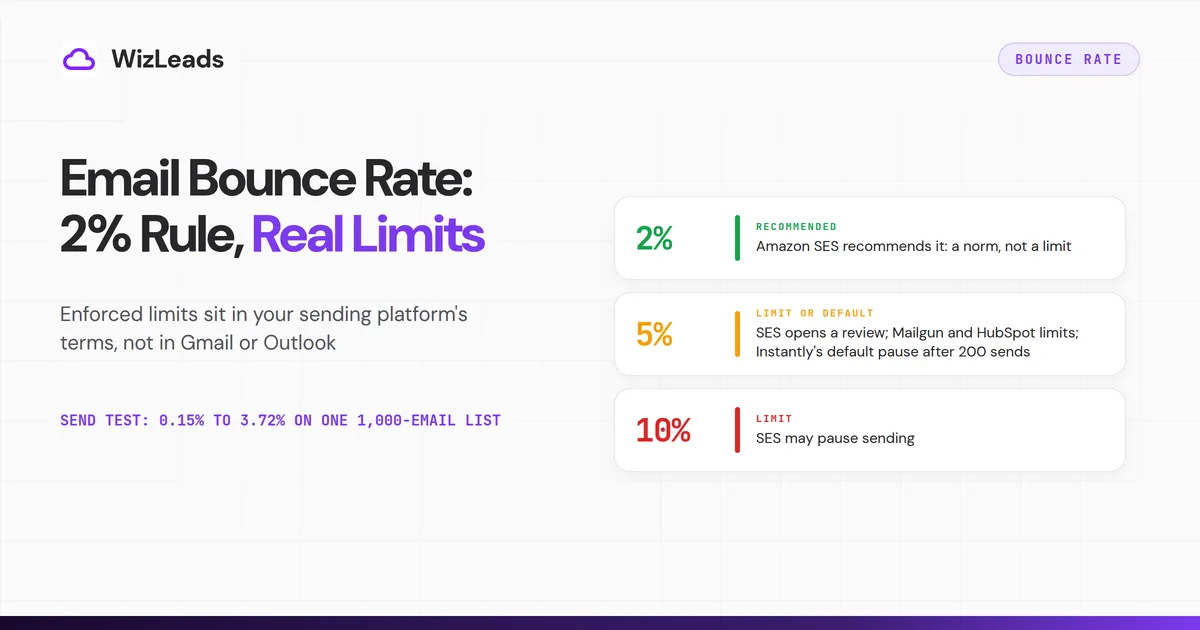
- The 2% rule is an operator norm that Amazon SES writes down as a recommendation. The limits that get enforced start at 5% and live in your sending platform's terms.
- Our benchmark ran one list of 1,000 emails through six verifiers. The approved lists bounced anywhere from 0.15% to 3.72%.
Email bounce rate is bounces divided by emails sent, times 100, so 50 bounces from 2,000 sends is 2.5%. Under 2% is the usual target. Limits and defaults start higher: 5% at Amazon SES, Mailgun, HubSpot and Instantly. Google's, Yahoo's and Outlook.com's sender pages give no bounce number.
Most guides stop at "keep it under 2%". That advice leaves out who decides when your sending stops. For cold email, that is almost never Gmail or Outlook. It is the platform you send from, and each platform counts bounces in its own way.
This guide gives the formula, the hard and soft split, the limits written into platform terms, and what we saw when we sent to verified lists.
How is email bounce rate calculated?
The formula is bounces ÷ emails sent × 100. That is how to calculate email bounce rate for your own reporting. If 50 of 2,000 emails bounce, the rate is 2.5%.
Your platform may use a different version. Amazon SES counts only hard bounces to domains you have not verified. It measures them over a "representative volume" of your sending, not a fixed period.
Full mailboxes and blocked-IP bounces do not count. The SES FAQ also says you cannot work the figure out yourself from the console.
Mailgun's Acceptable Use Policy says its figure is "calculated on the number of messages that have bounced". It never says what that is divided by. HubSpot's suspension rule counts a specific month. A dashboard may look back over a different window.
So one campaign can read lower in SES, which ignores soft bounces, than in a report that counts every bounce. Here is an illustration with made-up numbers. Say 38 of 2,000 emails bounce hard and 12 bounce soft. Counting every bounce gives 2.5%. Counting only the hard ones gives 1.9%. The first is over the 2% line and the second is under it, and the campaign is the same.
Compare your rate with a platform's limit only in that platform's own terms. Look at what your sequencer's dashboard counts before you trust its headline number.
Hard bounce vs soft bounce
A hard bounce is a permanent failure. A soft bounce is a temporary one. The split comes from SMTP itself: a 5xx reply is permanent, so the sending server should not repeat the request, and a 4xx reply is transient, so it should try again. "User unknown" is the classic hard bounce. A busy server that says "try later" is the classic soft one.
Platforms do not all file the same event in the same bucket. HubSpot's bounce types page says a hard bounce usually means a permanent error but can also come from a strict email security filter. It counts a full mailbox as hard when the mailbox has been inactive or over quota for a long time. A pending bounce is retried for up to 72 hours and becomes soft if it never delivers.
The same page has a fix for a valid contact that bounces on a security filter. Ask their IT team to allow your sending IP addresses, then unbounce the contact. That is a reason to check hard bounces on valid-looking addresses before you delete them.
| Event | Usual bucket | Where platforms differ |
|---|---|---|
| Address does not exist | Hard | They agree |
| Mailbox full | Soft | HubSpot counts a long-inactive full mailbox as hard; Amazon SES leaves it out of its rate |
| Server busy or deferring | Soft | HubSpot retries for 72 hours, then calls it soft |
| Security gateway blocks a valid address | Hard | HubSpot says a strict security filter can cause a hard bounce |
Many sequencers merge both kinds into one "bounced" count. Open the report and look for the split before you act. A 3% rate that is mostly soft bounces calls for a different fix than a 3% rate that is all hard bounces. The first points at timing and server trouble. The second points at the list.
Remove a hard bounce from every list at once. Treat a soft bounce as a warning only when the same address keeps coming back.
What counts as a good email bounce rate?
What is a good email bounce rate? Under 2% is the number you will see most. Amazon SES writes it down: its FAQ says to keep the rate below 2%, then puts the account under review at 5% or greater and says it might pause sending at 10% or greater. So 2% is a recommendation, and enforcement starts higher.
Some guides go further and say Gmail and Outlook cut you off above a set bounce rate. We found no bounce number on Google's, Yahoo's or Outlook.com's sender pages. Google's metric is the spam rate, and its guidance on bounces has no figure: if messages start bouncing or deferring, cut your volume until the SMTP error rate falls, then raise it slowly. Yahoo and Microsoft both ask senders to remove invalid addresses, and neither gives a bounce number.
Google also says its sender guidelines do not apply to mail sent to Google Workspace accounts, and that enforcement covers only personal Gmail. Many B2B prospects sit on Workspace or Microsoft 365, so mailbox-provider rules are a weaker guide for cold email than they look.
People also ask whether 8% is bad. It is, for cold email. At 8% you are past the 5% marks at SES, Mailgun, HubSpot and Instantly, so treat it as a list problem before you touch the copy.
This is our reading for cold email, built from the published limits below and not from any provider rule:
- Below 2%: you have margin under every limit in the table.
- From 2% to just under 5%: you are under every limit and default we list, but close to the 5% mark that four platforms share. Find the cause before the next send.
- Above 5%: Instantly's default pauses the campaign, SES opens a review, and you are past Mailgun's and HubSpot's limits.
There is also no single average email bounce rate worth copying. Each published average comes from one vendor's own customers, on their own lists, counted their own way.
Bounce rate limits by platform
These are the numbers that sit in contracts and settings. Instantly's auto-pause article says it pauses a campaign when the bounce rate passes 5%, and only after the campaign has sent at least 200 emails. The feature is on by default. You can edit the threshold or switch it off, so it is an adjustable default, not an enforced limit.
Mailgun's policy words its thresholds as those of Sinch Email and says a breach may lead to the account being limited, suspended or terminated.
| Platform | Bounce figure | What happens |
|---|---|---|
| Amazon SES | Below 2% recommended; 5% or greater; 10% or greater | Recommendation; account under review; sending may be paused |
| Mailgun | Over 5% (policy requires 5% or below) | Account may be limited, suspended or terminated |
| HubSpot | Hard bounce rate of 5% in a specific month | Marketing email may be suspended |
| Instantly | 5% by default, after 200 sends | Campaign paused; threshold editable; feature can be switched off |
Apart from SES's 2% recommendation, every number in the table is 5% or 10%.
Postmark, Smartlead, lemlist and Microsoft's Dynamics 365 marketing product also set limits or pause rules of their own, so read your platform's own page before you compare it with this table.
Why cold email runs on the sequencer's limit
Mailgun's policy prohibits contact lists that are bought, rented or scraped from third parties. So its 5% describes opt-in sending, not a prospect list. A cold email campaign built from a prospect list usually goes out through Google Workspace or Microsoft 365 inboxes and a sequencer.
That makes the sequencer's setting the limit that stops you first: Instantly's default, or the threshold you set in your own sequencer. Your cold email bounce rate also feeds the sender reputation of the domain behind those inboxes. Know the number your sequencer will act on before you load a list.
A pause saves the campaign, but the bounces that tripped it have already reached the receiving servers. That is why a low threshold and a small first batch matter more than a fast restart.
What verified lists bounced when we sent to them
Does a verified list stay under 2%? In our benchmark of 1,000 real-estate decision-maker emails sourced from Apollo, it depended on which verifier approved it. We ran the same file through six verifiers in April 2026, and WizLeads' email verifier was one of the six.
We then sent a plain-text message from a clean Google Workspace account to every address at least one tool approved. We counted hard bounces and mailbox-does-not-exist responses over 72 hours. Soft bounces that cleared inside that window did not count. The full method is in our verification benchmark. The table is sorted by bounce rate, lowest first.
| Verifier | Approved and sent | Bounced | Bounce rate on approved list | Rejected |
|---|---|---|---|---|
| DeBounce | 670 | 1 | 0.15% | 330 |
| NeverBounce | 711 | 4 | 0.56% | 289 |
| WizLeads | 852 | 5 | 0.59% | 148 |
| LeadMagic | 822 | 7 | 0.85% | 178 |
| MillionVerifier | 709 | 7 | 0.99% | 291 |
| ZeroBounce | 888 | 33 | 3.72% | 112 |
Each rate is the tool's bounces divided by the addresses that tool approved.
Five of the six tools landed under 1%. ZeroBounce's 3.72% is about 6.3 times WizLeads' rate. On a Fisher exact test, which is our own calculation, none of the five lower rates differs from another beyond chance at this sample size, and ZeroBounce's rate differs from each of them. The six approved lists overlap, so treat the test as a rough guide. The same 1,000 addresses gave approved lists that bounced anywhere from 0.15% to 3.72%, so a 2% line falls inside the spread.
Rates this small look harmless, so put them on a real send. On a 10,000-email campaign, 3.72% is about 372 bounces and 0.59% is about 59. That is the same list on the same day, and only the verifier changed.
The two lowest rates came with big rejection counts. DeBounce rejected 330 addresses and NeverBounce 289, against 148 for WizLeads. We mailed every address at least one tool approved. The 96 that every tool rejected were never sent, and this test does not grade any tool's rejections as right or wrong.
For contrast, one r/Coldemailing poster analysed 56,614 campaigns and reported that reply rates stayed roughly level up to a 10% bounce rate. The poster calls it correlation, not cause, and we could not verify the data. If it holds, a high bounce rate does not hurt replies at once. It still counts against every limit above.
Why emails bounce on a B2B list
People change jobs. Addresses go stale as people move, and a list exported months ago carries that decay. A contact who has left may have a closed mailbox by the time you send. Verify at send time, not at export.
Catch-all domains. A catch-all domain accepts mail for every address, real or not, so a standard check cannot tell a person from a made-up name. Instantly's causes of bounces include catch-all domains that accept email at first and reject it later. In our benchmark, WizLeads' classifier put 212 of the 1,000 addresses (21.2%) on catch-all domains.
Security gateways. The same Instantly page says a security gateway or policy block can bounce an email even when the address is valid. The same classifier put 159 addresses (15.9%) behind a Secure Email Gateway. An address can be both, so the 212 and the 159 are separate readings, not one total.
Typos. Any address typed or pasted by hand can hold a typo, and so can any list a rep has edited by hand.
Mixing sources adds its own risk. One r/SalesOperations poster with clean SPF, DKIM and DMARC still saw 8 to 9% hard bounces on lists built from vendor, manual and scraped sources. One reply blamed the vendor-supplied part; most put it on the data, not the setup.
How to reduce email bounce rate
These steps follow the order of a campaign.
- Verify every list before it enters a sequence. Instantly's own fix list after an auto-pause says to verify your leads. Do it close to send time, because a list ages between export and send. If the list sat in a CRM for a month, verify it again.
- Send catch-all and gateway-protected addresses in their own campaign. If those domains reject late, the bounces pause a small campaign and not your main one. Our catch-all verification guide covers how to check them.
- Suppress every hard bounce, everywhere. Check that your sequencer does it, and that a CRM sync or re-import cannot bring the address back.
- Set your auto-pause threshold below the 5% marks. Instantly's default is 5% after 200 sends, and after you resume it will not auto-pause that campaign for high bounces again for 7 days. Check your own sequencer's setting too.
- Send a seed batch of about 200 first. Instantly's check runs only after 200 sends, so a first batch of that size shows your real rate before the bulk goes out.
- Slow down when bounces start. Google's advice is to cut volume until the SMTP error rate falls, then increase slowly.
If you only do three things, set the pause threshold, verify close to send time and send the seed batch first. When the seed batch reads under 2%, send the rest. When it reads above 5%, stop and fix the list before anything else goes out.
Where WizLeads fits
If you want to check a list before it goes into a sequence, WizLeads verifies an email for 0.5 credits, charged for every email processed, whatever the result. Its guarantee refunds 100% of your credits if your bounce rate exceeds 2% on emails it marked as valid, subject to an email infrastructure diagnosis. The refund is in credits.
FAQ
Is a 2% email bounce rate good?
Yes. Under 2% is the usual target, and Amazon SES recommends it. It is a norm, not a limit. The numbers that get enforced start at 5%, and they sit in your sending platform's terms. We found none in Google's, Yahoo's or Outlook.com's sender pages.
How do you work out email bounce rate?
Divide the emails that bounced by the emails you sent, then multiply by 100. If 50 of 2,000 emails bounce, the rate is 2.5%. Your platform may count differently. Amazon SES, for one, counts only hard bounces to domains you have not verified, so compare your rate with a platform's limit only in that platform's own terms.
Is a 50% bounce rate bad?
Yes. It is ten times the 5% marks in this guide. Check first that you are reading the right metric, because some people confuse bounce rate with delivery rate. If the figure is real, stop sending and verify the whole list.