WizLeads


Three different things travel under the name "email bouncer", and search results mix all three together on the same page.
- The bounce message. The notification a mail server returns when it refuses your message. Marketers call these bounce-backs, and some call them email bouncers.
- The bounce checker. A tool that tests an address before you send, so the bounce never happens. This is the category ZeroBounce, NeverBounce, MillionVerifier, DeBounce and WizLeads compete in.
- Bouncer. A verification service at usebouncer.com, which owns the brand name and most of the search results for it.
Google hedges: ZeroBounce takes the top spot and generic checkers fill much of the page, but four of the ten results are Bouncer's own assets. The results page for this phrase carries Bouncer's own site, a Bouncer review, Bouncer's LinkedIn product page and lemlist's Bouncer setup doc, so the third meaning is what most people typing those two words are after. Bouncer gets the next section with its current prices. Everything after that covers the category around it, including six checkers we sent 1,000 real emails through, because Bouncer publishes an accuracy claim and no send data behind it.
Bouncer, the tool the search term usually means
Bouncer is an EU-hosted verification platform. Its site claims more than 4 billion addresses verified, GDPR compliance and data centres inside the EU, and that last part is why it turns up in agency stacks: it settles the question of where a client list gets processed before legal asks it. The platform is four products. Bulk list verification, a real-time API, Bouncer Shield for signup forms, and a Deliverability Kit that runs inbox placement tests plus SPF, DKIM, DMARC and blocklist checks.
Verification sells as one-off credit packs at one credit per address:
| Credits | Price | Per 1,000 |
|---|---|---|
| 1,000 | $8 | $8.00 |
| 5,000 | $35 | $7.00 |
| 10,000 | $60 | $6.00 |
| 50,000 | $250 | $5.00 |
| 100,000 | $400 | $4.00 |
| 250,000 | $750 | $3.00 |
| 500,000 | $1,250 | $2.50 |
| 1,000,000 | $2,000 | $2.00 |
Minimum purchase is 1,000 credits and signup includes 100 free ones; a monthly subscription takes 20% off each tier ($48 a month for 10,000), and Bouncer says credits never expire on either option. Duplicate rows inside a list are not charged, and neither are unknown results. Shield is priced separately at $2 a month for 1,000 form checks, $20 at 10,000 and $1,050 at a million, plus $5 a month per shield, so the default setup shows $7.00 a month. The Deliverability Kit runs $25 a month on Starter for 250 test emails and 10 monitored IPs or domains, $125 on Standard for 1,000 and 25, and $250 a month on Pro for 2,500 test emails and 50 monitored IPs or domains.
Two things are worth knowing before you buy on somebody else's write-up. The monthly plan names still quoted in the highest-ranking Bouncer review, Apprentice at $50 and Master at $1,000, are not on Bouncer's pricing page any more; that page sells credits, and its own FAQ now answers the question of why Bouncer offers credits instead of monthly plans. And Bouncer markets deep catch-all verification on Google Workspace and Microsoft 365 domains, which is the hardest thing a checker does, without publishing a measured bounce rate behind the claim. Its free list-quality sample is the cheap way to test that yourself, because it estimates your bounce rate from a random sample without spending credits.
What a bounce checker does before you send
A checker answers the question a real send would answer, without the send. It runs four layers in ascending order of cost, stopping as soon as it has a verdict.
- Syntax. Does the address parse as valid under the RFC grammar. This catches typos, stray spaces, and CSV columns that shifted by one.
- Domain and MX lookup. Does the domain resolve and publish mail exchanger records. A domain with no MX route hard-bounces every address on it, so this verdict applies to the whole domain at once.
- SMTP probe. The checker opens a session with the receiving server, sends
HELO, thenMAIL FROM, thenRCPT TOwith the address in question, reads the reply code, and disconnects beforeDATA. Nothing is delivered. A250means the server accepted the recipient path, a550means it refused. - Classification. Disposable domains, role accounts such as info@ and admin@, and known spam traps get flagged separately from the deliverability verdict, because they are deliverable and still bad for you.
Layer three is where the whole category is decided, and it is less reliable than vendors imply.
Why two checkers disagree about the same address
The SMTP specification lets a server decline the question, and plenty take it up. RFC 5321 defines reply code 252 as "Cannot VRFY user, but will accept message and attempt delivery", though section 3.5.3 is titled "Meaning of VRFY or EXPN Success Response", so that code answers a VRFY command rather than the RCPT TO probe a verifier actually sends. Section 4.3.2 allows only 250 or 251 in reply to RCPT. A server that wants to decline the question does it by accepting everything instead, which is the same shrug arriving through a different door. Separately, a fair number of servers accept or refuse every recipient regardless of validity to frustrate address harvesting, and a probe cannot tell that behaviour apart from a real answer.
So the probe returns three kinds of answer and only two of them are useful: definite yes, definite no, and a shrug. Vendors label the shrug differently, which is most of why two tools return contradictory verdicts on the same address.
Catch-all domains produce the largest share of shrugs, accepting every recipient during the handshake whether real or invented. Our benchmark list of 1,000 B2B addresses contained 212 of them, and how a tool treats that fifth of the list is the biggest quality difference in this category. The mechanics of resolving them sit in the catch-all verification guide.
Reading a bounce you already received
Every bounce carries a three-digit SMTP reply code and, on most modern servers, an enhanced status code from RFC 3463 in the form X.Y.Z. The enhanced code is the one worth reading, because it separates causes that the three-digit code lumps together.
| Reply | Enhanced | What the server is saying | What to do |
|---|---|---|---|
| 550 | 5.1.1 | Bad destination mailbox address. The part left of the @ does not exist | Hard bounce. Remove, never retry |
| 550 | 5.1.2 | Bad destination system address. The domain cannot accept mail | Hard bounce. Remove the whole domain |
| 550 | 5.1.6 | The mailbox was valid once and mail is no longer accepted for it | Hard bounce. This is list decay |
| 550 | 5.7.515 | Outlook.com rejecting on authentication, not on the address | Fix SPF, DKIM and DMARC. The address is fine |
| 452 | 4.2.2 | Mailbox full against a quota or physical capacity | Soft bounce. Retry on a schedule |
| 421 | 4.x.x | Service not available, connection closing | Soft bounce. Back off and retry |
The 5.7.515 row is the one that catches cold email teams out. It reads like a rejected address and it is Microsoft refusing a sending domain that fails authentication, which no amount of list cleaning will fix.
Soft bounces are where lists rot quietly. An address that returns 4xx on three consecutive sends is functionally dead, and a sender who keeps retrying it accumulates damage slowly enough not to notice. Set the rule in your sequencer: three soft bounces on one address converts it to a hard removal.
Who actually sets a bounce-rate limit
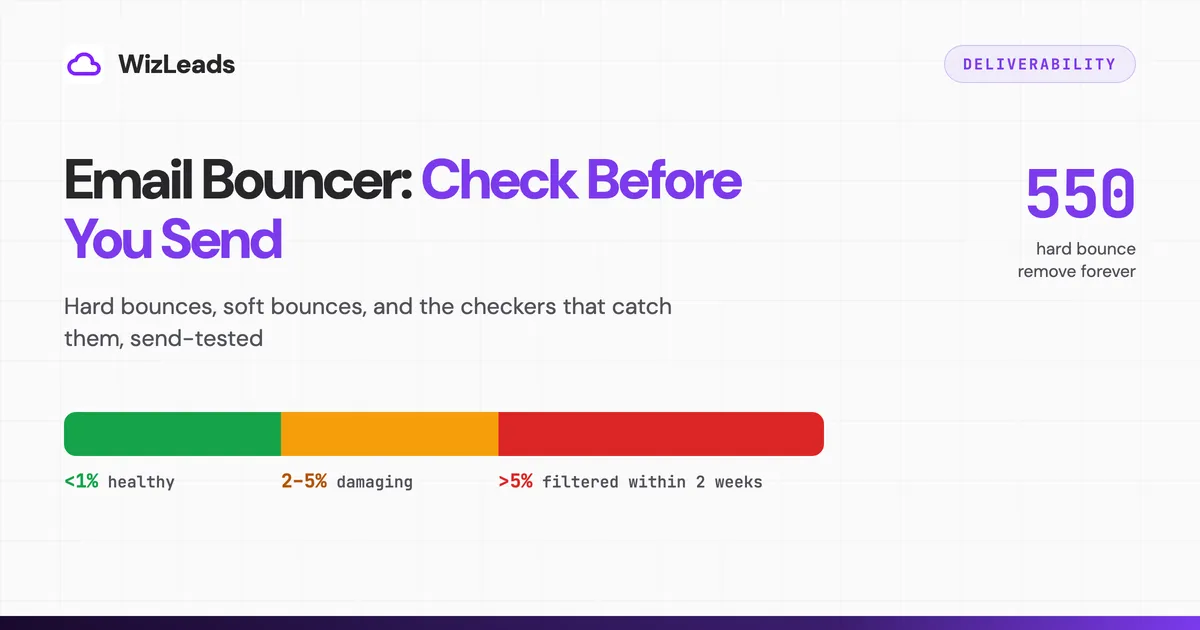
Almost every article on this topic tells you that Gmail and Outlook punish you above a 5% bounce rate. Both vendors publish their sender requirements, and neither of them says that.
Google publishes email sender guidelines with one hard numeric target, and it is a spam-complaint rate rather than a bounce rate: keep it below 0.10% in Postmaster Tools and never reach 0.30%. Domains sending more than 5,000 messages a day to personal Gmail accounts must pass SPF, DKIM and DMARC. On bounces the guidance is qualitative, telling senders to reduce volume until the SMTP error rate falls.
Microsoft applies the same 5,000-a-day line for Outlook.com, requiring SPF, DKIM and DMARC since May 5, 2025 and rejecting non-compliant mail with 550 5.7.515. List hygiene and bounce management appear as a recommendation with no number attached.
The famous thresholds come from somewhere else entirely. Amazon SES publishes them in its sending review process FAQs: maintain a bounce rate below 2% for best results, at 5% or greater the account goes under review, and at 10% or greater SES may pause its ability to send. SES also states that only hard bounces to unverified domains count toward the figure, and that it measures over a representative volume rather than a fixed window.
That changes what you are optimising for. The bounce number governs whether your sending platform suspends you, and it is enforced by your ESP, not by the inbox provider. The number that governs whether Gmail files you in spam is a complaint rate, which comes from sending relevant mail to people who might plausibly want it. A clean list helps both, and it only guarantees the first.
Six checkers, send-tested on the same 1,000 addresses
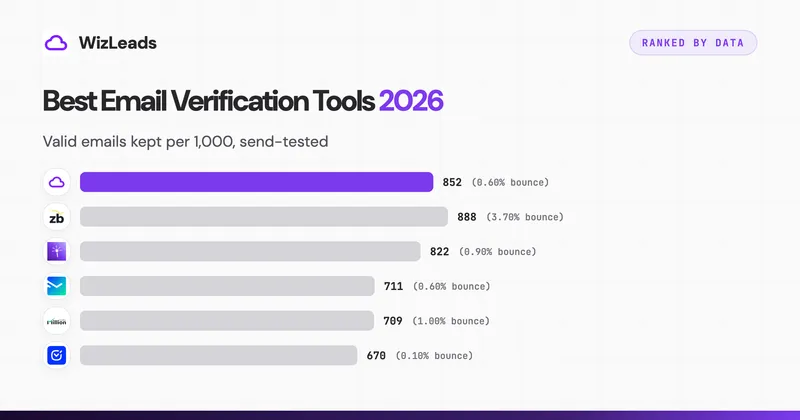
Vendor pages all claim 97% to 99% accuracy, and none of them define the denominator. We tested the category the direct way. One list of 1,000 real-estate decision-maker addresses sourced from Apollo, 212 of them sitting on catch-all domains and 159, or 15.9%, behind a secure email gateway, run through six checkers on the same day, then actually sent, counting the bounces that came back. Full methodology and raw data sit in the email verification benchmark.
| Tool | Kept valid | Bounces on send | Bounce rate | Rejected |
|---|---|---|---|---|
| WizLeads | 852 | 5 | 0.59% | 148 |
| ZeroBounce | 888 | 33 | 3.72% | 112 |
| LeadMagic | 822 | 7 | 0.85% | 178 |
| NeverBounce | 711 | 4 | 0.56% | 289 |
| MillionVerifier | 709 | 7 | 0.99% | 291 |
| DeBounce | 670 | 1 | 0.15% | 330 |
Bounce rate alone ranks these tools in a misleading order, because it is trivially gamed by rejecting more addresses. DeBounce posted the lowest rate in the test and bought it by rejecting 330 of 1,000. The test sent only to each tool's approved addresses, so it does not tell you how many of those 330 would have delivered. NeverBounce edged our 0.59% with 0.56% and reached it by rejecting 289 addresses against our 148, so a near-identical headline number came with 141 fewer people left to email. ZeroBounce shows the opposite failure, approving the most and bouncing the most, largely on Google-hosted catch-alls it read as valid.
Read the two columns as one measure and the question becomes how many usable addresses survive at a bounce rate you can safely send behind. Per-tool detail, integrations and fine print live in best email verification tools.
What it costs to check 10,000 addresses
Every figure below is normalised to one job, verifying 10,000 addresses, and read off the vendor's own pricing page on September 8, 2026. Sorted cheapest first. Where a tool bills verification at a fraction of a credit the arithmetic is spelled out, because that fraction is the difference between a plan looking expensive and being cheap.
| Tool | 10,000 addresses | Basis, and what to watch |
|---|---|---|
| WizLeads | $19.50 | The $39 Freelancer plan covers 20,000 verifications at 0.5 credits each |
| DeBounce | $25 | One-off credit pack. Catch-all resolution is billed separately at 10 credits per address |
| MillionVerifier | $39 | One-off credit pack. Credits never expire and risky results are refundable |
| NeverBounce | $49 | Growth plan, up to 10,000 a month. Pay-as-you-go runs $8 per 1,000 and expires after 12 months |
| LeadMagic | $49.50 | The $99 Essential plan covers 20,000 validations at 0.25 credits each |
| Bouncer | $60 | One-off credit pack. Credits never expire, 100 free to start, minimum purchase 1,000 |
| Hunter | $74.50 | The $149 Growth plan covers 20,000 verifications at 0.5 credits each |
| ZeroBounce | $129 | One-off credit pack. ZeroBounce ONE runs $99 a month at the same 10,000-credit minimum |
Price spreads 6.6 times across this table and predicts nothing about accuracy. DeBounce sits near the bottom on cost and posted the lowest bounce rate, and it also discarded a third of the list. ZeroBounce sits at the top on cost and posted the highest bounce rate in the test. The number that decides your budget is cost per surviving address you can actually mail, and it only exists after a test on your own data.
WizLeads verification runs at 0.5 credits per address on every plan. The 10,000-credit plan lists at $39 a month and is $1 for the first month, holding a 20% discount for life afterwards.
Checking before you send: the workflow
Every step below serves one goal, which is keeping unresolved addresses away from sending infrastructure you care about.
- Verify at the moment you source the list, not the night before the campaign. A file that has been sitting in a folder for six weeks has already decayed.
- Pick the interface that matches the job. A single address goes through a web checker in seconds. A file goes through bulk upload. A signup form or a CRM sync needs the API, because the check has to happen at the moment the address enters your database.
- Route by verdict rather than by tool. Valid addresses go to the campaign. Invalid gets deleted, not stored for later. Unresolved catch-alls go either to a second-opinion tool or to a segmented campaign on infrastructure you can afford to burn.
- Re-verify anything older than 30 days. B2B contact data decays through job changes faster than anything else on your list, and the workflow for handling that cadence is in B2B email verification.
- Watch bounces per sending domain daily and pause any domain trending past 2%. That is an operator habit rather than a platform rule: Amazon SES recommends staying below 2% and starts reviewing an account at 5%.
- Automate the soft-to-hard conversion so repeat 4xx addresses leave the list without anyone deciding.
If the bounces already came back
A campaign returning 5% or more needs triage in a specific order, because the wrong first move compounds the damage.
- Pause every campaign on the affected sending domains. Continuing to send while you diagnose is the single most expensive thing you can do.
- Pull the bounced addresses and check the enhanced status codes. A wall of
5.1.1means the list failed. A wall of5.7.515or other 5.7.x codes means authentication failed and the list was fine. - If the list failed, look up what verdict your checker gave each bounced address. Approved-then-bounced tells you the tool missed. Risky-then-sent-anyway tells you the process missed.
- Re-verify the remaining list with a different tool from the one that approved the bounces, preferring one that resolves catch-alls rather than labelling them.
- Resume at reduced volume on the cleanest segment, rebuilding daily volume over one to two weeks while watching per-domain bounce and reply rates.
- If placement stays broken after two clean weeks, retire the burned domains to warmup and rotate in fresh ones. Reputation is sometimes cheaper to replace than to repair.
Run that loop and bounces stop being something you discover in a campaign report. They become something you prevented a week earlier, for about two tenths of a cent per address.
FAQ
What is an email bouncer?
The phrase carries three meanings. It can mean the bounce message a mail server sends back when delivery fails, it can mean a bounce checker that tests whether an address will bounce before you send to it, and it can mean Bouncer, the verification service at usebouncer.com. On this search term the third meaning dominates, which is why the results page is mostly Bouncer's own pages and reviews of it.
How much does Bouncer cost?
One-off credits at one credit per address: $8 for 1,000, $35 for 5,000, $60 for 10,000, $250 for 50,000, $400 for 100,000, $1,250 for 500,000 and $2,000 for a million. Minimum purchase 1,000 credits, 100 free at signup, credits never expire, and duplicates and unknown results are not charged.
Is there a free email bouncer?
Free allowances rather than free tiers. Bouncer, MillionVerifier and DeBounce each hand out 100 credits at signup, ZeroBounce gives 100 validation credits a month on Freemium, and Hunter's free plan carries 50 credits a month, which is 100 verifications at 0.5 credits each. Enough to sample a list, not to clean one.
How do you check if an email will bounce without sending?
Use a checker that runs an SMTP probe. It opens a session with the recipient's mail server, issues MAIL FROM and RCPT TO, reads the reply code, then disconnects before the DATA command, so nothing is delivered. A 250 reply means the server accepted the recipient path and a 550 means it refused. The probe cannot resolve catch-all domains, which accept every address during the handshake.
What is an acceptable email bounce rate?
Neither Google nor Microsoft publishes a bounce-rate threshold. The widely quoted numbers come from Amazon SES, which states that senders should keep bounce rates below 2%, places accounts under review at 5%, and may pause sending at 10%. Google publishes a spam-complaint threshold instead: keep it below 0.10% and never reach 0.30%. A properly verified B2B list bounces well under 1%.
What is the difference between a hard bounce and a soft bounce?
A hard bounce is a permanent failure carrying a 5xx reply code, such as 550 with enhanced status 5.1.1 for a mailbox that does not exist. Remove those addresses and never retry them. A soft bounce is a temporary failure carrying a 4xx code, such as 452 with 4.2.2 for a full mailbox, and it can be retried. Treat an address that soft-bounces on three consecutive sends as a hard removal.
Does Gmail tell you if an email bounces?
Yes. Gmail returns a delivery status notification to the sending mailbox, and the useful part sits inside it: the SMTP reply the recipient server gave, quoted verbatim with its numeric code. Read that line rather than the summary text, because it distinguishes a dead mailbox from an authentication rejection that has nothing to do with the address.
Do verified lists still bounce?
A little, always. Mailboxes are deactivated between the check and the send, servers misbehave, and no resolver reads every catch-all correctly. In our 1,000-address send test the best results landed between 0.15% and 0.59% rather than zero. Verification keeps you an order of magnitude below the rates that get sending accounts suspended.