WizLeads


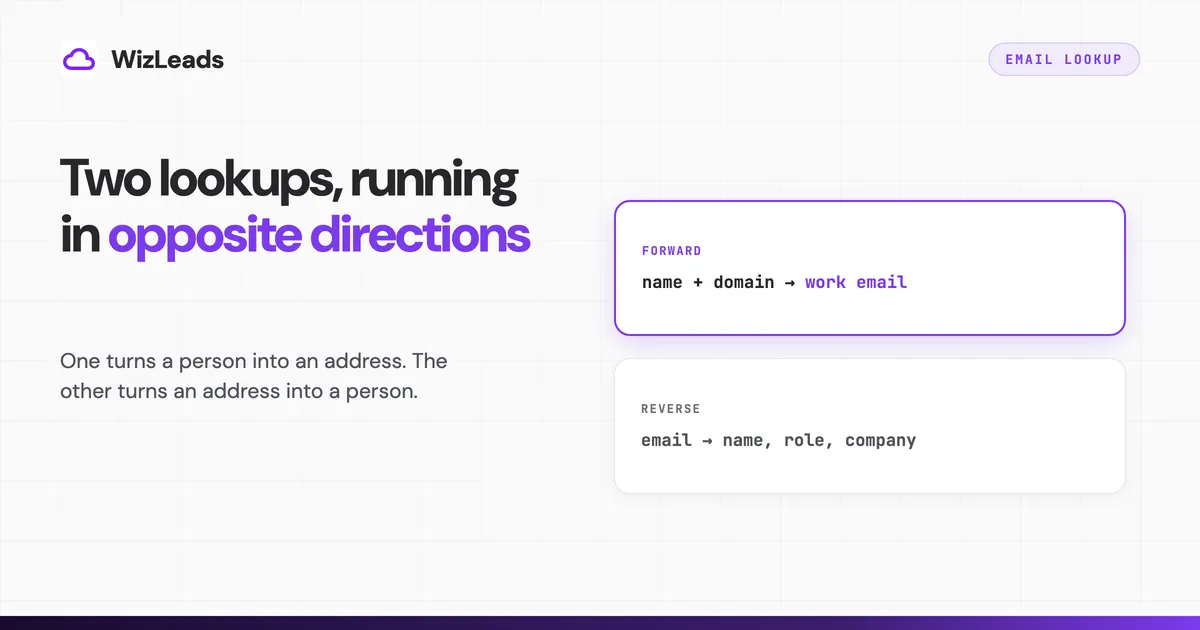
Two opposite jobs share this name. In one you have a person and want their address. In the other you have an address and want the person. Google serves both from the same two words, which is why the first page for email lookup carries OSINT services and B2B prospecting tools side by side.
This page covers the first job. An email address lookup, an email finder and a company email lookup are all names for it. You have a name, a company or a LinkedIn profile, and you need the work email that goes with it. If you are holding an address and want the person behind it, reverse email lookup is the other direction and a different set of tools.
Give a tool a full name and a company domain and you should expect an address back roughly six times in ten on a mixed B2B list. Vendor numbers above that are measuring something narrower than your list.
The two lookups run in opposite directions
The split is mechanical rather than semantic. A forward lookup can produce an address that has never appeared anywhere public, because the format is inferable from other addresses at the same company and the mail server can be asked to confirm it. A reverse lookup has nothing to infer. It matches your string against records somebody already compiled, so it either hits or returns nothing.
That shows up in the pricing. Forward tools charge per result and mostly refund misses, because a miss is a failed inference. Reverse and people-search services charge for database access, because the database is the whole product.
ContactOut sells both and draws the line the same way in its own FAQ: email lookup starts with an address and returns information about the person, an email finder starts with a name and company and discovers the address. Search volume ignores that line, so the SERP mixes them. Your workflow should not.
What happens between typing a name and getting an address
Tools that find email addresses run three things, in roughly this order, and knowing which one produced your result tells you how much to trust it.
A record match. The tool checks whether it already holds a confirmed address for this person, in a database built from web crawls, email signatures, public filings and shared contact books. A match is the strongest result available and the likeliest to be stale, because the record was true on the day it was captured and the person may have changed jobs since.
A format inference. With no record for the person, the tool works out the company's pattern from addresses it has already confirmed on that domain, then builds the candidate. Mailmeteor documents its version openly on its Email Finder page, listing the formats it tests and stating that the algorithm "adapts to patterns already observed at the company". That inference scales with observations. On a 4,000-person US employer there are thousands. On an eleven-person studio there are none, and the tool falls back to generating firstname.lastname and hoping.
A confirmation at the mail server. The candidate is a hypothesis until the receiving server is asked whether the mailbox exists. This step separates a returned address from a guess, and it fails silently on catch-all domains, where the gateway accepts every address including ones never created. In our 1,000-address verification benchmark, our classifier read 212 addresses (21.2%) as sitting on catch-all domains, which is why a tool worth paying for labels catch-all results rather than pretending the handshake settled anything.
Those three steps also predict where a lookup misses: small companies first, then employers sending mail from a domain other than the one on their website, then contacts outside the US. A list of 300-person American SaaS companies beats the averages below. European agencies under twenty people do not.
"97% accurate" and "found six in ten" are both true
Vendors advertise accuracy. Buyers hear coverage. That gap explains most of the disappointment in this category.
Accuracy describes the addresses a tool hands back: of the ones it returned, how many were real. Coverage describes your list: of the people you asked about, how many got an address at all. A tool that answers only when it is certain posts a spectacular accuracy figure and leaves most of your list blank.
Anymail Finder publishes a 14-tool benchmark that reports both, which makes it unusually useful even allowing for the vendor grading its own homework and claiming the top single-source spot. It used 5,000 B2B contacts sourced from Sales Navigator, collected on 19 June 2026, and defined coverage as the share of contacts a tool found a verified-valid email for and accuracy as verified-valid emails divided by all emails returned. Every returned address was checked by three verifiers, with a two-of-three consensus required on standard domains. Across the 14 tools, coverage ran from 41.3% to 87.1% and accuracy from 66.3% to 99.1%, and the two rankings barely resemble each other. Icypeas came back at 49.0% coverage and 99.1% accuracy, Skrapp at 49.4% and 73.8%. Near-identical coverage, opposite ends of the quality range, and a single "accuracy" headline would have told you nothing about either.
Our own numbers point the same way. We ran 1,000 identical B2B leads through seven enrichment providers on the same day and counted verified-valid results, so the figures below are coverage, not accuracy.
| Tool | Verified-valid on 1,000 leads | Find rate |
|---|---|---|
| WizLeads | 670 | 67.0% |
| Wiza | 633 | 63.3% |
| Findymail | 587 | 58.7% |
| Kitt | 517 | 51.7% |
| LeadMagic | 464 | 46.4% |
| IcyPeas | 418 | 41.8% |
| Prospeo | 259 | 25.9% |
Identical input, a 2.6x spread top to bottom, and the full enrichment benchmark records how each run was set up. Wiza returned more addresses than anyone at 671, of which 38 came back invalid, which is the coverage-accuracy trade inside a single result set.
Read published find rates with the sample in mind. Emailchaser's tool roundup reports 88 hits out of 100 for its own finder and 67 for Hunter, from a test of contacts whose addresses the author already knew. People whose email you already have are people you already deal with, which is a friendlier list than the one you are about to buy for.
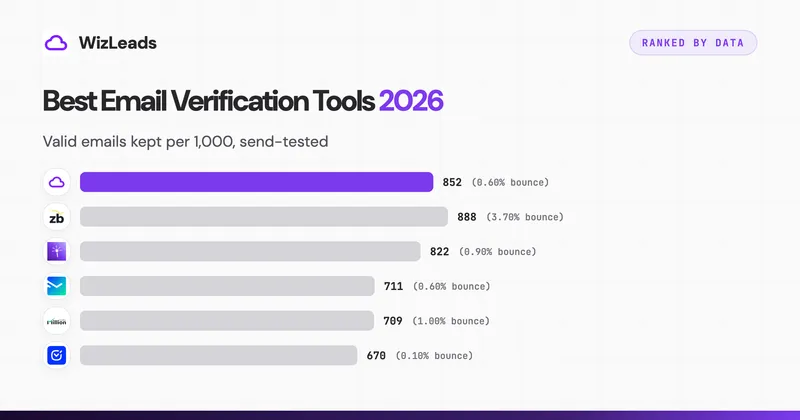
The finder's verdict is a starting position, and verifiers disagree about what counts as valid. We sent to 1,000 addresses after six verifiers had each approved their own subset, and the approvals disagreed sharply: ZeroBounce kept 888 and bounced 33, WizLeads kept 852 and bounced 5, Debounce kept 670 and bounced 1. The verification benchmark has the send conditions and the per-tool rejections.
Free email lookup tools, and what each free tier gives you
Seven of the nine organic results for email lookup on 8 September 2026 were product pages with a free search box rather than articles, which tells you what Google thinks the query wants. Those boxes are real, and they are metered. Everything below was read off the vendor's own pricing or product page on 8 September 2026.
| Tool | Free allowance | Renews |
|---|---|---|
| Prospeo | 100 credits | Monthly |
| Hunter | 50 credits | Monthly |
| Skrapp | 50 credits | Monthly |
| Snov.io | 50 credits, 100 recipients | Every 30 days |
| Apollo | 900 credits per seat per year | Granted monthly |
| ContactOut | 5 emails, 5 phones, 5 exports | Daily |
| Wiza | 20 valid emails, 5 phone numbers | Once |
| Findymail | 10 credits | Once |
| Mailmeteor | Manual lookups, no sign-up, fair-use limits | Continuous |
Hunter's Email Finder FAQ states the rule most of these follow: "One search that returns an email costs one Search credit. If the Email Finder fails to provide a result, it is free." That makes a free tier workable for a handful of named people and useless for a list. Fifty credits will not survive one afternoon of prospecting.
Free tiers also skip the bulk paths. Mailmeteor says its page is designed for single lookups and points bulk users at a separate API. Apollo's free plan caps record selection at 25 rows, which makes a 10,000-lead export 400 passes through the select-and-add loop.
What a paid lookup costs per thousand addresses
Comparing sticker prices tells you nothing, because a credit means something different at every vendor. The comparable unit is dollars per thousand addresses you actually receive, and it only works if you also record what the tool charges on a miss. Entry plan, list price, month-to-month billing where the vendor publishes one, all read off the vendor's pricing page on 8 September 2026.
| Tool | Entry plan | Included | Cost per 1,000 found | Charged on a miss |
|---|---|---|---|---|
| WizLeads | $39 Freelancer | 10,000 credits, 3 per email found | $11.70 | No |
| Skrapp | $39 Professional | 2,000 credits/mo | $19.50 | No, Valid and Catch-all only |
| Apollo | $49 Basic annually, $65 monthly | 30,000 credits/seat/yr | $19.60 | No charge when no valid email is found |
| Findymail | $99 Starter | 5,000 finder credits/mo | $19.80 | No |
| LeadMagic | $99 Essential | 5,000 credits/mo | $19.80 | No |
| Hunter | $49 Starter | 2,000 credits/mo | $24.50 | No |
| Prospeo | $49 Starter | 2,000 credits/mo | $24.50 | No |
| Snov.io | $39 Starter | 1,000 credits/mo | $39.00 | No |
| ContactOut | $49 Email, with US and UK data | see note | data-scope dependent | Not stated |
| Wiza | $99 Email | 500 valid emails/mo | $198.00 | No, extras at $0.15 |
ContactOut is the one row that resists a single number, and the reason is worth knowing before you compare it to anything else. Its pricing carries an Include or Exclude US and UK Data toggle, and the price roughly doubles across it: Email is $25 a month without US and UK data and $49 with it, Email plus Phone $49 without and $99 with. Each card also shows a struck-through $99 or $199, which is a list price rather than what you pay. For most B2B teams reading this, US and UK contacts are the list, so the $49 and $99 figures are the real ones. A comparison quoting ContactOut at $25 against tools whose price includes every geography is not comparing the same product.
Apollo's cost column uses its annual price, $49 a seat for 30,000 credits a year; billed monthly, Basic is $65 a seat for 2,500 credits a month, or $26.00 per 1,000. Hunter, Skrapp and Prospeo also discount for annual payment, so the other rows stay on monthly prices, and quoting one of them yearly against the others monthly would rank them by billing cycle rather than by data.
Hunter has the strongest domain search here, which is the company email lookup rather than the person one. Enter a domain and it returns every address it has indexed there plus the format, which is the fastest way to learn a pattern before looking anyone up individually. Starter is $49 a month, or $34 a month at $408 up front for the year, for 2,000 credits either way, which takes the yearly route to $17.00 per thousand. The limitation is what the index is built from: publicly published addresses, which is why it posted 57.6% coverage in Anymail Finder's benchmark against tools that infer more aggressively.
Findymail charges only for verified results, refunds your credits if your bounce rate exceeds 5%, and rolls unused credits over up to twice your monthly allowance. Its Starter tier is $99 a month for 5,000 finder credits, the highest entry ticket here, and the free tier to test it with is 10 credits.
Apollo is a 30,000-credit-a-year database rather than a lookup box, at $49 per seat per month billed annually with credits granted upfront. Its pricing page prices a reveal at 1 credit for an email and 8 for a phone number, without saying what happens when a contact has no email on file, and the per-seat structure puts a three-person team at $1,764 a year before anyone verifies anything.
Wiza prices per user rather than per credit, at $99 a month for 500 valid emails or $83 a month billed at $990 a year for unlimited reveals. Its Chrome extension no longer does bulk work. On 19 August 2026 Wiza removed bulk export and multi-select from LinkedIn, Sales Navigator and Recruiter search, list and company pages, leaving one-at-a-time reveals on profiles, Wiza Prospect, CSV upload or CRM import.
WizLeads charges 3 credits per email actually found, nothing on a miss, verification included, so the $39 plan covers 3,333 enriched addresses or 20,000 standalone verifications at 0.5 credits each. Scraping a Sales Navigator search adds 1 credit per lead on a connected account and 2 without one. Sizing on a 60% find rate, 10,000 leads scraped account-less plus 6,000 emails found comes to 38,000 credits, which is the $99 Agency plan with 2,000 to spare. Start a run if the input is a saved search rather than a CSV.
The manual methods still worth the time
For one person who matters, a few habits beat a credit.
Check the company site. Contact, About and team pages publish addresses, and one confirmed address is the cheapest way to find email address formats for everyone else at that domain.
Search the domain with an operator rather than a name. site:company.com "@company.com" surfaces PDFs, job posts and press pages holding addresses no crawler filed as contact data.
Ask. A LinkedIn message or a note to the general inbox gets you a confirmed address rather than an inferred one. It does not scale, which is the point: use it on the twenty accounts that matter and buy credits for the rest.
Skip the permutation trick. Mailing six candidates puts five hard bounces per contact on your sending domain, six when none of the guesses was right. If your input is a set of LinkedIn profiles, the scrape, enrich and verify pipeline is the mechanical version of the same job.
Getting an address without asking the person
A forward lookup obtains personal data from a source other than the person, which puts it under Article 14 of the GDPR rather than Article 13.
Article 14 requires the controller to give the data subject a defined set of information "where personal data have not been obtained from the data subject". That set includes, at 14(2)(f), "from which source the personal data originate, and if applicable, whether it came from publicly accessible sources". The timing at 14(3)(a) is "within a reasonable period after obtaining the personal data, but at the latest within one month", or at the first communication to that person if that happens sooner.
Article 14(5)(b) exempts you where notice "proves impossible or would involve a disproportionate effort". Putting that notice inside a cold email you were sending anyway is not obviously disproportionate, and the exemption expects a documented assessment rather than an assumption.
For outbound the practical consequence is small: a line in the first email naming where you got the address, plus a working opt-out, which covers the source-disclosure and timing points without a separate mailing. This describes what the regulation says. It is not legal advice, and the analysis turns on jurisdiction and on whether your recipients are EU residents.
FAQ
What is an email lookup?
The phrase covers two opposite jobs. A forward lookup starts with a person, usually a name plus a company domain, and returns their work email address. A reverse lookup starts with an address and returns whatever is known about the person behind it. B2B prospecting tools sell the first. OSINT and people-search services sell the second. ContactOut, which sells both, puts it the same way on its own FAQ: email lookup starts with an address, email finder starts with a name and company.
How do you find someone's email address by their name?
You need the name plus the company, not the name alone: most finders want the company domain, and some, such as PhantomBuster's Professional Email Finder, accept the company name instead. A lookup tool checks its own records for that person, works out which format the company uses from addresses it has already confirmed there, generates the likely candidate, and tries to confirm the mailbox at the receiving server before returning it. Hunter's free plan allows 50 searches a month and charges a credit only when a search returns an address. Prospeo's free plan gives 100 credits a month on the same pay-on-success rule.
Is there a free email lookup?
Several, and most of them meter you. Checked on 8 September 2026: Hunter gives 50 credits a month, Skrapp 50 credits a month, Prospeo 100 credits a month, Apollo 900 credits per seat per year granted monthly, ContactOut 5 emails and 5 exports a day, Wiza 20 valid emails once, and Findymail 10 credits once. Mailmeteor's Email Finder page states that manual lookups are free with no sign-up and no daily quota, subject to fair-use limits. A free email lookup tool answers one question at a time, and none of these will build a list.
How accurate are email lookup tools?
Accuracy and coverage are separate numbers and vendors advertise the flattering one. Accuracy describes the addresses a tool hands back. Coverage describes the share of your list it found anything for. Anymail Finder's published 14-tool benchmark of 5,000 contacts, collected 19 June 2026, reports coverage from 41.3% to 87.1% against accuracy from 66.3% to 99.1%. Our own 1,000-lead test returned verified-valid find rates from 25.9% to 67.0%. Budget on 60% coverage of a mixed B2B list.
What is the difference between an email lookup and a reverse email lookup?
Direction, and it changes the whole product. A forward lookup infers an address that may never have been published anywhere, then confirms it at the mail server. A reverse lookup matches an address you already hold against records someone else compiled, so it either hits or it does not, and there is nothing to infer. The tools, the pricing models and the privacy exposure differ accordingly.
Can an email lookup find a personal Gmail address?
Not reliably, and the vendors say so. Mailmeteor's Email Finder FAQ states the tool is built for business addresses on company domains and points users elsewhere for personal ones. The reason is mechanical: a work address follows a company format that can be inferred and confirmed, while a personal Gmail handle follows nothing. Anything that returns a personal address is matching a record, not deducing one.
Is email lookup legal?
Finding a business address is generally lawful, and the obligation lands on what you do next. Under GDPR Article 14 a controller who obtains personal data from a source other than the person must tell them, including from which source the data originate, within a reasonable period and at the latest within one month, or at the first communication if that comes sooner. Article 14(5)(b) allows an exemption where notice is impossible or would involve a disproportionate effort, which is an assessment you have to document rather than assume. This is a description of the text, not legal advice.