WizLeads


TL;DR
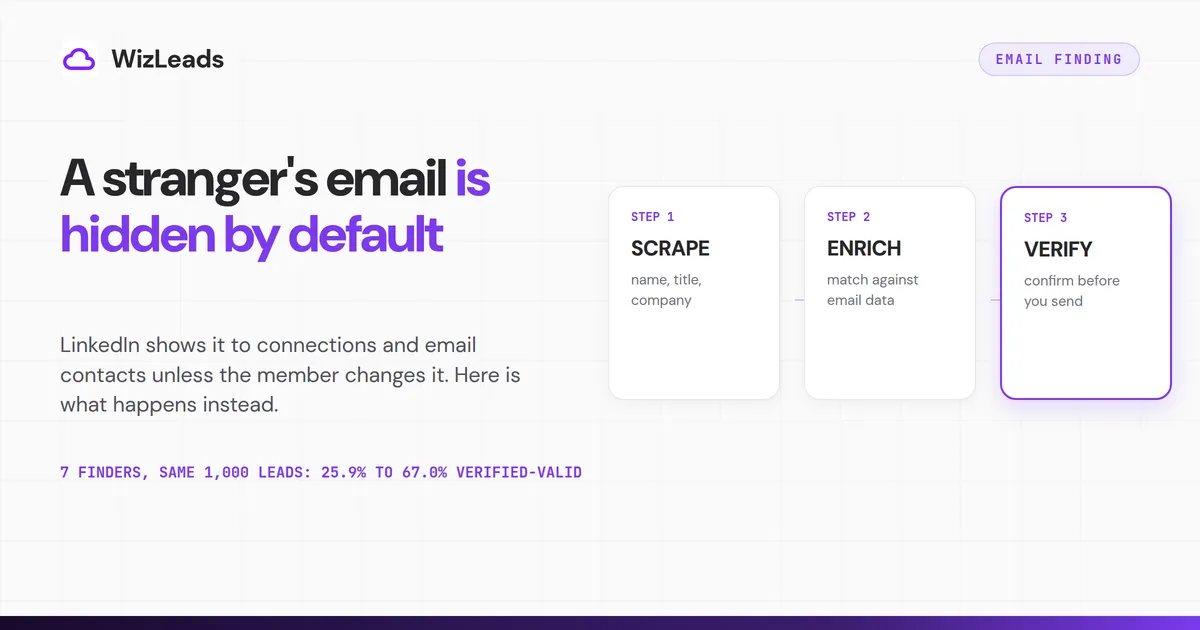
A LinkedIn email scraper does three jobs: it reads the name and employer off Sales Navigator, finds the work address from that name and the company's domain, and verifies it. If you only hold a name and a company, find the company's website and run a finder; WizLeads charges 3 credits per email found and nothing on a miss. Plan on a 50% to 60% find rate and check catch-alls before you send.
LinkedIn's help centre says a member's registered email is shown by default only to direct connections and email contacts, and the member can change that in settings. For anyone who has not shared it with you, a work address comes from a finder: on 1,000 identical B2B leads, seven finders returned between 259 and 670 verified-valid addresses.
LinkedIn's exact words for that default are "only visible to your direct connections on LinkedIn". A connection who links an app such as Outlook sees the address there too. Sales Navigator, at US$119.99 a month for Core on LinkedIn's compare-plans page, holds no email field either.
Hunter sells email finding, and its help centre answers no when asked whether Hunter can find emails from LinkedIn or other social profiles. Hunter's article says social platforms keep registration addresses private.
Everything else runs a three-step pipeline. Knowing which step you are paying for is what separates a $99 run from a $299 one on the same 10,000 leads. WizLeads, which can find a work email from a name and website, is priced next to the other tools below.
The three steps behind every "scraped" email
Step one reads identity off LinkedIn. That means first name, last name, current title, employer, the employer's website and the profile URL. The data is on the page, and every scraper collects it, free GitHub scripts included. A cloud scraper that needs no connected LinkedIn account does this on its own servers. This is the only part of the job that touches LinkedIn at all.
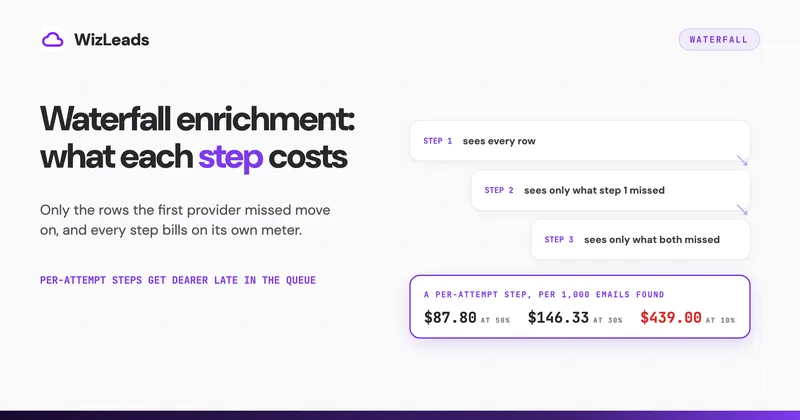
Step two enriches that identity into an address. The finder takes the name and the company domain and checks its own records. It generates the plausible formats for that domain and tries to confirm one at the receiving mail server. That happens entirely outside LinkedIn, against databases built from web crawls, email signatures, public filings and shared contact data.
Step three verifies the result before it reaches a sequencer. An address that resolved in step two is a hypothesis until something confirms the mailbox exists.
On WizLeads' pricing, those three steps cost 1 credit per lead scraped with a connected account and 2 without one. Each email found costs 3 credits, a miss costs nothing, and verification is included in that 3.
The $39 plan carries 10,000 credits. That is 10,000 leads scraped on a connected account, or 3,333 emails found, or 20,000 emails verified. Most confusion about what a LinkedIn scraper costs per email comes from comparing the price of one step with the price of all three.
The New Task panel shows the same meter. Account-Less Scraping adds 1 credit, Enrich Business Emails adds 3, and the credit estimate reads 2 to 5 per result.
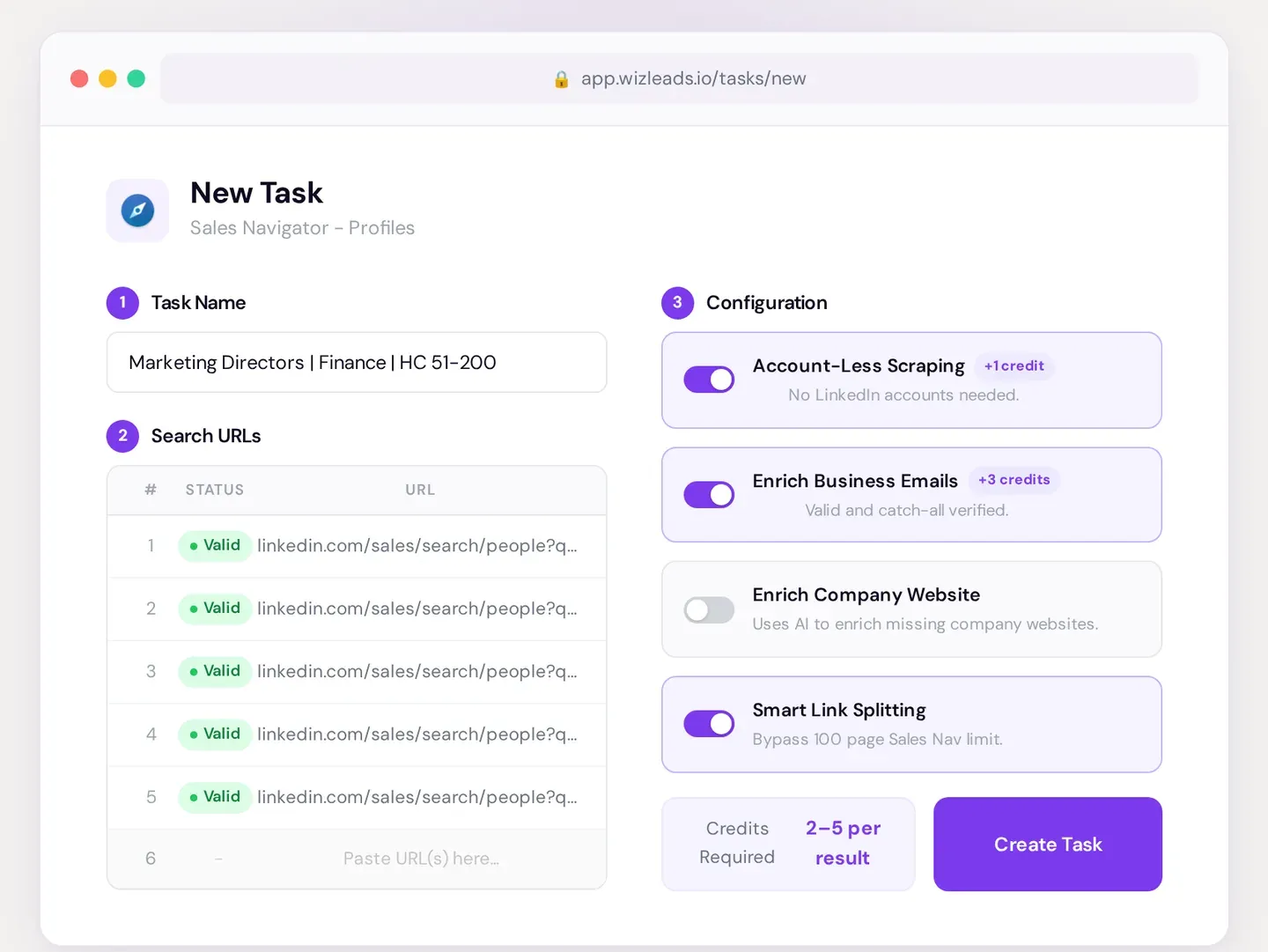
Where step one happens is the question the category argues about most, and it has the least effect on email quality. A Chrome extension captures identity inside your logged-in session, and a cloud tool captures it on its own servers. That choice sets how exposed your LinkedIn account is. It changes nothing about the address, because the same step two runs behind either one.
Can you find a work email from just a name and a company?
Yes, for a work address. A name plus an employer is enough, because the employer gives you what LinkedIn will not: a mail domain to test. The address registered to the person's LinkedIn account is a different matter: finders do not read it.
A finder does four things with those two inputs:
- It turns the company into its website domain.
- It looks up or infers the pattern that domain uses, such as firstname.lastname.
- It generates the candidate addresses for that person.
- It checks the best candidate with the receiving mail server.
With WizLeads, Find Work Email takes a first name (or a full name) and the company website. The last name is optional. It has no field for a company name or a LinkedIn URL, so look up the website first. An email found costs 3 credits.
A miss costs nothing, and a repeat lookup of the same input within 72 hours is free, per the WizLeads API reference.
Two limits matter. First, personal addresses such as Gmail sit outside this route. WizLeads' personal lookup needs a Sales Navigator profile ID (or a URL that contains it) rather than an ordinary profile URL, and it costs 5 credits per email found.
Second, misses cluster where finders have seen little mail, which in our enrichment benchmark meant smaller and non-US domains for most tools. Coverage also varies by tool: 25.9% to 67.0% verified-valid on the same 1,000 leads.
If the person is already a 1st-degree connection, LinkedIn's help page on profile visibility says their Contact Info section is visible to you, and by default it shows the email they registered with, unless they changed the setting.
Why the same list gives different tools different answers
We ran 1,000 identical B2B leads through seven enrichment providers, and our benchmark of seven finders on the same leads records the per-tool method. WizLeads returned 670 verified-valid addresses. Wiza found 671, of which 633 held up and 38 came back invalid. Findymail returned 587, Kitt 517, LeadMagic 464, IcyPeas 418 and Prospeo 259.
That is the same input on the same day, a 2.6x spread top to bottom.
A provider learns that Acme uses firstname.lastname by observing confirmed Acme addresses, so its confidence on a domain tracks how much mail from that domain it has seen. On a 4,000-person US company it has thousands of observations. On an eleven-person agency in Lisbon it has none, and it guesses firstname.lastname and hopes the server confirms it.
That mechanism predicts where a LinkedIn email scraper misses: small companies first, then employers that send mail from a different domain than their website, then non-US contacts. Assume 50% to 60% on a mixed B2B list and size the budget on 60%. That turns 10,000 Sales Navigator leads into roughly 6,000 contactable people.
Catch-all domains, and why "found" is not "valid"
WizLeads flagged 212 of the 1,000 addresses in our verification test as catch-all. A catch-all gateway accepts every address sent to it, including addresses that were never created. The ordinary SMTP handshake returns the same yes for a real mailbox and a typo. Providers either hand the address over marked risky, or refuse to release it at all.
Both choices cost you something, and the only way to price it is to send. We ran 1,000 real-estate decision-maker addresses exported from Apollo through six verifiers, mailed whatever each one approved, and counted the hard bounces.
| Verifier | Kept as valid | Bounces | Bounce rate |
|---|---|---|---|
| ZeroBounce | 888 | 33 | 3.72% |
| WizLeads | 852 | 5 | 0.59% |
| LeadMagic | 822 | 7 | 0.85% |
| NeverBounce | 711 | 4 | 0.56% |
| MillionVerifier | 709 | 7 | 0.99% |
| Debounce | 670 | 1 | 0.15% |
The top and bottom rows are the same tradeoff resolved in opposite directions. ZeroBounce released 888 addresses and 33 bounced. Debounce released 670, bounced one, and rejected 330 that never got to prove themselves either way.
The only threshold Google publishes is a spam rate: below 0.10% in Postmaster Tools, and never reaching 0.30%. The 2% bounce ceiling quoted everywhere is an operator convention. We use it anyway, and hold our own domains under it.
Twelve tools, priced today
The tables group the tools by what they do to your list, because the groups are not substitutes.
Group one: paste a search, get a CSV with emails
These run all three steps, so they hand you a file in one pass.
| Tool | What it does to your list | Entry price and unit |
|---|---|---|
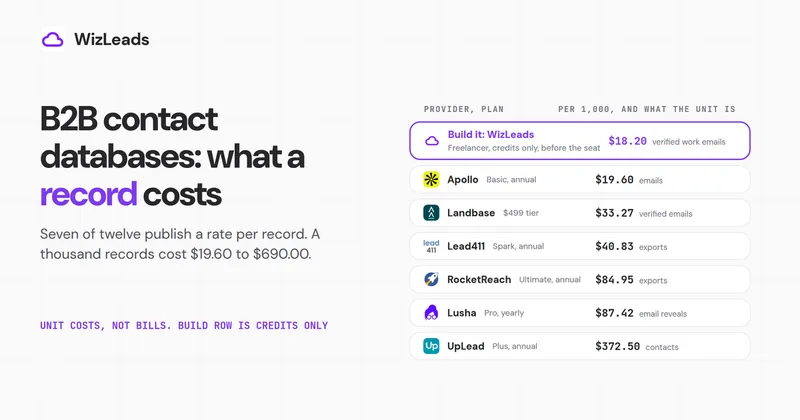
| WizLeads | Scrapes a Sales Navigator search, then finds and verifies emails | $39 for 10,000 credits. 1 credit per lead, 2 without a connected account, 3 per email found, nothing on a miss |
| Evaboot | Exports a Sales Navigator search from your own browser session | $9 a month for 100 credits. 1 credit per lead, email free when found |
| Wiza | Finds verified emails and phones from its own search or a CSV of LinkedIn URLs (CSV import is listed on its Team plan) | $49 per user a month for 100 valid emails, $0.15 per extra |
| Skrapp | Extension for LinkedIn, Sales Navigator and Recruiter, plus a website extractor | $39 a month ($29 billed yearly) for 2,000 credits. The finder bills Valid and Catch-all results, and the verifier bills every check |
Prices in this post are from each vendor's own pricing page. WizLeads' plans and credit costs come from its email enrichment page and API reference.
WizLeads turns a Sales Navigator search URL into a CSV (42 columns in the raw people export), optionally without connecting a LinkedIn account. Plans run $39 for 10,000 credits, $99 for 40,000, $199 for 100,000 and $499 for 300,000, and credits roll over for one month. You need Sales Navigator access to build the search URL, though the account-less scrape itself runs without your seat.
Evaboot is a Chrome extension that cleans and exports Sales Navigator searches. Its pricing page shows Starter at $9 for 100 credits, Grow at $29 for 400 and Scale from $49 for 1,000. Scale then steps through $99 for 3,000, $149 for 6,000 and $299 for 15,000, and Enterprise is custom. One credit exports a lead with its email included, and a lead with no email found still costs one credit. Every export runs through your own session, so the tab stays open and your account carries the exposure.
Wiza's help centre says its Chrome extension no longer bulk-exports from LinkedIn or Sales Navigator pages on any plan, a change dated 19 August 2026. Skrapp contradicts itself on catch-all billing: its Fair Credit tooltip says catch-alls are free, while its pricing FAQ and API docs say they are charged.
Group two: feed it a name and a domain
These do step two only, so a scraper or your own Sales Navigator export feeds them.
| Tool | What it does to your list | Entry price and unit |
|---|---|---|
| Hunter | Finds and verifies from a name and a domain | $49 a month ($34 billed yearly) for 2,000 credits. 1 credit per email found, verification included, nothing on a miss |
| Prospeo | Finds from a name and a domain, plus people search | $49 a month ($37 billed yearly) for 2,000 credits. 1 credit per verified email, 10 per mobile |
| Findymail | Finds and verifies from a name and a domain | Credit plans from $49 a month for 1,000 credits. 1 credit per verified email, 10 per phone, nothing on a miss |
| LeadMagic | Email, mobile, company and job-change endpoints on one credit pool | $99 a month for 5,000 credits. 1 credit per valid email, 0.25 per validation |
Group three: search a database instead of a list
| Tool | What it does to your list | Entry price and unit |
|---|---|---|
| Apollo | Searches its own database, with a sequencer and dialer attached | $49 per seat a month billed yearly ($65 monthly) for 30,000 credits a year. 1 credit per email, 8 per phone |
| Snov.io | Finder plus a sequencer, warmup and CRM | $39 a month billed monthly ($29.25 billed yearly) for 1,000 credits. 1 credit per email found |
| ContactOut | Reveals emails and phones through a portal and extension | $25 a month for the Email plan without US and UK data, $49 with it. Exports cap at 300 a month |
| Lusha | Emails and direct dials from a credit slider | $37.45 a month billed yearly for 4,800 credits a year. 1 credit per email, 5 per phone |
Free tiers are sized for testing: on their own pricing pages, Hunter gives 50 credits a month, Prospeo 100 a month and Lusha 40 a month, Skrapp 50 credits, Wiza 20 valid emails and 5 phones once, and ContactOut 5 emails a day, while WizLeads gives 500 credits once.
What a full run actually costs
Take ten thousand Sales Navigator leads, enriched at a 60% find rate and verified. That is 6,000 usable emails, and it takes four searches, because a people search stops at 2,500 results.
| Route | Plan needed | Cost | Per 1,000 emails |
|---|---|---|---|
| WizLeads, account-less scrape plus enrichment | $99 Agency: 38,000 credits billed, 50,000 held at launch | $99 | $16.50 |
| Evaboot, export with email included | Scale $299 stop, 10,000 of 15,000 credits | $299 | $49.83 |
| Enrichment only, Hunter Growth | $104/mo billed yearly ($1,248), 6,000 of 10,000 credits | $104 a month | $17.33 per 1,000 |
The WizLeads bill is 38,000 credits, but a task holds 3 credits per row for enrichment up front and releases them for rows with no email. Launching all 10,000 leads account-less therefore needs 50,000 credits on hand, more than Agency carries. On Agency, split the job into tasks of about 1,600 leads (by our arithmetic at a 60% find rate, 2,500-lead tasks come up 1,000 credits short on the last one), or take Cartel at $199. With a connected account the job needs exactly 40,000 credits.
The Hunter row excludes the scrape, and you still need the 10,000 leads from somewhere.
Add the Sales Navigator seat to all three routes. Core is US$119.99 a month, which costs more than the tool on the cheaper routes, and nobody counts it when they quote a tool at $39. Domains, mailboxes and warmup are a separate bill.
The rules, the account risk and the privacy side
Section 8.2 of the LinkedIn User Agreement, effective 3 November 2025, tells members not to "develop, support or use software, devices, scripts, robots or any other means or processes (such as crawlers, browser plugins and add-ons or any other technology) to scrape or copy the Services, including profiles and other data from the Services." That covers every tool that starts from a LinkedIn search. LinkedIn's help centre adds that it does not permit third-party software or extensions that "scrape, modify the appearance of, or automate activity".
Enforcement lands on the account doing the scraping. A Chrome extension acts as your logged-in session, which is why extensions carry the most exposure and ship daily caps.
Cloud tools holding your session cookie slow the pace and keep the same link. Account-less extraction removes your account from the transaction. That three-way split is the axis that sets your exposure. It also turns the 2,500-result Sales Navigator export limit into something you route around with split searches.
Two data protection rules apply to a scraped and enriched list. GDPR Article 14 requires you to say where the data came from and what you are doing with it "at the latest within one month" of obtaining it or "at the latest at the time of the first communication to that data subject", whichever comes first (GDPR Art. 14(3)). A first cold email sent more than a month after the scrape is already too late to carry the notice.
CCPA gives California residents a right to know and delete what you hold, so keep the record of where each address came from. None of that is legal advice, and selling into the EU is worth an actual lawyer.
Running it end to end
Build the search in LinkedIn Sales Navigator first, and build it tight. A people search caps at 2,500 results, so filter by seniority, headcount and geography until the count sits under it. Do not export broad and clean up afterwards.
Paste the search URL into a cloud scraper, turn on account-less mode and email enrichment, and run it. Five thousand leads takes 15 to 20 minutes server-side. You get a CSV with the profile fields, the company fields, and an email column filled for the roughly 60% that resolved.
Split the file before it goes anywhere. Confirmed addresses go straight to the sequencer. Catch-all domains go through a verifier that classifies them as valid or invalid, not one that returns "risky" and hands the decision back to you. Rows with no email go to a phone or LinkedIn segment.
Then send in cohorts: two hundred addresses on day one, then watch the bounce column before you scale. A list that bounces clean at 200 usually bounces clean at 6,000, and if it fails at 200, you lose 200 sends and keep the domain.
WizLeads runs all three steps as one task on one credit pool. The $1 first month and the 20% off for life that follows show on the billing page after signup.