WizLeads


TL;DR
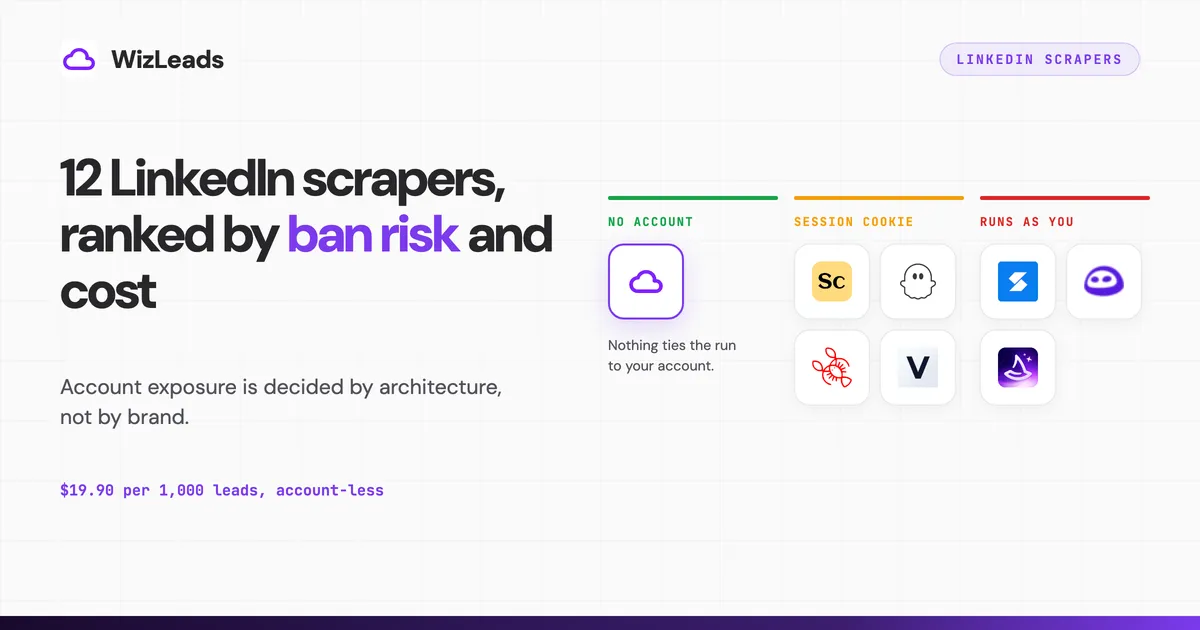
The best LinkedIn scrapers differ most on one question: whose LinkedIn account does the work. Nine of the twelve tools here scrape LinkedIn by running your own logged-in session, and a restricted account is the one cost you cannot re-buy. Two keep your account out of the request path: WizLeads in account-less mode, and Bright Data, which cannot read Sales Navigator. Vayne also describes a cookie-less mode, which its pricing page lists as on request.
If cost per delivered email matters most, Skrapp is cheapest at $12.90 per 1,000 verified emails, against $19.90 for WizLeads, before the Sales Navigator seat. LinkedIn caps every Sales Navigator search at 2,500 results, so each tool either splits the search inside the job or hands the splitting back to you. Every price comes from the vendor's own page.
What this list is ranked on
The job being priced is the one most people are buying: take a Sales Navigator search, get the profiles out, attach a work email to each one, verify it, and hand a CSV to a sequencer. These LinkedIn scraping tools are ranked on four things in this order.
Whose LinkedIn account does the work. This is first because it is the only failure that costs you something you cannot re-buy. A restricted account takes your network with it.
What happens past 2,500 results. LinkedIn's help centre puts a Sales Navigator search at 2,500 lead results across 100 pages, or 1,000 account results across 40 pages. That ceiling is LinkedIn's, so no tool removes it.
Whether emails arrive verified or merely found. Email addresses do not exist on LinkedIn profiles. Every tool returning one is running a separate lookup and charging you for it, and the difference between an address that has been checked and one that has only been guessed shows up in your bounce rate two weeks later.
Cost for a defined job. The standard workload is 10,000 delivered work emails. Find rates across the seven tools ran from 25.9 to 67.0 percent in the 1,000-lead enrichment benchmark. This post sizes every job at 60 percent, near the top of that range and generous to every vendor here, so landing 10,000 emails means scraping roughly 16,700 profiles. Each tool's own credit rules get applied to that workload and the price shown is the cheapest single plan tier covering it inside one month.
Five tools that appear on most lists in this category are not ranked here. Linked Helper, Dripify, Dux-Soup, Waalaxy and Octopus CRM automate LinkedIn activity, and their daily action quotas sit one or two orders of magnitude below this job. Dripify's help centre puts its maximum at 400 profile views a day on a Sales Navigator account, which still turns 16,700 profiles into about 42 days. They suit sending connection requests, not building a list, so they come up at the end. Open-source Python libraries on GitHub are left out too, because they run as your logged-in account with no rate limiting of their own.
Every tool here that reads a Sales Navigator search needs a live Sales Navigator seat on top of its own subscription, which LinkedIn charges $119.99 a month for Core and $159.99 for Advanced, so what Sales Navigator costs stacks onto nearly every price below. The exception is a scraper running account-less, where the seat doing the reading is not yours; building the search URL still takes Sales Navigator access.
The split that does most of the work
Criterion one sorts the field into two piles. Nine of these twelve tools put your own logged-in session into the request path, either as a browser extension acting as you or as a cloud service holding your session cookie. Two do not, and Captain Data's API docs do not say whose session it uses.
The reason the second pile is so small is that Sales Navigator's filters are the whole point of scraping LinkedIn, and reaching them normally requires a seat that is logged in. Scrapers that avoid your account almost always avoid Sales Navigator too, and fall back to public profile pages, which carry fewer fields and no search filters. WizLeads is one exception: account-less extraction that still reads Sales Navigator searches. Vayne describes a cookie-less mode as well, which its pricing page lists as on request. Bright Data is account-less and does not touch Sales Navigator at all.
The table
| Tool | How it runs | Your LinkedIn account | Past 2,500 | Emails | Cheapest plan covering 10K emails | Per 1,000 |
|---|---|---|---|---|---|---|
| WizLeads | cloud, account-less option | untouched in account-less mode | automatic link splitting | found and verified in one pass | $199 | $19.90 |
| Skrapp | extension plus lead search | runs as your session | per-day search limit not on its pricing page | found and verified | $129 | $12.90 |
| Scrupp | cloud after cookie handoff | reads your session cookie | FAQ says split by hand, homepage says no cap | found and verified | $329 | $32.90 |
| PhantomBuster | cloud, session based | reads your session cookie | split by hand | enriched via email credits | $352 yearly | $35.20 |
| Lobstr | cloud after cookie handoff | reads your session cookie | Split Search toggle, one level | 9 credits per email found | $500 | $50.00 |
| Vayne | cloud, cookie based; cookie-less mode on request | reads your session cookie; none needed in cookie-less mode | automatic query splitting | separate enrichment credits, refunded on a miss | $289 for 10K emails | $28.90 |
| Wiza | web app plus a one-profile extension; no Sales Navigator export since 19 Aug 2026 | reveals run as your session | 2,500 list exports a month on annual plans | found and verified | $1,524 | $152.40 |
| Bright Data | API, no LinkedIn account | untouched, no Sales Nav access | not applicable | none | $25.05 profiles only | not comparable |
| Apify | actor marketplace | depends on the actor | depends on the actor | none at platform level | $83.50 profiles only | not comparable |
| Captain Data | API and cloud | not stated in its API docs | not published | 1 credit per enriched record | $1,319 on the 50K plan | $131.90 |
| Evaboot | cloud after cookie handoff | reads your session cookie | split by hand | found and verified | Custom, above the $299 plan for 15,000 credits | not comparable |
| TexAu | cloud automation | reads your session cookie | split by hand | pay on match | above the top published tier | not comparable |
Ban risk belongs to the architecture, not the brand
Every vendor page in this category promises safety, and the promises are worth reading against the document that governs the relationship. Section 8.2 of the LinkedIn User Agreement lists what members agree not to do, and two of its bullets decide this entire category.
The first prohibits using another's account, and it names the mechanism in parentheses: sharing log-in credentials or copying cookies. The second prohibits developing, supporting or using software, devices, scripts, robots or other processes to scrape or copy the Services, and it names browser plugins and add-ons among the examples. Read those two together and a Chrome extension exporting your Sales Navigator search is squarely inside both, and a cloud tool that asked you to paste your session cookie has moved the same exposure onto a server without reducing it.
Whether any of this is also a crime under the Computer Fraud and Abuse Act is unsettled, and the ruling everyone cites to say it is not does not hold the position they give it. The 2019 Ninth Circuit opinion in hiQ Labs v. LinkedIn was vacated by the Supreme Court in June 2021 and reissued on 18 April 2022, and the reissued opinion says of itself that "we did not resolve the companies' legal dispute definitively". What it affirmed was a preliminary injunction, on a finding that hiQ had raised "serious questions" about the Computer Fraud and Abuse Act. That injunction was dissolved 105 days later. In November 2022 the district court found hiQ had breached the User Agreement, granting summary judgment on the fake accounts hiQ's contractors had created and leaving hiQ's own scraping for trial on waiver and estoppel. On 8 December 2022 Judge Edward M. Chen entered a consent judgment of $500,000 against hiQ plus a permanent injunction covering automated access "whether logged in to a LinkedIn account or not".
The practical reading is that contract liability is what gets enforced, and for an individual operator that liability arrives as a restricted account. Access law, contract and data protection are three separate rulebooks with three different consequences. None of this is legal advice, and if you are scraping EU residents at volume, get a lawyer's opinion on legitimate interest.
For what the ceilings look like day to day, PhantomBuster publishes the most useful numbers of any vendor here, broken out by account age. On profile extractions it puts a new account at 80 profiles over 8 launches, an active free account at 150 over 10, and a Premium account at 300 over 20. On search result extractions it puts a Premium account at 200 pages and 5,000 results a day. Lobstr gives two figures: its help centre allows up to 25,000 leads a day per account, while its blog says Sales Navigator caps you at 5,000. At 5,000 a day, a 16,700-profile job takes several days on a tool that runs through your session.
Operators reporting in public agree on what getting it wrong costs. One operator whose agent visited 200 profiles in a recognisable pattern was restricted within 48 hours and lost two weeks to the appeal. Another was banned after six months of connection requests with no messaging at all, and got the account back roughly a week later by uploading a government ID and agreeing to stop automating. That is the number worth putting next to a $49 subscription, and the reason criterion one is first.
Session cookies fail in a quieter way. The session cookie a cloud tool holds is the same one your browser holds, and LinkedIn invalidates it whenever it decides a session looks wrong. A job that dies at 60 percent because the cookie expired is a partial CSV and a re-run against the same daily quota.
What happened to Proxycurl
LinkedIn sued Nubela, the company behind the Proxycurl LinkedIn data API, in January 2025. Its founder puts Proxycurl at roughly $10M in revenue, and Proxycurl shut down on 4 July 2025 because, in his words, it had to close "to comply with the legal settlement with LinkedIn". LinkedIn's VP of Legal says the resolution requires Proxycurl to delete the LinkedIn data it obtained, entered as a permanent injunction that Proxycurl must send to its customers. That is the risk for any tool that calls a scraping API: the service behind it can end in a settlement, so ask a vendor which API sits behind its product.
The twelve scrapers
Each section fills the same six slots in the same order: how it gets the data, what your account is exposed to, what happens past 2,500, the email layer, the verified price, and who it fits.
1. WizLeads
How it gets the data. Cloud infrastructure, with no browser extension or other software on your machine in account-less mode. You paste a Sales Navigator search URL and it runs server-side.
Your LinkedIn account. Account-less mode extracts without your session, so there is no cookie to hand over and no account for LinkedIn to throttle. It costs 2 credits per lead, against 1 credit when you connect your own account. Connect an account and the exposure is the same as everything else here.
Past 2,500 results. Smart Link Splitting checks the lead count and splits the link into chunks of 2,000 results or less, so you never lose results past the cap. It is gated to the Agency plan and above.
Emails. Enrichment and verification run in the same pass as the scrape at 3 credits per email found, nothing for misses. Catch-all addresses come back classified as valid or invalid, so there is no risky pile for you to triage. That pipeline kept 852 valid and produced 5 bounces, a 0.59 percent bounce rate, in a six-verifier test on 1,000 real addresses, and the verification benchmark publishes the raw data.
Price. Freelancer $39 for 10,000 credits, Agency $99 for 40,000, Cartel $199 for 100,000, Kingpin $499 for 300,000. Quarterly billing takes roughly 25 percent off. The 10,000-email job is 33,400 credits for the account-less scrape plus 30,000 for the emails, so 63,400 credits, which lands on Cartel at $199, or $19.90 per 1,000. Connect your own account and it drops to 46,700 credits, still Cartel.
Who it fits. Agencies and operators running Sales Navigator territories large enough that manual search splitting has become a weekly chore, and anyone whose LinkedIn account is too valuable to keep inside the export path. Skip WizLeads if you want native HubSpot and Zapier connectors out of the box, because it is API-first and expects you to wire it up.
2. Skrapp
How it gets the data. A Chrome extension over LinkedIn Basic, Sales Navigator and Recruiter, plus a lead search database you can query without going through LinkedIn at all.
Your LinkedIn account. The extension runs as your logged-in session on the LinkedIn side, which puts your account in the same position as Evaboot's cookie-based export.
Past 2,500 results. Skrapp's pricing page no longer lists per-day search quotas, so check your plan's limit with Skrapp before a large job.
Emails. One credit buys one deliverable email, which is a cleaner meter than most of this list because you are not paying separately to scrape the profile. Skrapp does not publish a find rate, so the credit count that lands 10,000 emails is an estimate.
Price. Nine monthly tiers: $0 for 50 credits, $39 for 2,000, $99 for 5,000, $129 for 10,000, $199 for 25,000, $349 for 50,000, $599 for 100,000, $999 for 250,000 and $1,499 for 500,000. Yearly billing takes 25 percent off. Ten thousand emails needs the $129 tier, or $12.90 per 1,000, the cheapest verified price for this job in the whole list.
Who it fits. Anyone who cares more about cost per delivered email than about turnaround. Confirm the plan's search limit with Skrapp before you promise a client a date.
3. Scrupp
How it gets the data. A Chrome extension captures your LinkedIn session cookie, then the scrape runs in Scrupp's cloud, so you can close the browser once an export starts.
Your LinkedIn account. The cookie moves to a server, and the server makes the requests as you. Scrupp's own FAQ answers the ban question with "risk is reduced by safe extraction and external enrichment", and "reduced" is the accurate word.
Past 2,500 results. Scrupp's pages contradict each other. Its pricing FAQ states the platform ceilings at 1,000 for LinkedIn Basic, 2,500 for Sales Navigator and 2,500 for Apollo and tells you to segment the search, while its homepage says "Sales Navigator caps a search at 2,500. We don't" and its store listing promises auto-split exports.
Emails. One extra credit adds a verified work email, two more add a phone number, and a miss on either add-on is free. Scrupp's homepage claims a 36 percent email find rate, which we have not tested.
Price. Subscriptions at $29 a month for 1,000 credits, $39 for 2,000, $59 for 5,000, $99 for 10,000, $169 for 20,000, $329 for 50,000 and $499 for 100,000. One-time packs that never expire run from $35 for 1,000 to $599 for 100,000. A free plan gives 100 credits a month. The 10,000-email job is 26,700 credits and lands on the $329 tier, or $32.90 per 1,000.
Who it fits. Teams that want phone numbers alongside emails without a second vendor, and anyone scraping Apollo and Google Maps under the same credit balance. The phone add-on at 2 credits is the cheapest direct-dial pricing on this list by a wide margin.
4. PhantomBuster
How it gets the data. Cloud automations called Phantoms, covering over 15 platforms with LinkedIn among them, chained into workflows that can scrape, enrich and then send.
Your LinkedIn account. Session cookie handed to the cloud. PhantomBuster is unusually direct about what that means and publishes the per-account rate ceilings quoted earlier, which is more disclosure than any other vendor here offers.
Past 2,500 results. Split by hand into narrower searches.
Emails. A separate email credit pool, consumed when a profile is enriched. The current pricing page says consumption varies "based on usage" and states no flat one-credit-per-email rate, so treat the plan allowance as an upper limit on emails.
Price. Three plans, priced annually by default. Start is $56 a month billed annually ($672 a year) with 20 hours of execution and 500 email credits, Grow $128 ($1,536) with 80 hours and 2,500 credits, Scale $352 ($4,224) with 300 hours and 10,000 credits. Switch the toggle to monthly and the same plans are $69, $159 and $439. Scale covers the 10,000-email job at $352 on annual billing, or $35.20 per 1,000, and $439 if you pay month to month.
Who it fits. Anyone whose workflow crosses platforms, because scraping a LinkedIn post's engagers, enriching them and pushing them into a sequence is one chained workflow here and three tools anywhere else. It is poor value if LinkedIn is the only platform you touch.
5. Lobstr
How it gets the data. Cloud scrapers called squids, with an optional Chrome extension used only to sync your session.
Your LinkedIn account. Lobstr holds your session cookies and does not take your login credentials. Its FAQ claims 0 percent account bans, on the basis of throttling that respects LinkedIn's limits.
Past 2,500 results. A Split Search toggle inside the scraper breaks an oversized search along one filter, such as seniority, function or industry, up to about 50,000 leads. Lobstr's help centre says it does not split again, so a sub-search still over 2,500 is capped and the rest is missed.
Emails. Nine credits per email found, on top of 1 credit per lead exported. Mobile numbers cost 300 credits each. Lobstr's product page says valid addresses carry a 97 percent plus deliverability guarantee and that bounce stays under 3 percent. The output itself is the widest here at 103 attributes per lead.
Price. Free at 100 credits a month with exports capped at 30 rows per request, Starter $20 for 10,000, Pro $100 for 100,000, Team $500 for 1,000,000. Credits do not roll over. The 10,000-email job is 106,700 credits, which overshoots Pro by 6,700 and lands on Team at $500, or $50.00 per 1,000. Add-on top-ups exist but their rates are not published on the pricing page.
Who it fits. High-volume scraping where you are not buying emails, since 100,000 raw profile credits for $100 is the cheapest scraping on this list. The 9-credit email charge is what makes the enriched job expensive, so bring your own enrichment and Lobstr becomes hard to beat.
6. Vayne
How it gets the data. Cloud, driven from a Sales Navigator session. Vayne's scraper page now describes a cookie-less mode that needs no login or cookie from you, at 2 credits per delivered profile; its pricing page lists it as "on request", and its standard mode reads your session.
Your LinkedIn account. In the request path today. Vayne's blog argues against Chrome extensions harder than any other vendor here, on the grounds that extensions modify LinkedIn's interface, yet its standard mode still runs on your session.
Past 2,500 results. Automatic splitting of queries above 2,500 profiles is listed on every tier including the free one, so Vayne handles the cap inside the job, as WizLeads does.
Emails. Vayne meters scraping credits and enrichment credits separately, and sells enrichment as its own packs: $19 for 500, $37 for 1,000, $69 for 2,000, $149 for 5,000, $289 for 10,000, $559 for 20,000, $1,399 for 50,000 and $2,699 for 100,000, each valid 30 days from purchase. One credit buys one email; a phone number costs about twelve, since 500 credits buys 500 emails or 41 phones.
The part worth borrowing is the metering. Credits are consumed only on a successful enrichment and misses are refunded, so a credit count is a delivered count. That is the exact opposite of PhantomBuster, where a credit is an attempt, and it means Vayne's ladder can be read at face value where PhantomBuster's cannot. The 10,000-email job is the $289 pack, or $28.90 per 1,000. Vayne claims up to about 90 percent discovery, and the refund-on-miss rule limits what an optimistic claim can cost you.
Price. Freelance $29 a month for 10,000 profiles, Starter $49 for 20,000, Growth $99 for 50,000, Expand $159 for 100,000, free tier 200 leads a month. Annual billing takes two months off. Scraping 16,700 profiles fits inside Starter at $49.
Who it fits. Volume scraping on a small budget where you will verify emails yourself anyway. One hundred thousand profiles a month for $159 is the third cheapest per-profile rate here, after Lobstr and Bright Data, and the missing email metrics are the reason it is not ranked higher.
7. Wiza
How it gets the data. A web app over Wiza's own lead database, CSV and CRM enrichment, an API, and a Chrome extension that reveals one full profile at a time. Its help centre says exporting from Sales Navigator search pages, lead lists and account lists is no longer available, for all accounts and plans, as of 19 August 2026.
Your LinkedIn account. One-profile reveals run as your session; database and CSV lists do not touch LinkedIn.
Past 2,500 results. A Sales Navigator search can no longer be exported at all. On the annual plans, list exports from its database or a CSV are capped at 2,500 a month, so a 16,700-row job takes about seven months on a single seat.
Emails. Found and verified. Wiza returned 671 emails per 1,000 leads in our enrichment benchmark, of which 633 were valid, the highest raw find rate in that test and 37 fewer valid emails than the top verified-valid score, 670. Its phone numbers cost $0.35 each.
Price. A one-time free allowance of 20 valid emails and 5 phone numbers. Monthly, per user: Starter $49 for 100 emails and 100 phones, Email $99 for 500 emails, Email plus Phone $199 for 500 emails and 500 phones, with extra emails at $0.15 and extra phones at $0.35. Annually, per user: Email $83 a month billed $990 a year with unlimited email reveals, Email plus Phone $166 a month billed $1,990 with unlimited phones, both capped at 2,500 exports a month. The 10,000-email job on the monthly Email plan is $99 plus 9,500 extra emails at $0.15, so $1,524, or $152.40 per 1,000.
Who it fits. Enterprise sellers who need mobile numbers that connect and who price it against ZoomInfo. At list-building volume the per-seat model and the 2,500 export cap make it the most expensive way to do this job among the eight tools with a per-1,000 price in the table.
8. Bright Data
How it gets the data. Ten separate LinkedIn scraper APIs covering people profiles, company pages, job listings, posts and public people search, delivered with no LinkedIn account anywhere in the flow.
Your LinkedIn account. Not involved. There is no cookie, no extension and no session, so there is nothing of yours for LinkedIn to restrict.
Past 2,500 results. Not applicable, because Bright Data does not read Sales Navigator searches. Its people search scraper covers LinkedIn's public search, which has neither Sales Navigator's filters nor its result depth. That gap is the price of the account isolation.
Emails. None. Bright Data returns profile, company, job and post fields and stops there, so an email layer is a second vendor.
Price. Free tier 5,000 records a month with no card. Pay as you go $1.50 per 1,000 records. Scale $499 a month including 384,000 records, then $1.30 per 1,000 after that. Enterprise on quote. Scraping 16,700 public profiles on pay as you go is $25.05, and there are no emails attached to them.
Who it fits. Data teams building a dataset, and anyone who needs post or job data at volume. If your deliverable is a verified email in a sequencer, this is the first half of a two-vendor stack.
9. Apify
How it gets the data. A marketplace of about 69,500 actors, community-built and official, several dozen of which target LinkedIn. Some ask for your LinkedIn session cookie, others run cookie-free against public pages, and quality varies actor by actor.
Your LinkedIn account. Whatever the actor you picked decides. The cookie-based Sales Navigator actors put your session on someone else's server, and the cookie-free profile actors leave your account alone at the cost of Sales Navigator access.
Past 2,500 results. Depends on the actor, and none of them removes LinkedIn's cap.
Emails. Nothing at the platform level. Enrichment means paying for a second actor, and Apify's own blog says it stopped accepting new rental listings on 31 March 2026 and set 30 September 2026 as the deadline, after which an actor still on rental switches to pay-per-usage. Check an actor's current pricing before you build a pipeline on it.
Price. Platform: Free $0 with $5 of usage at $0.20 per compute unit, Starter $19 a month, Scale $199 at $0.16 per compute unit, Business $999 at $0.13. Actors bill on top of that from the same balance. The most used Sales Navigator search actor charges $5.00 per 1,000 results on every Apify plan, the free one included, and the most used profile scraper charges a flat $10.00 per 1,000. So 16,700 profiles is $83.50 or $167 in platform usage depending on which you pick, before any email layer.
Who it fits. Developers who want a scheduler, storage and an API without building them, and who are comfortable auditing an actor before depending on it. Non-technical teams end up paying the same money for more moving parts.
10. Captain Data
How it gets the data. An API-first automation platform with LinkedIn among many sources, sold to product teams that embed enrichment in their own software.
Your LinkedIn account. Its API takes a Sales Navigator query and an API key, and its docs do not say whose LinkedIn session runs the search.
Past 2,500 results. Not addressed on the pricing page.
Emails. Most operations cost 1 credit per record, enrichment included, with complex operations costing more.
Price. Pricing is a volume dial. The base rate is €59.99 per 1,000 credits, falling to €29.99 per 1,000 at 20,000 credits a month, which their calculator prices at €600 a month. The dial starts at 2,500 credits and 100 credits are free. No rate is published for the band our standard job lands in, around 26,700 credits, so the cheapest plan that covers it is the 50,000-credit tier at $1,319. Against 10,000 delivered emails that is $131.90 per 1,000, the second most expensive route in this comparison after Wiza. That cost is the trade you make for putting enrichment inside your own product.
Who it fits. Teams putting LinkedIn data inside their own product, where an SLA and an account manager matter more than the per-lead rate. At list-building volume the entry price is several times what the Sales Navigator specialists charge.
11. Evaboot
How it gets the data. A Chrome extension over Sales Navigator, one click from a search to a CSV. It captures your session cookie and the export runs in Evaboot's cloud, so the browser can close once it starts.
Your LinkedIn account. Every export travels through your own logged-in session. Evaboot manages that with pacing, and no extension can remove it.
Past 2,500 results. Evaboot's own FAQ puts the ceiling at 2,500 leads or 1,000 companies and tells you to split by headcount, geography or industry and export each. Correct advice, and an hour of manual work every time a territory outgrows one search.
Emails. Found and verified in the export itself: one credit per exported lead with its verified email included, and a lead with no email found still costs one credit. The standalone Email Finder is one credit per email found and the Verifier one per email checked. Evaboot also cleans the data: it re-checks every result against the filters you set and flags the rows that do not match, which catches the false positives Sales Navigator starts returning past the first few pages. No other tool here replicates it. It returns no phone numbers at all.
Price. Four published plans: Starter at $9 a month for 100 credits, Grow at $29 for 400 and Scale from $49 for 1,000, with stops at $99 for 3,000, $149 for 6,000 and $299 for 15,000, then an Enterprise tier with custom pricing. Seats and connected Sales Navigator accounts are unlimited on every tier, and credits roll over while the subscription is active. The 10,000-email job exports about 16,700 leads at one credit each, so 16,700 credits, which is more than the $299 stop of 15,000 credits (that stop covers the job only at a find rate of 66.7 percent or better). Evaboot's price for that job is custom at a 60 percent find rate, so it has no per-1,000 figure here.
Who it fits. Anyone exporting up to roughly 15,000 leads a month, which is where the published plans end ($49 covers 1,000, $99 covers 3,000 and $299 covers 15,000), and where the one-click flow matters more than the price per lead. Unlimited seats on a $99 plan is also rare in a category that mostly bills per head.
12. TexAu
How it gets the data. Cloud automation with a large recipe library, sold as two separate products: a platform for GTM teams and a standalone API with MCP access for engineers.
Your LinkedIn account. Session-based, same exposure as the other cloud tools.
Past 2,500 results. Split by hand.
Emails. Pay on match across a 12-source waterfall, so a failed lookup costs nothing. TexAu's own page claims 97 percent verification accuracy, and its worked example puts 2,500 credits at roughly 500 enriched leads, which is 5 credits per delivered lead.
Price. Solo $99 a month monthly or $79 billed annually, 2,500 credits. Starter $249 monthly or $199 annually, 8,000 credits. Teams $649 monthly or $549 annually, 25,000 credits. Extra members $99 each. At TexAu's own 5-credits-per-lead ratio, 10,000 enriched leads needs about 50,000 credits, which is twice the top published tier, so this job needs an Enterprise quote.
Who it fits. Teams already running multi-step automations who want enrichment inside them, and engineers who want the MCP server. As a Sales Navigator list builder the credit ratio makes it expensive early.
What actually separates these twelve
The cookie is the product decision. Nine of these twelve tools solve the same problem the same way, by borrowing your logged-in session, and then compete on ergonomics and price. That is why their safety pages all read alike: throttling, delays and randomised timing. Those measures lower the odds of a restriction without changing who absorbs it. The two tools that skip the session solve a different problem, and one of them pays for it by losing Sales Navigator entirely.
The email layer is where the money goes and where the quality varies. Scraping is close to free. Lobstr sells 100,000 profile credits for $100. The spread in this article comes almost entirely from what each vendor charges to attach an address, from Skrapp's single credit to Lobstr's nine, and from whether that address was checked before it reached you. Across the seven providers in our enrichment benchmark the verified-valid rate ran from 25.9 to 67.0 percent, a 2.6x spread on identical input, so two tools quoting the same price per email are not selling the same thing.
The 2,500 cap decides how many hours the tool costs you. PhantomBuster, Evaboot and TexAu hand the problem back to you as manual search segmentation, and so does Scrupp's FAQ. Lobstr, Vayne and WizLeads do it inside the job, Lobstr along one filter only. The rest run into a quota of their own before the cap becomes the binding constraint. On a single 5,000-lead territory that difference is twenty minutes. On an agency running eleven client ICPs it is a recurring day a week, and it never appears on an invoice.
How to pick
Run down this in order and stop at the first line that describes you.
Your LinkedIn account is the account your network and your inbound live in, and losing it would cost more than the tool saves: use something that does not need your session. That is WizLeads if you need Sales Navigator filters, Bright Data if you only need public profile, company, job or post data.
You are billing clients and the cost per delivered email is the number on your spreadsheet: Skrapp at $129 for 10,000 credits, or WizLeads at $199 if you also want the splitting and the account isolation.
You need phone numbers: Scrupp at 2 credits each if you want them cheap, Wiza if you want them to connect.
You are exporting a few hundred leads a week and want it to take one click: Evaboot at $49 for 1,000 credits.
Your workflow crosses platforms, or ends in messages: PhantomBuster for the scraping and enrichment, Dripify or Waalaxy if the LinkedIn sending is the point.
You have a developer and want to own the pipeline: Apify if you want a marketplace, Bright Data if you want an API with an SLA, Captain Data if it goes inside your own product.
If you are still working out how to scrape LinkedIn, start with how LinkedIn scraping works. Is LinkedIn scraping legal works through the legal question one rulebook at a time.
If you want to test the account-less path against your own list before deciding, the first month on WizLeads is $1 and accounts that stay keep 20 percent off for life as early adopters. Ten thousand credits scrapes 5,000 leads without touching your LinkedIn account, which is enough to check the field coverage and the bounce rate against whatever you are running now.