WizLeads


TL;DR
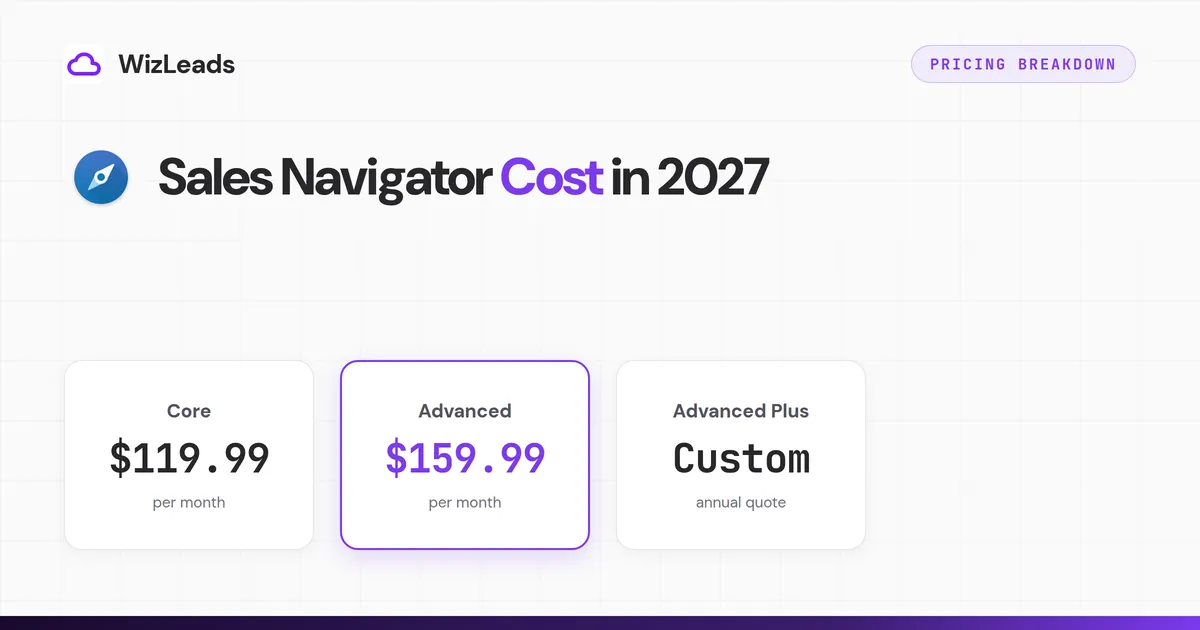
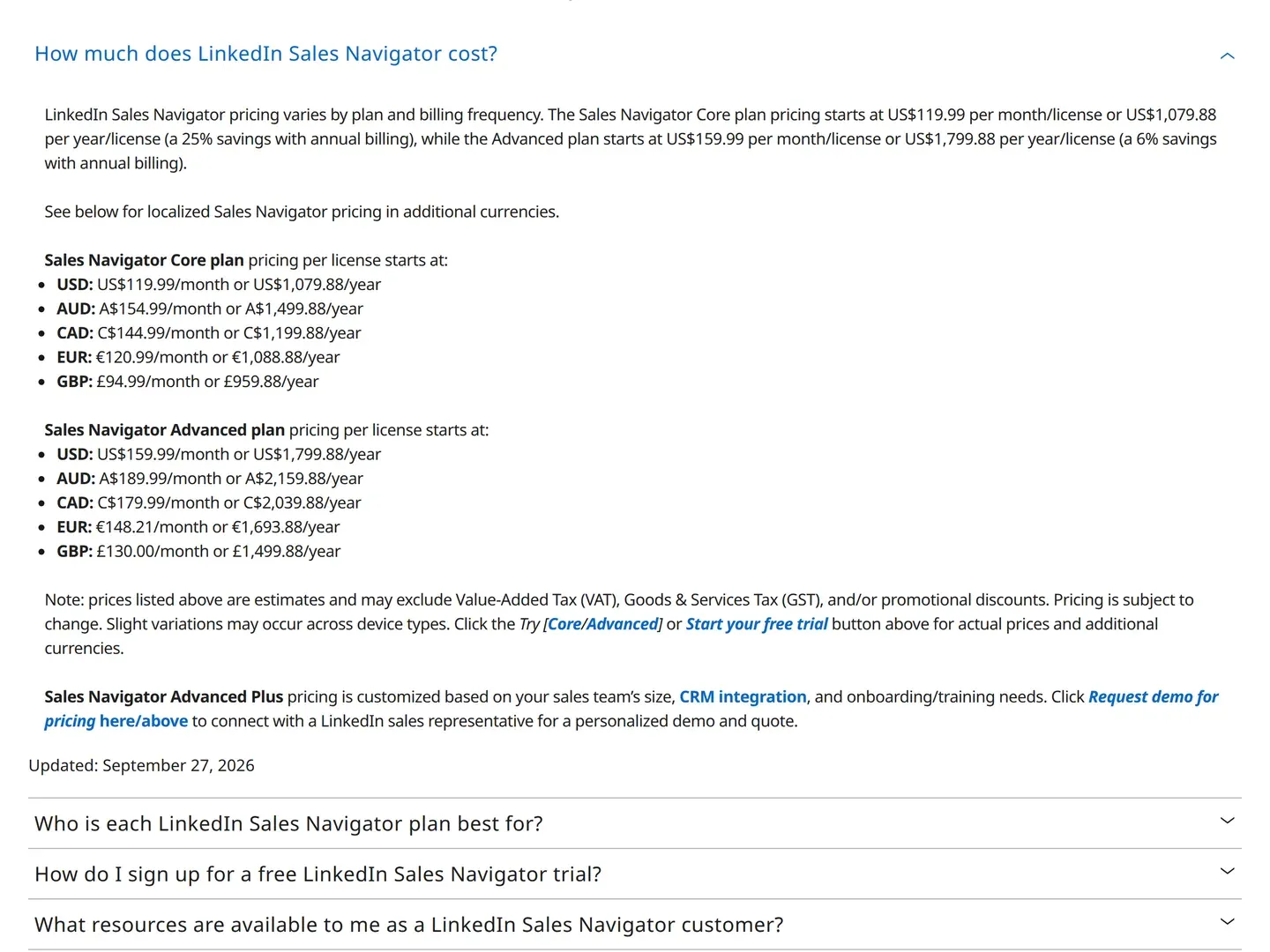
On LinkedIn's compare-plans page, as of November 2026, Core is US$119.99 monthly or US$1,079.88 for a year ($89.99 a month). Advanced is US$159.99 monthly or US$1,799.88 for a year ($149.99 a month), and Advanced Plus is quote only. Pick Core on annual billing if you work alone, Advanced if a team needs shared billing and TeamLink, and Advanced Plus only when CRM sync has a cost you can name.
If another guide told you Core costs $99.99, it is quoting a price from before mid-June 2025. So how much is LinkedIn Sales Navigator once you use it? The seat is the smaller part of the bill, because LinkedIn says there is no CSV export and a lead's contact details appear only where someone added them.
We build a Sales Navigator scraper, so we read the seat price against the cost of getting leads out of it.
Sales Navigator pricing: every plan
Core is the cheapest plan at US$119.99 a month. Advanced Plus is the only one with no published price.
| Plan | Monthly billing | Annual billing | Effective monthly on annual | Annual saving |
|---|---|---|---|---|
| Core | $119.99 | $1,079.88 | $89.99 | $360.00 (25%) |
| Advanced | $159.99 | $1,799.88 | $149.99 | $120.00 (6%) |
| Advanced Plus | quote only | quote only | quote only | n/a |
All figures are per license, in US dollars, from LinkedIn's compare-plans page. LinkedIn calls them estimates and says tax and promotions may not be included. The page is one static list in five currencies, with no billing or currency toggle. It sends you to Try for "actual prices", a signed-in checkout we did not follow, so everything here is list price.
LinkedIn's price FAQ, below, is the only block on its page that prints the Sales Navigator Core price. The plan grid shows buttons and no numbers.
Sales Navigator price per month vs per year
The Sales Navigator price per month depends on how you pay: annual billing saves $360.00 a year on Core and $120.00 on Advanced. Twelve monthly payments cost $1,439.88 for Core and $1,919.88 for Advanced.
LinkedIn quotes one saving per plan, in dollars: 25% on Core and 6% on Advanced. It lists four other currencies without recalculating. We divided each annual price by twelve times its monthly price.
| Currency | Core monthly | Core annual | Core real saving | Advanced monthly | Advanced annual | Advanced real saving |
|---|---|---|---|---|---|---|
| USD | $119.99 | $1,079.88 | 25.00% | $159.99 | $1,799.88 | 6.25% |
| EUR | €120.99 | €1,088.88 | 25.00% | €148.21 | €1,693.88 | 4.76% |
| CAD | C$144.99 | C$1,199.88 | 31.04% | C$179.99 | C$2,039.88 | 5.56% |
| AUD | A$154.99 | A$1,499.88 | 19.36% | A$189.99 | A$2,159.88 | 5.26% |
| GBP | £94.99 | £959.88 | 15.79% | £130.00 | £1,499.88 | 3.85% |
A UK buyer on Core gives up monthly cancellation for a 15.79% discount, and a Canadian buyer gets 31.04% for the same commitment. On Advanced the saving runs from 6.25% in USD down to 3.85% in GBP, close to no discount for a year of lock-in. Core and Advanced sit $40 a month apart on monthly billing but $720 a year apart on annual billing.
Why other pages show different Sales Navigator prices
LinkedIn Sales Navigator pricing changed twice in 2025, and many guides never caught up; Reddit threads still call Core a $100-a-month seat. Archived captures of its compare-plans page show how the list prices moved.
| LinkedIn page capture | Core monthly | Core annual | Advanced monthly | Advanced annual |
|---|---|---|---|---|
| 16 Jan 2025 | $99.99 | $959.88 | $179.99 | $1,679.88 |
| 13 Jun 2025 | $119.99 | $1,079.88 | $179.99 | $1,679.88 |
| 9 Dec 2025 | $119.99 | $1,079.88 | $159.99 | $1,799.88 |
| Live page now | $119.99 | $1,079.88 | $159.99 | $1,799.88 |
The first row is the Wayback Machine's 16 January 2025 capture of that page, and the others are its captures of 13 June and 9 December 2025. Core's annual saving rose from 20.00% to 25.00%. Advanced got $20 cheaper a month and $120 dearer a year, so its annual saving fell from 22.22% to 6.25%. Both savings are our arithmetic.
A guide that prints Advanced at $179.99 a month is quoting the page as it stood before 9 December 2025, when the Wayback Machine's capture of LinkedIn's page already shows $159.99.
What each plan includes
All three plans share the 50+ advanced search filters, Relationship Explorer, Relationship Map, alerts and 50 InMail credits a month. LinkedIn's InMail help page says unused credits accumulate to 150 and you cannot buy more. The plans differ in team and CRM tools.
Core now also includes Account IQ and Lead IQ, LinkedIn's AI account and lead summaries, and Message Assist, its AI drafting tool. The grid ticks all three on every plan, and LinkedIn's help pages for Account IQ and Lead IQ say they come with all Sales Navigator subscriptions.
LinkedIn's Sales Navigator product page contradicts itself here. Its feature blocks still say these features are "Available only on Advanced and Advanced Plus plans in select languages" and call Message Assist a "public beta". The same page also says all three are "now available across Core, Advanced, and Advanced Plus plans". We follow the plan grid and the help centre, and if one of these features decides your plan, test it on the trial.
Advanced adds mostly team machinery: Buyer Intent, TeamLink, Smart Links, team reporting, centralised seat management and billing, and CSV upload of your book of business. One search filter, Viewed your Company Page recently, is Advanced and above only, per LinkedIn's filter guide. That costs $40 more a month, or $720 more a year on annual billing.
Advanced Plus adds the CRM layer: Advanced CRM Integrations for Salesforce, HubSpot, Microsoft Dynamics and Oracle, lead and contact creation in the CRM, CRM-embedded profiles, custom ROI reporting, and Sales Navigator for Microsoft Teams. CRM sync is the main reason to ask for a quote.
Sales Navigator team pricing
Two seats of Advanced cost $3,599.76 a year on annual billing, or $3,839.76 on twelve monthly payments. LinkedIn publishes no volume discount, so the table is list price times seats, per year: our arithmetic from LinkedIn's per-license prices in US dollars.
| Seats | Core, annual billing | Core, monthly billing | Advanced, annual billing | Advanced, monthly billing |
|---|---|---|---|---|
| 2 | $2,159.76 | $2,879.76 | $3,599.76 | $3,839.76 |
| 5 | $5,399.40 | $7,199.40 | $8,999.40 | $9,599.40 |
| 10 | $10,798.80 | $14,398.80 | $17,998.80 | $19,198.80 |
| 25 | $26,997.00 | $35,997.00 | $44,997.00 | $47,997.00 |
LinkedIn's product page says "The Advanced and Advanced Plus plans accommodate sales teams of 2+ and 10+, respectively." The 2+ half clashes with the compare-plans FAQ, which lets you buy up to five Advanced licenses online from your desktop, or a single license through the mobile app. So the 10 and 25 seat Advanced rows go through a sales conversation, and Advanced Plus, quote only, has no row.
LinkedIn's help centre calls Core "Solo prospecting (single seat)", so the Core rows are our multiplication and LinkedIn describes no team purchase of Core. If you are choosing between the two plans, Core vs Advanced sets out the feature differences.
Sales Navigator Advanced Plus pricing
LinkedIn Sales Navigator Advanced Plus pricing is not published: LinkedIn quotes it after a demo request. It says the price "is customized based on your sales team's size, CRM integration, and onboarding/training needs". There is no self-serve path.
Third parties fill the gap. When we searched, Google's AI Overview for this search repeated a per-seat yearly figure that LinkedIn's page does not contain. That figure was lower than the US$1,799.88 LinkedIn lists for Advanced, a lower plan. We print no Advanced Plus number, and you should not budget against one until you have a quote.
What LinkedIn discounts when you ask
The published tiers are negotiable. A corporate quote we were given had this structure:
- Thirteen months for the price of twelve, so one month comes free.
- A discount that is largest on the shortest term: 15% off a 12-month commitment, 5% at 24 months and 7.5% at 36. The 12-month deal had the best per-month rate.
- A price break at 10 or more seats, separate from any term discount, around 6% below the 5-to-9-seat rate.
That quote was LinkedIn's India corporate rate card, so the figures do not convert to US list prices and we are not printing them. The structure travels: ask for the bonus month, the seat-tier break and a 12-month term.
The Sales Navigator free trial
Sales Navigator is not free: it is a paid product with a free trial. LinkedIn offers 30 days free on Core or Advanced, and Advanced Plus has a demo request instead. The trial is open only to members on no paid LinkedIn subscription, Premium included, and LinkedIn's compare-plans page sets a 365-day look-back for earlier trials. In practice, an account that has used a trial cannot take another, so read the free trial guide before you start one.
You need a card, and LinkedIn sends a warning email a week before the trial expires. Its trial help page says trial duration "may vary based on region or promotional terms", and its billing help page puts the first charge one month after you started. Ending the trial early removes your access at once, so cancel on the last useful day.
The other free route is a referral: a subscriber can refer up to 15 connections to two free months on Core, once per member account.
Cancelling, refunds and the price you lose
Cancelling stops renewal at the end of the paid period. The compare-plans FAQ says annual plans end "at the end of the paid year", so cancelling in month two still costs the full year.
LinkedIn's refund policy gives a 7-day window after the charge, only "without Premium usage", and warns that a previous refund may affect your eligibility. LinkedIn does not define "usage", so assume any use counts. If you are using the service for yourself, not on behalf of a business, three more rules apply:
- EU citizens get a full refund within 14 days of the subscription beginning, and a free trial counts from its first day.
- Brazil gets a full refund within 7 days of the charge.
- Denmark and the Netherlands get one month's notice with the remainder refunded. Germany gets the same, excluding the first year of an annual plan.
If you paid by SEPA direct debit, the page adds that you claim a refund from your bank within eight weeks of the debit. Anything bought through iOS is refunded by Apple, not LinkedIn.
Two more costs sit in LinkedIn's cancellation page. Saved leads, saved accounts and messages are removed as soon as you cancel, and LinkedIn says you cannot save them first. The old rate goes too: "If prices have changed since you last subscribed, your current pricing will be lost when you cancel your existing Sales Navigator account."
The costs that are not on the pricing page
For an outbound team the seat is only the first line of the budget. Four constraints drive the cost per usable lead.
Search results are capped at 2,500 per people search. LinkedIn's help centre states that cap and puts free search at 250 results per search, so the paid cap is ten times that. A 40,000-result territory needs at least 16 searches. We cover the mechanics in how Sales Navigator caps people searches.
There is no export. LinkedIn's help centre says outright that Sales Navigator cannot send lead or account data to a CSV or XLS file. The CSV line on the grid is CSV upload, which brings your own list in. Getting leads into a sequencer or CRM means manual copying or third-party tooling.
Contact details appear only where someone added them. LinkedIn's lead page help says the top card shows contact details only "if the member has added it", which can also be you, a teammate or a CRM sync. The page describes no tool that finds a work email or a phone number. Sales Navigator tells you who to contact and gives you 50 InMails a month, so email needs a separate layer. Across seven email finders given one 1,000-lead list, verified-valid output ranged from 259 to 670 emails, a 2.6x spread on identical input, in the enrichment benchmark on this blog.
Seats multiply. Every seat is billed at list price, as the team pricing table above shows, but the quote above had a break at 10 or more seats, so ask.
What one seat plus an extraction layer costs
One Core seat on annual billing plus an extraction layer costs $188.99 a month for 10,000 extracted leads and about 6,000 work emails. The seat is $89.99 of that and gives one person the search interface. Everyone else uses the output and needs no login.
WizLeads scrapes the results of a Sales Navigator search you build, so you or a colleague still needs a seat to create the search URL. In account-less mode the scrape runs without connecting your LinkedIn account, and it covers search URLs only: saved lists need your own account connected. Connected mode runs on your account, and LinkedIn's help page on automation says members who run such software "risk having their accounts restricted or shut down". Scrapers that run in your browser use your own account too, so the same rule applies to them.
On the Agency plan and above, Smart Link Splitting checks the lead count and splits a search above 2,500 results into chunks of 2,000 or less, so you never lose results. Credits are 2 per lead scraped account-less and 3 per email found, with nothing charged for a miss.
At list prices, with a 60% find rate:
- 10,000 Sales Navigator leads scraped account-less: 20,000 credits
- About 6,000 work emails found: 18,000 credits
- Total 38,000 credits, inside the 40,000 on the Agency plan at $99 a month
WizLeads holds 3 credits per row while emails are found and releases them for misses when the task completes. A 10,000-lead account-less run needs 50,000 credits on hand against a final bill of 38,000, so on Agency you run it in batches.
Add the Core seat at $89.99 and the stack is $188.99 a month, or $0.0315 per email at the 60% find rate.
Is Sales Navigator worth the cost?
Is Sales Navigator worth it on LinkedIn? Yes for one seller who searches every week and has a separate way to extract leads and find emails: buy Core on annual billing. Advanced earns its higher price only when TeamLink maps onto your target accounts, and for the other plans the answer depends on your team.
LinkedIn's own answer is a Forrester Total Economic Impact study it commissioned in 2023. It found 312% ROI over three years and payback in under six months for a modelled company with US$250M in annual revenue, published on LinkedIn's "Is Sales Navigator worth it" page. The same page says "Participants in the Forrester study were Advanced Plus plan users", and it credits the 65 hours a year per user to the CRM integration, which Core and Advanced do not include. It is a data point for enterprise buyers and tells a solo operator little.
Cost per InMail shows what the extra money buys. Every plan gets 600 credits a year, so annual Core works out to $1.80 per InMail credit and Advanced to $3.00.
If you are a solo founder or individual seller, buy Core on annual billing, and only if you search weekly. Spread over 5,000 leads a month, $1,079.88 a year comes to about 1.8 cents of seat cost per lead ($1,079.88 / 60,000).
If you run cold email or a lead gen agency, buy one Core seat plus an extraction and enrichment layer. Advanced adds $720 a year of team features a one-person outbound function may not use, and the InMail allowance is the same.
If your team sells on warm paths, Advanced earns the upgrade when TeamLink maps onto your target accounts, meaning colleagues already know the executives you sell to. Test that on the trial. Ask for Advanced Plus only when stale CRM data has a cost you can name per quarter, because that is what procurement will ask for.
LinkedIn Premium is a separate subscription with its own price, and Premium Business does not carry the 50+ lead and account search filters LinkedIn advertises for Sales Navigator. If a cheaper tier might cover your searches, price Premium first. We show where Premium Business runs out for prospecting work.