WizLeads


TL;DR
- Waterfall enrichment runs each row of a list through data providers in order. Each provider sees only the rows the one before it missed.
- The bill depends on what each step charges for a miss, an unverified return and a validation check. Vendors' own pages disagree on several of these.
- In a chain we model with assumed prices and hit rates, three steps fill 730 of 1,000 rows for $21.60, and the last 30 emails take 17% of that spend.
- A chain pays when later steps bill per email found and a test on a sample of your own list shows the second step fills enough misses.
Waterfall enrichment sends each row through several data providers in a set order. A provider sees only the rows the one before it missed, and the run usually ends when one returns a result or the lineup runs out. The cost depends on each provider's meter. Apollo's API pricing page puts an email waterfall at 1 to 4 credits per contact, and some setups at 20 or more.
Most pages that rank for this term come from vendors that sell a waterfall. The ones we read quote their own plan prices, if they quote any, and none puts a dollar cost on each step of a chain. This guide covers the order, the stop rule and the billing events. Then it prices a chain from published rules and labelled assumptions.
Where a vendor's pages disagree with each other, we name both sides. Every hit rate in the cost model is an assumption, not a measurement, so test a sample of your own list before you buy anything.
What is waterfall enrichment?
Waterfall enrichment means a chain of data providers that fills a missing field, such as a work email, a personal email or a mobile number. Step 1 gets every row. The rows it cannot fill pass to step 2, then to step 3. Clay describes its version as a way to "search sequentially across multiple tools until you find a valid match".
Clay's waterfall page lists separate blocks for work emails, personal emails and mobile numbers. Apollo and FullEnrich also price emails and phone numbers apart. The name has nothing to do with the waterfall model in software development.
What does a waterfall need, and when does it stop?
The company domain does most of the work. Clay's Infer Email step lists it as required (Clay's Work Email waterfall doc), and FullEnrich's waterfall page asks for a name and a company domain. Clean the domain column first, because a wrong domain fails at every step.
Some finders need only two inputs. WizLeads is an email finder that takes a first name and a company website. It runs its own algorithm, so it is one provider you can place at any step of a chain.
Order matters because step 1 sees every row. When each step bills per email found, a row that step 1 fills never reaches step 2. Step 1 therefore decides how many rows, and how much spend, reach the later steps. Clay lists Infer Email as a free first step. It builds first.last@domain.com from the name and domain, and if the guess passes validation, the waterfall stops with no paid provider called. Clay says that default pattern returned a valid email about 31% of the time on one software-industry dataset. That is Clay's claim about one dataset, not a rate for your list.
The stop rule decides how many steps a row can reach. Clay's doc says its waterfall stops as soon as one provider returns a valid result. Apollo's pages give two answers. Its overview says the run "does not stop at the first result returned" (Apollo's overview), while its setup guide lets an admin end enrichment on a verified result or on any result. Because the pages do not agree, read the setting your admin chose before you read the bill.
Repeat runs have their own rule. Apollo skips a third-party source that already returned usable data for the same contact and data type in the last 30 days. Each vendor has its own window, and a failed attempt does not reset it. Clay's beta doc on reusing saved enrichment data is opt-in. A reused value uses no Data Credits and still uses one Action.
What does each step bill you for?
Each provider bills on its own meter. The meters differ on three events, a miss, an unverified return and a validation check, and on one setting, whose API key runs the step.
A miss. Most finders here charge nothing for one. Clay says an enrichment that returns no result costs no Data Credits or Actions (Clay's pricing page). FullEnrich's pricing page says "If we can't find the data, you don't pay."
PhantomBuster is the per-attempt meter. Its plan article says one email credit is one lookup, "even if no match is found" (PhantomBuster's plan article). The same article calls a good match rate about 60% in its body and gives 30 to 50% in its FAQ.
Apollo disagrees with itself on misses. Its overview says you are not charged when a source finds nothing. Its API docs say some sources may consume credits for a lookup even when they find no email or phone number. Apollo does not say which sources are which, so compare the credit estimate it shows before a run with what a small test run spent.
An unverified return. This is an address a provider hands back that no check has confirmed. Apollo charges for it: its overview says credits are used whenever a source returns an email or phone number, verified or not. Its setup guide's credit callout says waterfall enrichment uses credits only for successful enrichments, while other sections of the same guide say sources that return unverified data still charge credits, so in Apollo's usage a successful enrichment means data returned, not data verified.
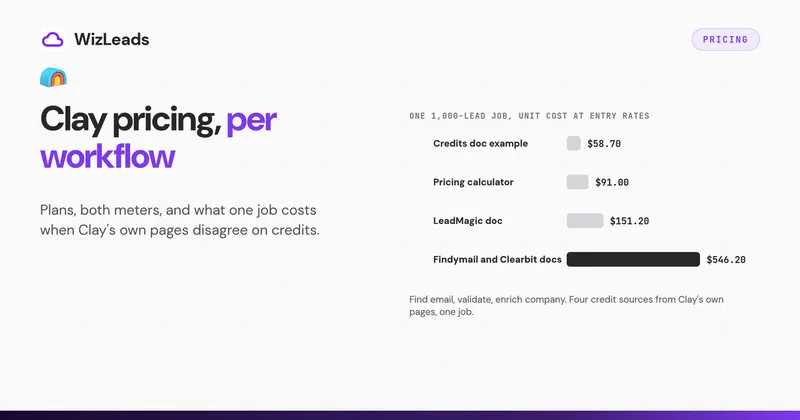
Clay's pages disagree here too. Its Work Email doc says you pay credits only for the provider that finds a match. Its FAQ on unsuccessful searches says each step that returns data uses Data Credits and an Action, and each validation step does too. Under the FAQ, a provider that returns an address the validator then rejects still bills.
Some finders bill only for verified output. FullEnrich spends credits only on data it found and verified. WizLeads' Find Work Email returns only emails its docs call "valid and catch-all verified", and it charges only when it finds one.
A validation check. Apollo's validator charges each time it checks a returned address, not once per run. A contact that cycles through several providers can bill several checks. Clay's pages differ again: its Actions and credits doc calls select validators free, and its FAQ says each validation step uses Data Credits and an Action. WizLeads' Verify Email is a separate endpoint that costs 0.5 credits per email processed, whatever the result.
Your own key. Bringing your own API key moves the meter. In Clay you skip Data Credits and use Actions only. In Apollo, external sources set their own credit charges and do not consume Apollo credits, and Apollo's waterfall reports count Apollo credits only. Check the provider's invoice as well as the report.
| Platform | A miss | An unverified return | A validation check |
|---|---|---|---|
| Clay | No charge | Pages disagree: the Work Email doc bills the winner, the FAQ bills every step that returns data | Pages disagree: free on some pages, Data Credits plus an Action in the FAQ |
| Apollo | Pages disagree: no charge in the overview, some sources charge per its API docs | Charged | Charged each time the validator runs |
| FullEnrich | No charge | Credits only on found and verified data | No separate check line |
What does a chain cost?
For each step, the cost is the rows that reach it, times its hit rate, times its price per email found. A step that bills every attempt costs the rows that reach it times its price per attempt, however few it finds.
Take 1,000 rows and three steps. The prices and hit rates below are assumptions for illustration, not vendor figures.
| Step | Assumed price per email found | Assumed hit rate on rows it sees | Rows it sees | Emails found | Cost |
|---|---|---|---|---|---|
| A | $0.02 | 60% | 1,000 | 600 | $12.00 |
| B | $0.06 | 25% | 400 | 100 | $6.00 |
| C | $0.12 | 10% | 300 | 30 | $3.60 |
| Total | 730 | $21.60 |
The chain returns 730 emails at an average of $0.0296 each and leaves 270 rows empty. Step A finds 600 emails for $12.00. Step C finds the last 30 and takes $3.60, which is 17% of the spend for 4% of the emails. The last 30 cost $0.12 each against $0.02 for the first 600. If step B billed every attempt at $0.06, it would try all 400 rows and cost $24.00 for the same 100 finds, or $0.24 per email found.
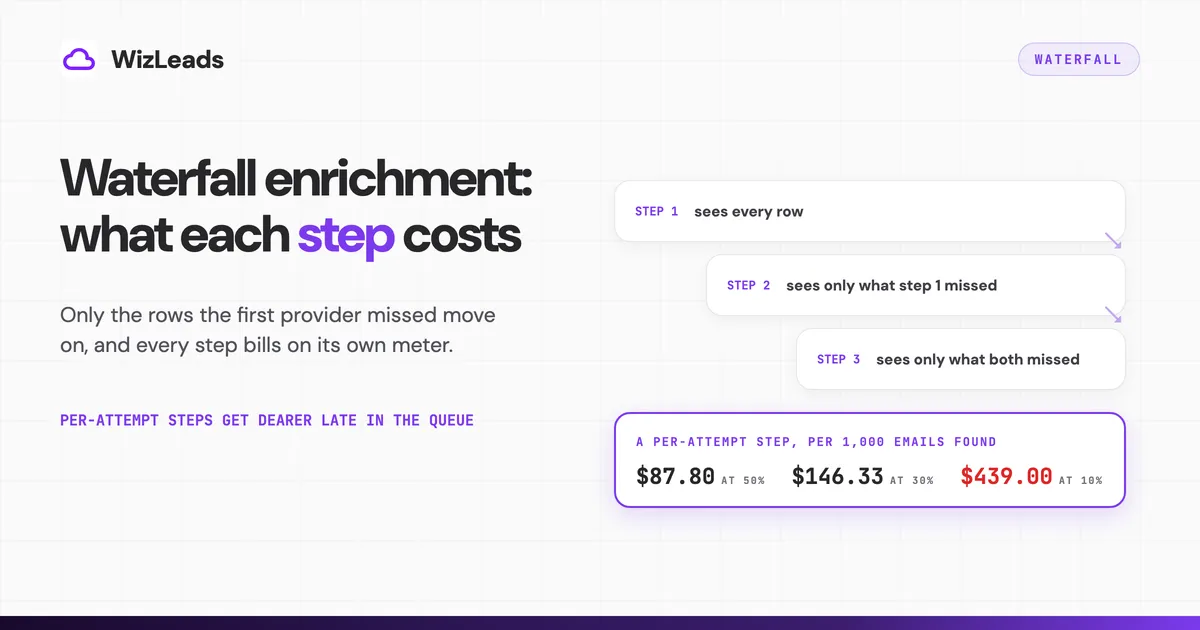
Per-attempt steps get dearer late in the chain. PhantomBuster's pricing page lists its Scale plan at $439 a month on monthly billing for 10,000 email credits, which is $43.90 per 1,000 attempts. At the 30 to 50% match rate its FAQ gives, that is $87.80 to $146.33 per 1,000 emails found. At an assumed 10%, a rate a late step might see, it is $439.00. These are unit costs, not bills.
A plan minimum changes the math for a backfill step. FullEnrich's pricing page lists an entry plan at $29 a month for 500 credits on monthly billing, and a work email costs 1 credit when found and verified. Spread over the whole plan, that is $58.00 per 1,000 emails. Now assume step 1 fills 600 of your 1,000 rows and you buy the plan to fill the other 400. If it finds 20% of them, or 80 emails, the $29 bill works out to $0.3625 per email. That is 6.25 times the $0.058 pro-rata price. At 10% it is $0.7250. The 600 and the percentages are assumptions.
Apollo's cost depends on its sources. The API pricing page says an email waterfall typically uses 1 to 4 credits per contact, and some vendor setups use 20 or more. Apollo's pricing page lists Basic at $65 per seat a month for 2,500 credits on monthly billing, so a credit is $0.026. That makes 1 to 4 credits $26 to $104 per 1,000 contacts, and 20 credits $520. It is a pro-rata unit cost, and it assumes waterfall credits cost what plan credits cost.
Should you verify between steps or once at the end?
The stop rule decides. Under stop-on-any-result, an invalid address from step 1 ends the row, and a later provider that might have found a good one is never asked. A check after each step catches that, at the price of a check on every returned address. A single check at the end costs one check per final address and leaves those rows wrong.
Under stop-on-verified, the run keeps going until a check passes, and Apollo says its connected providers charge for each unverified result returned before that.
Clay adds a validation column after each provider step once you set a validation provider. Its "Threshold for duplicate results" setting is off by default (0); set it to 2 or more and it stops the waterfall early when the same invalid email keeps failing validation.
Finders that bill only verified output need at most one final pass. If you want to re-check an old list, WizLeads' Verify Email is the separate endpoint at 0.5 credits per email.
Set one catch-all policy for the whole chain. Apollo's bulk enrichment has an "Include catch-all emails" checkbox, and Clay's Balanced validation strategy includes catch-alls. If step 1 returns catch-alls and step 2's validator rejects them, one list carries two standards.
When does a waterfall pay?
It pays when your own sample says so. Run a sample of your list through step 1 alone. Then send only the misses to step 2, and count how many come back verified and at what price per email. Coverage figures that vendors publish carry no stated method on the pages we read, so they cannot predict your list.
A waterfall tends to pay when:
- every later step bills per email found, so the tail costs only what it fills;
- the backfill uses a plan you already pay for, or the step is pay as you go;
- you record which provider found each address. Clay's "Output name of successful provider?" option adds that column.
It tends not to pay when:
- step 1 already fills most of the segment, so a few leftover rows carry a whole plan;
- a per-attempt provider sits late in the chain;
- the list is small, so a plan minimum costs more than the emails it finds.
The cheapest lever sits upstream. One reply in an r/gtmengineering thread on Clay's costs describes narrowing the list with cheap signals and firmographics first, then running the waterfall only on leads that pass (the thread).
Add a second step only when your sample shows it fills enough misses at a price per email you accept. Otherwise stay with one provider.
How do you build a waterfall?
How do you build a Clay waterfall?
In Clay, add an enrichment and search for "Work Email" to get a pre-built waterfall. Clay waterfall enrichment lets you reorder, add or delete providers, switch a step off with its toggle, and save the setup as a template. Set a validation provider if you want a check after each step.
Clay's pricing page lists multi-provider waterfalls on the Free plan. HTTP API integrations, which you need to call a provider Clay does not list, start on Growth. Plan prices and credit rules are in Clay's pricing breakdown.
How do you set up Apollo waterfall enrichment?
An admin sets the lineup and the stop rule. To turn the waterfall off for everyone, an admin takes the third-party sources out of the lineup, which leaves Apollo's own data as the only source. To skip it for one job, switch off the Find data via Waterfall toggle when you save contacts, import a CSV or build an enrichment workflow.
Through the API, call people enrichment or bulk people enrichment with run_waterfall_email=true and a webhook URL. Apollo answers at once with the person data and posts the final result to the webhook later. A bulk call takes up to 10 people.
How do you build one in your own code?
A self-built chain is one HTTP request per provider, a branch that passes a row on only when the step returned nothing, and a source column naming which provider filled each row. Throttle each step to that provider's rate limit.
Custom chains fail quietly. In a Reddit thread on replacing Clay with a self-built Claude Code setup, one commenter warned that custom code can run to completion while quietly hitting rate limits and returning empty fields. Another said the whole system lived entirely in their head (the thread).
Where does WizLeads fit in a chain?
WizLeads' Find Work Email is one provider you can call at any step. It takes a first name or full name plus a company website. It charges 3 credits per email found and nothing for a miss, and it serves a repeat lookup of the same input within 72 hours from cache at no charge. A task that enriches a list holds 3 credits per row at launch and does not charge for rows where no email is found, so your balance must cover the hold.
In Clay, call it from an HTTP API column you set up yourself; Clay's pricing page puts HTTP API integrations on Growth and above. WizLeads' API doc says to set Request Limit to 10 and Duration to 1000 ms there. The API allows 10 calls per second across endpoints and returns a 429 above that. New accounts get 500 credits once, about 166 emails found, enough to test a sample.
Which other products sell a waterfall?
FullEnrich, BetterContact, ZoomInfo's GTM Studio and Instantly's Lead Finder each sell the cascade as a product. Read each one's billing page against the three events above. If you would rather leave Clay's table behind, Clay alternatives lists the tools and the ways to build the chain yourself. The data enrichment tools list prices 13 tools and ran seven email finders on the same 1,000 leads.