WizLeads


Two different people type "reverse email lookup free" into Google. One got an email from a stranger and wants to know whether the sender is real. The other is holding a list of 4,000 addresses and needs to know how many belong to actual people at actual companies before pressing send.
Most of the pages ranking for that query are free-tool landing pages, and most are vague about the same thing: where the free tier stops. This one is specific about it. Every figure below was read off the vendor's own site on 8 September 2026, and where a vendor publishes no figure at all, that is stated too.
Reverse email search, email address lookup and reverse email lookup all name the same job, and the tools use the three terms interchangeably. The question underneath all of them is who owns this email address, and the useful answer depends on which of three data layers the answer lives in.
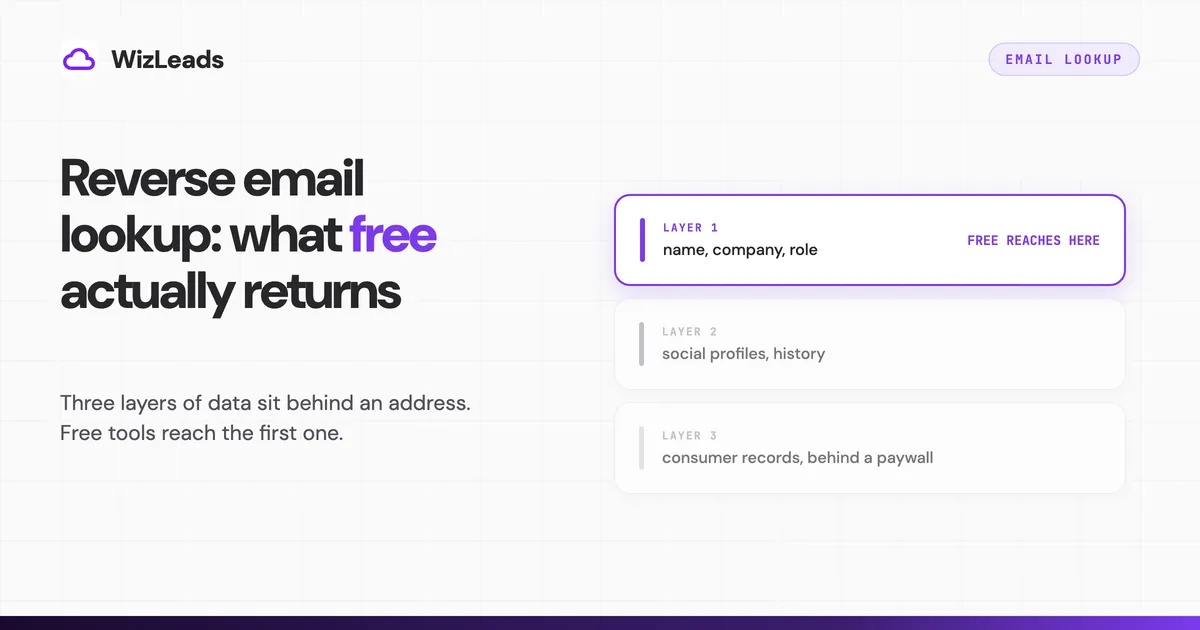
Three layers of data sit behind an email address, and free reaches one
Everything a reverse lookup can tell you comes from one of three places, and they have very different economics.
The first layer is public. DNS records say whether the domain accepts mail at all. The domain's own website says which company owns it. The Gravatar profile API returns a display name, photo and linked accounts when the person published one. The local part of the address, everything before the @, usually encodes the name outright. None of this costs anything to query, which is why the free tools all check the same four things and arrive at similar answers.
The second layer is a contact database. A verified job title, a confirmed LinkedIn URL, a direct-dial mobile number: these were assembled and maintained by someone, and they are the product being sold. No free tier hands them over at volume, and a page promising them for nothing is either capped hard or gating a paid report.
The third layer is public records aggregation, which is the consumer people-search business. Property records, relatives, age, prior addresses, court filings. It exists, it is priced by subscription, and US federal law restricts what you can decide on the basis of it.
Almost every disappointment with a free reverse lookup traces back to expecting layer two or three from a layer one tool.
The free B2B tools, and where each one stops
Each tool below gets the same three questions in the same order: what it returns without payment, where that stops, and what the first paid tier costs.
Cleanlist allows 25 lookups per IP per day with no signup and no email capture, running four public checks at once and labelling the parsed name as a pattern read from the address rather than a confirmed identity. It stops at public sources, so nothing it hands back has been checked against a contact database. A free account adds 30 credits a month, and paid plans start at $79 a month (cleanlist.ai/pricing).
Mailmeteor returns a name, job title and company for professional addresses, with no account and no card. It stops at personal addresses and says so, warning that Gmail, Yahoo and Outlook may return limited information. There is no paid tier for the lookup and no bulk path, because the tool exists to sell a Gmail mail merge product.
Overloop states that every check runs inside your browser and that the address is never sent to or stored by Overloop, with only public DNS and Gravatar seeing a derived query. It returns syntax, MX, SPF and any Gravatar hit. It stops well short of a name, which its own guide concedes by calling the result triage rather than identification. Paid enrichment starts at $69 per user per month with 250 credits (overloop.com/pricing), a tier that same guide describes as carrying 500.
Tomba gives three lookups on the page with no account. Its monthly free allowance is harder to pin down from Tomba's own copy: the reverse-lookup page carries a "75 free searches per month" signup prompt and a "25 free searches every month" feature line on the same screen, and the pricing page says 25. Paid volume runs $8.90 per 1,000 credits, so $89 a month buys 10,000 credits split between finder and verification (tomba.io/pricing).
ContactOut describes its free plan in several ways across its pages, one of them 5 emails, 5 phones and 5 exports a day, for one user per company. The Email plan is $49 a month with US and UK data included, and adding phone data takes it to $99; no annual price is shown to a logged-out visitor. Check the data-scope switch before comparing: some renders open on a cheaper view that excludes US, UK and Canadian data, and every figure sits beside a struck-through price about double it (contactout.com/pricing).
Hunter is a forward-direction tool that people press into reverse service, and its free plan is 50 credits a month, against the 25 that several pages ranking for this keyword were still quoting in September 2026. What stops on that tier is the surrounding product: basic database filters, one connected email account, no auto-verification. Starter is $49 a month for 2,000 credits (hunter.io/pricing).
Epieos is an OSINT option, and its free member plan reaches the Google, Email Checker and Skype modules. It stops with a heavy watermark across the result, which Epieos lists as a drawback of that tier on its own pricing page. Full module access, LinkedIn included, is €29.99 a month with 30 full-access requests per month (epieos.com/pricing).
Two sources are worth querying directly rather than through anyone's wrapper. The Gravatar Profiles API is free, allows 100 unauthenticated requests per hour, and returns at most four verified accounts per profile without a key (Gravatar REST API docs). Have I Been Pwned checks any address free and on 8 September 2026 indexed 1,034 breached sites and 17.8 billion addresses, though it answers a different question: exposure, not identity.
The consumer tier, the paywall pattern, and the FCRA line
PeopleSmart was the only people-search site in the organic top five for this query on 8 September 2026, and that category operates on a different model from everything above. The search is free, the result is a subscription.
Spokeo's reverse email lookup page publishes no price anywhere in the page source. It mentions that a background-check upgrade carries additional fees without naming one (spokeo.com/email-search). The figure appears after you run a search.
BeenVerified does publish. A 7-day trial is capped at 100 reports, after which billing is $36.89 a month with the same 100 report ceiling, or $71.94 every three months, which works out to $23.98 a month (beenverified.com/pricing). PeopleSmart runs the same shape at $1 for a 7-day trial, then $69 a month for 150 contacts or $99 a month for 300 (peoplesmart.com/pricing). Predicta Search gives unlimited searches on its free tier and 3 detailed reports a month, with paid tiers from €7.99 a month billed annually at €95.90 a year (predictasearch.com/pricing).
The free search in each case is the advertisement for the subscription, and what the subscription buys is a report ceiling rather than open access.
BeenVerified, PeopleSmart and Social Catfish each carry a near-identical disclaimer stating they are not consumer reporting agencies under the Fair Credit Reporting Act. BeenVerified's reads: "You may not use our site or service or the information provided to make decisions about employment, admission, consumer credit, insurance, tenant screening or any other purpose that would require FCRA compliance."
Those disclaimers restrict what you may decide with the data rather than whether you may hold it, and the FTC's guidance on using consumer reports for employment decisions sets out the process that applies when a report is used that way. If you are screening a candidate or a tenant, a people-search subscription is the wrong instrument regardless of what it returns. None of this is legal advice, and the position differs by state and by use.
On the privacy side, an address you look up is personal data in the EU and the UK, and enriching it triggers obligations even though you never contacted the person. In California, businesses that sell or share personal information have to carry a "Do Not Sell or Share My Personal Information" link, and the state Attorney General sets out what that link must let a person do. BeenVerified, PeopleSmart and Social Catfish each carry one. The lookup being easy has never been the same as the lookup being unregulated.
For a B2B list, "who is this" is the second question
The two searchers part company here. If a stranger emailed you, identity is the whole job. If you are working a list, identity is the cheaper half of a problem whose expensive half is deliverability.
Four things about a business address change what you do with it, and only one of them is identity:
- Will it bounce? A dead mailbox costs sender reputation on the send, not on the lookup.
- Is it a role account? info@, sales@ and support@ are real, deliverable, and usually worthless to sequence.
- Is it a catch-all? The domain answers 250 OK for every recipient, so an SMTP check confirms an address that may not exist.
- Is it stale? B2B contact data decays as people change jobs, and a name that was correct last year can point at an inbox nobody reads.
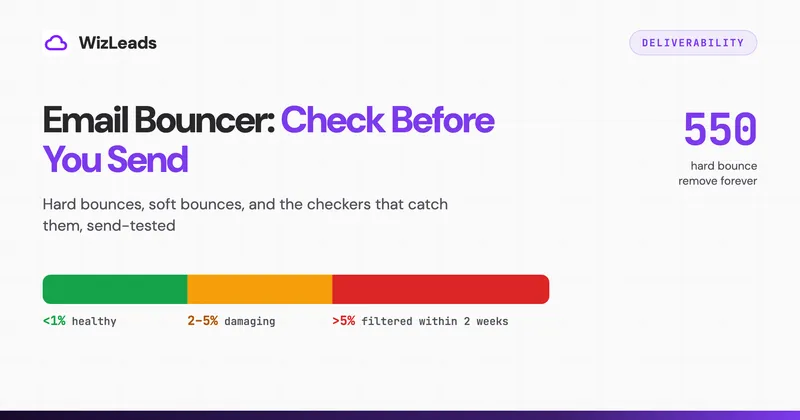
Catch-alls are the one that breaks free tools. Every browser lookup that reports "the domain accepts mail" is reporting exactly nothing on a catch-all domain, because a catch-all accepts mail for addresses that were never created. In our 1,000-email verification test on B2B decision-maker addresses, 212 of them sat on catch-all domains, which is roughly one address in five where a plain MX or SMTP result carries no information. Resolving those to valid or invalid is a separate capability, covered in more depth in our guide to catch-all email verification.
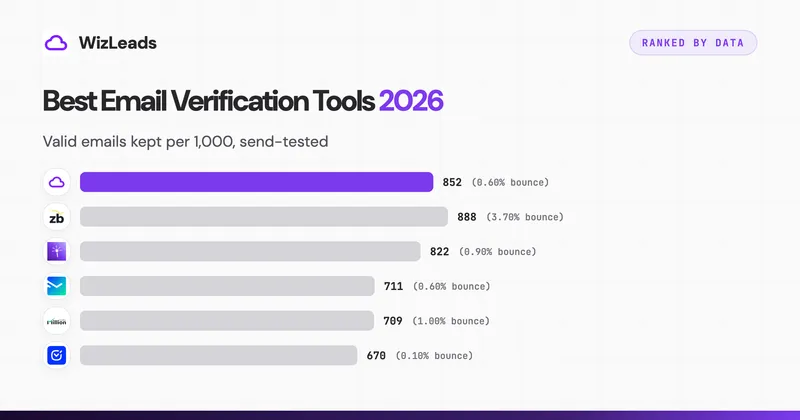
The same test showed how far the tools diverge on the rest of the list. Every send went only to the addresses that tool had approved, so the bounce rate is measured against what each one kept.
| Tool | Kept valid | Bounces | Bounce rate | Rejected |
|---|---|---|---|---|
| WizLeads | 852 | 5 | 0.59% | 148 |
| ZeroBounce | 888 | 33 | 3.72% | 112 |
| LeadMagic | 822 | 7 | 0.85% | 178 |
| NeverBounce | 711 | 4 | 0.56% | 289 |
| MillionVerifier | 709 | 7 | 0.99% | 291 |
| Debounce | 670 | 1 | 0.15% | 330 |
NeverBounce takes the lowest bounce rate in the set at 0.56% and pays 289 rejections for it against our 148. Debounce goes further, bouncing once across 670 sends and discarding 330 addresses per thousand to get there. What separates these tools is less the bounce rate than the number of real contacts spent reaching it. Our email verification benchmark sets out how the list was built and how each tool was scored.
Running it on a list rather than one address
Free lookups are rate limited per IP or per day by design, so the moment you have more than a few dozen addresses the workflow changes shape rather than scaling up.
Verification comes first because it is cheap and it decides what happens next. On WizLeads, standalone verification runs 0.5 credits per address, so the $39 Freelancer plan and its 10,000 credits covers 20,000 addresses, or roughly $20 per 10,000. That is the step that protects the sending domain, and it costs less than the enrichment that follows. New accounts get that plan at $1 for the first month and keep a 20% discount after that.
Enrichment comes second, on the addresses that survived. Attaching a name, title and company to a verified address is the reverse-direction job at scale, and the lookup tools above are the ones that do it. WizLeads does not take an email address as input: its work-email enrichment runs the other way, from a first name and a company website, at 3 credits per email actually found and nothing charged for a miss.
If you are pointed the other way, holding a person or a company and needing their address rather than the reverse, that is a different tool set and a different cost structure, covered in our guide to email lookup. The two jobs share a database and almost nothing else.
For teams sending regularly, the sequence that holds up is: verify the whole list, drop the invalid, resolve the catch-alls, enrich what remains, and re-verify anything older than a quarter. That last step is the one people skip, and our B2B email verification guide works through how often a list actually needs it.
FAQ
Is there a truly free reverse email lookup?
Yes, for the layer of data that is already public. Cleanlist allows 25 lookups per IP per day with no signup, Mailmeteor runs its lookup with no account, and Overloop's tool checks syntax, MX and Gravatar in the browser. All three return what DNS, the domain's own site and a public Gravatar profile expose. A verified job title, a confirmed LinkedIn URL or a direct-dial phone number was never in a public source, so no free tool returns one.
How do I find out who owns an email address for free?
On a work address, usually. The domain names the employer, the local part normally encodes the person's name, and a quoted search on the full address finds the pages that publish it. On a personal Gmail or iCloud address, usually not. Google and Apple expose no account holder data publicly, so free tools fall back to whatever the owner attached to that address on a public profile, and often that is nothing.
Does a reverse email lookup notify the person you looked up?
A public-source lookup does not. Reading DNS records, fetching a company website and querying the Gravatar profile API never touch the person's mailbox. SMTP verification opens a connection to their mail server and asks whether the mailbox exists without sending a message, so it leaves a connection log entry on the receiving server but delivers nothing to the inbox. Tools that probe password-reset flows on consumer platforms are the exception worth knowing about, because some of those flows do send mail.
Is reverse email lookup legal?
The lookup itself is data processing rather than contact, and processing business contact data is broadly permitted in the US and, under GDPR, on a documented lawful basis with a route to object. The specific restriction to know about in the US is the Fair Credit Reporting Act. BeenVerified, PeopleSmart and Social Catfish all state that they are not consumer reporting agencies and that their data may not be used for employment, credit, insurance or tenant screening decisions. This is not legal advice; check your own position before you build a process on it.
What is the difference between a reverse email lookup and email verification?
A lookup answers who is behind the address. Verification answers whether mail sent to it will arrive. They fail independently: a lookup can name a real person at a real company whose mailbox was closed nine months ago, and verification can confirm a live mailbox that belongs to nobody in particular, such as info@ or a catch-all domain. Before a send, verification is the one that protects sender reputation.
Can I run a reverse email lookup on a list instead of one address at a time?
Not with the free browser tools, which are rate limited per IP or per day by design. At list scale the two jobs separate: verification tells you which addresses are safe to send to, and enrichment attaches names and titles to the ones that survive. Verification is the cheaper of the two and usually the one that changes the outcome, at roughly $20 per 10,000 addresses on WizLeads' entry plan.