WizLeads


TL;DR
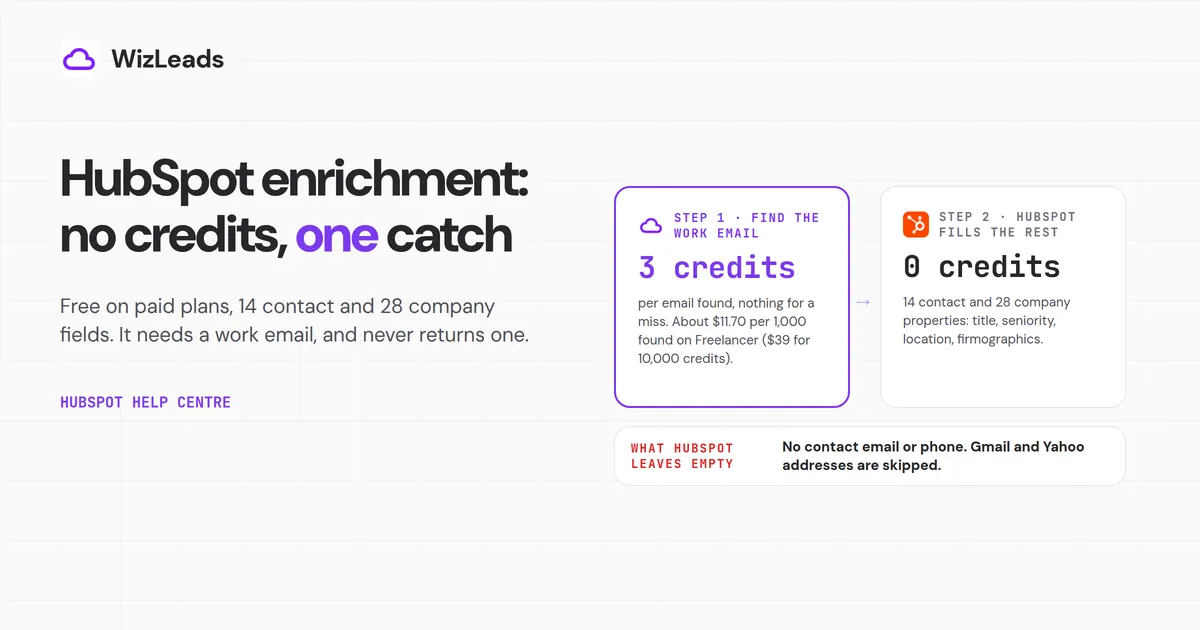
HubSpot data enrichment uses no HubSpot Credits and comes with paid plans. But it only runs on contacts that already have a work email. It can fill 14 contact properties and 28 company properties, such as job title, seniority and revenue range. It never returns an email address or phone number for a contact, and it skips Gmail and Yahoo addresses.
So the job has two steps. First get a verified work email onto each contact, then let HubSpot fill the rest. A CSV round trip does the first step on any plan that includes enrichment. A workflow that calls an email API needs Data Hub Professional, from $800 a month.
This guide is for outbound teams that run HubSpot as their CRM. The worked example for the email step is WizLeads' work email finder. The CSV and workflow routes below work with any finder that has a batch upload or an API.
Does HubSpot data enrichment cost anything?
Enrichment itself costs nothing per record. HubSpot's getting-started article says "Data enrichment does not consume HubSpot Credits". Its product page says enrichment is "included in all paid plans with HubSpot's Smart CRM".
Credits pay for the features around enrichment.
| Feature | HubSpot Credits | At $0.010 a credit |
|---|---|---|
| Data enrichment, contact or company | 0 | $0 |
| Form shortening (since 3 September 2025) | 0 | $0 |
| Data agent, one prompt for one record | 10 | $0.10 |
| AI action in a workflow, one execution | 10 | $0.10 |
| Intent signals, one company for one month | 10 | $0.10 |
| Prospecting agent, outreach recommended for one lead | 100 | $1.00 |
Credit rates come from HubSpot's Product & Services Catalog. The two zero rows come from HubSpot's data enrichment and form shortening help articles. The dollar column is our arithmetic at $0.010 a credit, so each figure is a unit cost. Prices as of September 2026.
Paid editions include 500 credits a month on Starter, 3,000 on Professional and 5,000 on Enterprise. With Data Hub or Customer Platform the figures are 500, 5,000 and 10,000. HubSpot's credits article says unused credits do not roll over. Smart properties, HubSpot's AI research fields, do use credits.
Extra credits come in $10 capacity packs of 1,000 a month. Overage at $0.010 a credit needs a pack first. Without one, the same article says, usage-based features pause until the next reset once the included credits are spent.
Older guides still price Breeze Intelligence in credit packs, the old model. HubSpot sold them at one credit per enrichment until June 2025. An archived copy of its credits page shows the switch to 10 HubSpot Credits per enrichment. HubSpot's help page today says enrichment uses none.
Which plans include HubSpot enrichment
HubSpot's enrichment settings article lists data enrichment on five Hubs at Starter, Professional and Enterprise. The Hubs are Marketing, Sales, Service, Data and Content. On Smart CRM and Revenue Hub it lists Professional and Enterprise only.
On Smart CRM, HubSpot disagrees with itself. The help centre says Professional and up. The catalog marks automatic, bulk, contact, company and continuous enrichment on all three Smart CRM editions, Starter included, and the product page says "all paid plans".
If you hold Smart CRM Starter and nothing else, confirm in your own account before you plan around either page.
Running enrichment takes a paid subscription, which leaves out the free CRM. HubSpot's data test article says "A Starter, Professional, or Enterprise subscription is required to run enrichment on your records". Any user can run the test itself.
What happened to HubSpot Breeze Intelligence
HubSpot announced its agreement to acquire Clearbit on 1 November 2023. The deal closed on 4 December 2023. On 18 September 2024 it launched Breeze Intelligence in public beta, bundling data enrichment, buyer intent and form shortening.
HubSpot's catalog and its enrichment help articles now call the feature data enrichment, though a few other help pages still say Breeze Intelligence. The old HubSpot Insights help URL redirects to "Get started with data enrichment". If you searched for HubSpot Breeze Intelligence, this is what it became.
What HubSpot fills in, and what it leaves empty
The getting-started article names the inputs. "For contact enrichment, HubSpot uses first name, last name, and work email address. For company enrichment, HubSpot uses company domain." HubSpot matches the record against its commercial dataset, third-party providers and public web information. Its how-it-works article says it writes a value only "If HubSpot finds verified business information across multiple sources".
| Record | Properties HubSpot can enrich |
|---|---|
| Contact (14, two of them opt-out flags) | City, Country, Country Code, Employment Role, Employment Seniority, Employment Sub Role, Enrichment opt-out, Enrichment opt-out timestamp, First Name, Job Title, Last Name, LinkedIn URL, State/Region, State/Region Code |
| Company (28) | Annual revenue, City, Company domain name, Company keywords, Company name, Country/Region, Country/Region Code, Description, Employee range, Facebook company page, Industry, Industry group, Is public, LinkedIn company page, LinkedIn handle, Number of employees, Phone number, Postal code, Redirect domain, Revenue range, State/Region, State/Region Code, Street Address, Total Money Raised, Web Technologies, Website URL, X account handle, Year founded |
Property lists come from HubSpot's "Enrich your contact and company data" help article.
The company list covers more than basic firmographics. It includes Web Technologies and Total Money Raised.
The contact list has no email address or phone number. The only phone field HubSpot enriches is the company's. That holds even though HubSpot's product page says 380 million email addresses are indexed in its database.
Contacts HubSpot enrichment will skip
The same article sets the entry rule: "Contacts must have a business email address. Personal addresses such as Gmail or Yahoo will not be enriched." The data test article extends that to "any temporary email address provider". Companies need a domain. A record with nothing new to add is left alone.
That rules out the contacts outbound teams most want fixed.
Think of a webinar sign-up with a Gmail address. Or a Sales Navigator export with names and companies but no email. Or a conference list of names and company websites. None of them enrich until a work email is on the record.
How to set up HubSpot enrichment
Run a data test first
Any HubSpot user can test records for enrichment and see the match rate and coverage per property. You can test up to 100 records at a time from an index page or segment. Or test every contact and company at once from the Data Enrichment tool.
HubSpot warns that eligible companies "may not match the number of domains available for data enrichment due to factors such as geographical location". Plan on your own test's match rate.
Turn on automatic and continuous enrichment
Automatic enrichment is off by default for contacts and companies. You switch it on separately for each object. Only Super Admins can change the settings. Continuous enrichment will "update previously enriched records monthly when new data becomes available", per the settings article.
The same page has settings to auto-enrich recently engaged records. With continuous enrichment on, it can also replace enriched values with nulls when the source proves inaccurate.
Decide what enrichment may overwrite
The enrich article says automatic enrichment fills blank properties and "doesn't overwrite values set by a user or another system". Manual enrichment can fill blanks or overwrite. Continuous enrichment refreshes values it filled earlier. It stops on any property a user or another system edits.
The settings article adds an overwrite rule for each property in its mapping tab. One option is "Fill empty values and overwrite existing values", which HubSpot suggests for Job Title and Employment Seniority. The same article warns that the rule does not cover every method: conversational enrichment and the workflow Enrich record action "can overwrite properties regardless of the overwrite rules". Check the tab before you switch automatic enrichment on.
In a workflow, the Enrich record action carries its own overwrite choice. HubSpot's workflow actions article says that choice "will take precedence over any overwrite rules set in your enrichment property mapping". If your SDRs correct job titles by hand, leave overwrite off in that action.
Enrich existing records in bulk
You can enrich from an object's index page, a segment, an import or a workflow. The index page takes "a maximum of 100 records at a time". Workflows need a Professional or Enterprise edition. On the Hubs, the Enrich record action therefore sits one tier above enrichment itself.
Three ways to get work emails into HubSpot
Everything above assumes a work email is already on the contact. Short of importing a file, HubSpot gives you three ways to add one. Each needs a different plan.
Marketplace integrations
| Tool | How data reaches HubSpot | Plan and price |
|---|---|---|
| Apollo | Enriches HubSpot records; you choose Overwrite or Auto-fill per field | Needs Apollo's CRM Enrichment. Automated CRM Enrichment listed from Basic, $49 per seat a month billed annually or $65 monthly. Free plan: 100 CRM enrichments a month |
| Lusha | Pushes contacts and companies you find in Lusha into HubSpot, enriches HubSpot form submissions and bulk-enriches existing HubSpot companies | CRM integrations on the Free plan, 40 credits a month. Starter $49.90 a month billed monthly for 400 |
| ZoomInfo Enrich | Matches and enriches records in your CRM, HubSpot included | No list price. Vendr buyer-reported median $33,377 a year |
| Cognism | Admin-led export from Cognism into HubSpot; two-way sync announced 17 February 2026 | No list price. SpendHound buyer-reported SMB average $20,536 a year (19 SMB customers in its data) |
| Clay | CRM auto-sync, enrichment and HTTP API integrations | Growth and Enterprise only. Growth from $495 a month billed monthly, $446 billed annually |
As of November 2026. ZoomInfo's figure is Vendr's buyer-reported median. Cognism's is SpendHound's buyer-reported average.
The other rows come from Apollo's and Clay's pricing pages. They also use Apollo's HubSpot doc, Lusha's integration and pricing pages, ZoomInfo's Enrich help article and Cognism's guide and newsroom.
Each runs on an account with the other vendor, and the meters differ. Apollo's "Understand Email Statuses" help article charges 1 credit per verified email. It says "Apollo doesn't charge an email credit for a contact without a known, valid email address". The Apollo email finder review lists every Apollo credit price.
Lusha's pricing page charges 1 credit to reveal a verified email, 5 for a phone number and 1 more for each record exported to a CRM. An email pushed to HubSpot therefore costs 2 credits.
ZoomInfo charges one Bulk Credit when it first matches a record, and nothing for no match. It keeps updating a matched record for up to 365 days without another credit. The data enrichment tools roundup groups Apollo, ZoomInfo, Cognism and Lusha as databases. You search or upload, then spend credits to reveal an email or phone.
Apollo's HubSpot Marketplace listing disagrees with its pricing page. The listing shows $5,000 a year plus a "$2,400 add-on fee for enrichment" (last updated September 2025). The pricing page lists Automated CRM Enrichment on Basic. HubSpot marks listing prices "for display purposes only".
Apps also avoid the Data Hub Professional requirement that the API route below runs into.
HubSpot's Prospecting agent
HubSpot's own route to net-new contacts runs on someone else's data. The Prospecting agent finds contacts through one connected source at a time: ZoomInfo, Apollo, Surfe or Seamless.AI. It uses your own login or API key for that source. HubSpot's agent page says it runs on Starter, Professional and Enterprise, on HubSpot Credits.
At the table's 100 credits per recommended lead, a Professional plan's 3,000 included credits cover at most 30 leads a month, if nothing else spends them. The agent's help article adds "additional steps based on your play settings". You pay the data vendor's subscription on top.
An API call from a workflow
If your email source has an API but no HubSpot app you want to use, a workflow can call it. The two actions that do this, Custom code and Send a webhook, are "Data Hub Professional and Enterprise only". Data Hub Professional starts at $800 a month with one Core Seat included, per the catalog.
HubSpot's custom code documentation sets the limits. An action must "Finish running within 20 seconds" and use no more than 128 MB of memory. It runs Node.js or Python (beta), and you can cap executions per second, minute or hour. If a call fails with a 429 or 5XX error, HubSpot retries the action for up to three days.
Adding work emails with WizLeads, then letting HubSpot enrich
WizLeads' Find Work Email API supplies the one input HubSpot's enrichment needs and never fills. Give it a first name (or the full name), an optional last name and the company website. It returns a work email the API doc calls "valid and catch-all verified".
It costs 3 credits per email found. A miss costs nothing, and a repeat lookup of the same input within 72 hours comes from cache at no charge.
On the $39 Freelancer plan with 10,000 credits a month, that works out to about $11.70 per 1,000 emails found. That is a pro-rata unit cost on a plan that carries about 3,333 found emails a month. New accounts get 500 credits once, enough for about 166 emails.
HubSpot company records already carry the website the finder needs. It sits in Company domain name or Website URL. Pay a finder for the email alone, WizLeads included, and let HubSpot fill the firmographics free.
For a handful of contacts a month, Lusha's Free plan costs nothing at all. Its 40 credits cover about 20 emails pushed to HubSpot, at 2 credits each.
No finder reaches everyone. In the enrichment benchmark, seven finders ran on the same 1,000 B2B leads and returned verified-valid emails for between 25.9% and 67.0% of them. Plan for a share of your list to stay unenriched.
Route 1: A CSV round trip
- In HubSpot, build a segment of contacts that have a name and an associated company but no work email. Include those whose only address is Gmail or Yahoo.
- Export the segment with Record ID, First Name, Last Name and Website URL, which HubSpot defines as "the contact's company website". If Website URL is blank, copy the domain from the associated company.
- Upload that file to a WizLeads Find Work Email batch task. The column mapping needs
firstNameandcompany_website, withlastNameoptional. If you have full names, map that column tofirstName. Misses are free. - In a spreadsheet, join the results back to your HubSpot export on name and company domain, so each work email sits beside its Record ID. Drop the rows with no email.
- Import the joined file with Record ID mapped as the unique identifier and the work email mapped to Email. Then enrich from the import. HubSpot's import guide warns that "If a row in your file doesn't contain a value for Record ID, a new record will be created."
Mapped to Email, the work email replaces any Gmail or Yahoo address already on the contact. To keep the personal address, put it in an Additional email addresses column in the same file. HubSpot's import file guide takes secondary emails there.
This works on any plan that includes enrichment, so it suits a backlog. You can enrich HubSpot contacts that have no work email without a workflow or Data Hub.
Route 2: A workflow that calls the API
For contacts that arrive every day, a workflow can do the same per record. A custom code action sends first name, last name and company domain to the endpoint below. It writes the returned address to the contact, and an Enrich record action then runs on the same contact. Store your API key as a secret.
GET https://api.wizleads.io/email/find-email?first_name=Jane&last_name=Doe&website=example.com
x-api-key: YOUR_API_KEY
Two details keep the action inside both platforms' limits:
- WizLeads' API allows 10 calls per second across all endpoints. It returns a 429 above that and can ban for an hour on excessive calls. Set the action's rate limit to 10 executions per second, or lower if anything else uses the API on your account.
- Let axios errors throw, so HubSpot's three-day retry covers a 429 or 5XX. Besides the 200, the API doc lists two responses for this endpoint: 402 "Insufficient Credits Error" and 422 "Validation Error".
This route needs Data Hub Professional before you find a single email.
If Clay already sits between your lists and HubSpot, the same call works from Clay's HTTP API integration. Use Request Limit 10 and Duration 1000 ms, as the API doc specifies.
Keeping enriched contacts current
Continuous enrichment refreshes the properties HubSpot filled, monthly, when new data is available. The work email is not one of those properties, so it stays exactly as you supplied it.
People change jobs, and when a move takes them to a new company, the work email in HubSpot still points at the old one.
Re-verify addresses that have sat in HubSpot for months before you send, and re-find the ones that fail. WizLeads verification costs 0.5 credits per email, charged for every email processed whatever the result. That is 20,000 verifications on the $39 Freelancer plan. The email verification API comparison prices 12 APIs per 10,000 checks and shows how each bills catch-alls.
What HubSpot does with the data you enrich
Enrichment feeds HubSpot's dataset as well as your CRM. The how-it-works article says: "If HubSpot can verify the record, limited fields (first name, last name, and business email address) may be added to HubSpot's commercial dataset." HubSpot says it does not use your entire CRM. Continuous-only use adds nothing. Turning off automatic and continuous enrichment stops your account contributing through those features.
That exchange drew attention in July 2026. HubSpot announced terms-of-service changes on 1 July about putting business-card-level details in a shared enrichment dataset. On 5 July it withdrew them in a Community announcement. It promised that new enrichment features using customer data "will be fully and transparently opt-in".
If your contracts limit how you share contact data, read the how-it-works article first.