WizLeads


TL;DR
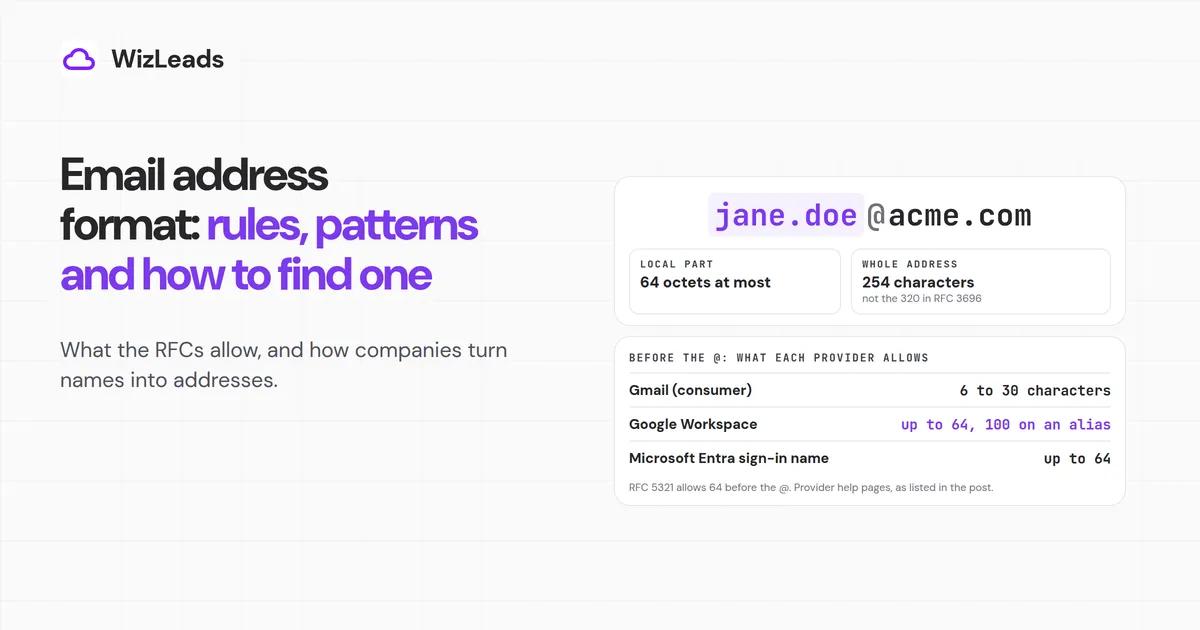
An email address is a local part, an @ sign and a domain, as in jane.doe@acme.com. RFC 5321 caps the local part at 64 characters and, once the angle brackets in its 256-octet path are counted, the whole address at 254, while Gmail, Google Workspace and Microsoft Entra sign-in names allow fewer. Each company picks its own work email pattern, such as first.last@ or flast@, and the standard says nothing about which. To find one company's pattern, collect addresses for two staff, build the candidate and verify it, though catch-all domains defeat that step: they held 212 of the 1,000 Apollo-sourced real-estate addresses in our verification benchmark, as WizLeads' classifier read them.
If you only need the address, WizLeads' work email finder takes a name and a company website and returns one that is catch-all verified.
The three parts of an email address
The email address structure has three parts. Take jane.doe@acme.com: everything before the last @ is the local part, which people also call the prefix or username. Everything after it is the domain, acme.com, a host name made of labels separated by dots. RFC 5322 defines the pair as addr-spec = local-part "@" domain.
The two halves do different jobs. The domain decides where the message goes: the sending server looks up the domain's MX records and connects to the host they name. The local part means something only to the server that receives the message. That server decides whether it maps to a mailbox, an alias or a group.
The standard says how a local part may be written and almost nothing about what it should contain. Each company chooses its own email naming convention, and the only way to learn the choice is to see examples.
Email address syntax: what RFC 5321 and 5322 allow
Two documents set the email address rules and the email address characters allowed. RFC 5321 governs SMTP and caps lengths. RFC 5322 governs the message format and defines the characters.
| Part | Rule | Where it comes from |
|---|---|---|
| Local part length | 64 octets at most | RFC 5321 section 4.5.3.1 |
| Domain length | 255 octets at most, each label 63 or fewer | RFC 5321; RFC 1035 section 2.3.4 |
| Whole address | 254 characters in practice | RFC 3696 Erratum 1690 |
| Characters allowed without quotes | letters, digits and the symbols # $ % & ' * + - / = ? ^ _ ` { } ~, the exclamation mark and the pipe, with dots between runs | RFC 5322 section 3.2.3 |
| Needs quoting | space, the double quote and ( ) < > [ ] : ; @ \ , (a dot only where it breaks the dot rule) | RFC 5322 section 3.2.3 |
| Case | the local part may be case sensitive, the domain is not | RFC 5321 section 2.4 |
| Non-ASCII characters | only with SMTPUTF8 supported on both servers | RFC 6531 section 3.3 |
Dots are the one structural rule inside the local part. They may sit only between runs of allowed characters. So a leading dot, a trailing dot and two dots in a row are invalid unless the local part is quoted. Digits, hyphens and underscores can start or end a local part.
Quoting lets a local part carry spaces and the other characters in the table. RFC 3696 itself says "The quoted forms are rarely used in practice".
The 254 limit, not 320
RFC 3696 section 3 gives 320 characters for the whole address, which is 64 + 1 + 255. Its Erratum 1690, verified in April 2010, keeps that sum but says the upper limit "should normally be considered to be 254". RFC 5321 section 4.5.3.1.3 caps the forward path at 256 octets, and that path includes the angle brackets around the address, so the longest address you can send is 256 minus 2, which is 254. Use 254 in any validator you build or buy.
Digits at the start, and case
Digits are allowed anywhere in the local part under RFC 5322, so an address can start with a number. Gmail and Google Workspace both accept numbers in usernames.
A domain can start with a digit too. RFC 1123 section 2.1 relaxed host names to start with a letter or a digit. RFC 3696 only requires that the top-level domain is not all numeric, so 123456.com is legal.
RFC 5321 says the local part "MUST BE treated as case sensitive". Google Workspace converts a username to lowercase when it is created, and the Gmail and Microsoft pages above say nothing about case, so lowercase is the safe way to write an address in outreach.
RFC 6531 permits non-ASCII characters in the local part only where both servers support SMTPUTF8. For a contact named José, the ASCII candidate, jose@, is the safer one to test first.
What Gmail, Workspace and Microsoft actually allow
An admin creating a mailbox meets the provider's rules, which are narrower than RFC 5322.
| Gmail (consumer) | Google Workspace | Microsoft Entra sign-in name (UPN) | |
|---|---|---|---|
| Length before the @ | 6 to 30 characters | up to 64 on the primary address, 100 on an alias | up to 64 |
| Characters | letters, numbers, periods | letters, numbers, dashes, underscores, apostrophes, periods; accents and other symbols also allowed | A-Z a-z 0-9 ' . - _ # ^ ~ and the exclamation mark |
| Periods | ignored on gmail.com | count: no leading, trailing or doubled period | no period immediately before the @ |
| Case | not stated | converted to lowercase | not stated |
The table draws on Gmail's username rules help page, the Google Workspace naming guidelines and the Microsoft Entra password policy page. Gmail's page says a username can be "any combination of letters, numbers, or symbols" and, a few lines later, letters, numbers and periods only. The table uses the specific list.
The Microsoft column is the user principal name, the sign-in name. Its page does not say that name equals the mailbox address, so read it as a sign-in rule. It also allows 48 characters after the @ and 113 in total.
The periods row decides how much the pattern matters. Google says that on gmail.com the dots are ignored, but that for Gmail through work, school or another organization, dots do change your address. On a Workspace domain, john.smith@ and johnsmith@ are different users unless an admin creates an alias. A guess that is one dot off reaches nobody, or reaches a different person.
Google Workspace lists letters, numbers, dashes, underscores, apostrophes and periods. It adds that "Accents and other symbols are also allowed", and advises minimizing symbols such as % and ^ because third-party apps may apply stricter validation. A validator built from the RFC will pass addresses a provider would refuse. One built from provider rules will reject some that are legal, and neither tells you the mailbox exists.
Corporate email format templates
A corporate email format is a template that maps a name to a local part, and a company's choice becomes its professional email address format for every employee. The table below shows ten templates for one invented person, Jane Doe at acme.com.
| Pattern | Example for Jane Doe |
|---|---|
| first.last@ | jane.doe@acme.com |
| flast@ | jdoe@acme.com |
| first@ | jane@acme.com |
| firstlast@ | janedoe@acme.com |
| first_last@ | jane_doe@acme.com |
| f.last@ | j.doe@acme.com |
| last@ | doe@acme.com |
| last.first@ | doe.jane@acme.com |
| first.l@ | jane.d@acme.com |
| first-last@ | jane-doe@acme.com |
These ten templates are the candidates you test in the method below, and the two addresses you collect in step 2 decide between them. No study we can cite counts how often companies use each template, so the order of the table says nothing about which is most common.
Names that break any pattern
A pattern describes the common case, and names produce exceptions the template cannot predict:
- Hyphenated and double-barrelled surnames, where the company may keep the hyphen, drop it or use one half.
- Middle initials, which some companies fold into the local part.
- Duplicates, where the second John Smith becomes jsmith2@ or gets a middle initial.
- Preferred names, where Robert is bob@ or rob@ while his profile says Robert.
- Accents, where jose@ is the safer ASCII candidate. Google Workspace's guidelines say accents are allowed in a username, so check how the company spelled names like it.
- Apostrophes, where O'Brien could be obrien@ or o'brien@. The apostrophe is legal in RFC 5322 and in a Workspace username, so both can exist.
How to work out a company's email pattern
You want one confirmed address for someone who works there, then a template you can apply. Steps 1 and 2 need no tool, step 3 uses a domain-search tool and step 5 uses a verifier.
- Collect real addresses at the domain. Look at the company's contact, press, careers and legal pages, its PDFs, and press releases that name staff contacts. Google operators such as
"@acme.com" filetype:pdfsurface conference programmes and press kits. Keep only personal addresses of staff and drop info@, sales@ and other role mailboxes, because they say nothing about how names are mapped. - Get addresses for two different people. One address can be an exception, such as a founder who kept an early short alias. Two people with the same template is a pattern. Say you find mark.alvarez@acme.com in a press release and tina.chen@acme.com in a PDF. Both are first.last@, so for Jane Doe you build jane.doe@acme.com. If the second address had been tchen@, you would find a third before choosing.
- Ask a domain-search tool as a cross-check. Hunter's Domain Search API documentation says it returns a
data.patternvalue for a domain, such as{first}, and null when the domain is unsupported. As of October 2026, Hunter's pricing page shows a Free plan at $0 with 50 credits a month that do not roll over, and says a Domain Search uses 1 credit per email found and none if it finds no emails. The reported pattern is Hunter's inference, so weigh it against the addresses you collected yourself. - Build the candidate for your person. Lowercase it, strip accents and apply the template. Then run through the edge cases above: a hyphenated surname, a nickname, a common name where a duplicate is likely.
- Verify before you send. A verifier asks the company's mail server whether the mailbox exists. Hunter's plan cards list "Email verified" at 0.5 credit, so the free plan's 50 credits cover 100 checks a month if you spend nothing else. The result is only as informative as the server's answer, which the next section covers, and the guide to verifying without sending shows what each check can and cannot tell you.
Why guess-then-verify breaks on catch-all domains
The method above leans on the server telling a real mailbox from a made-up one. On a default Google Workspace setup, routing unknown addresses to a catch-all mailbox is opt-in, according to Google's Workspace admin help page on misaddressed email. On an Exchange Online domain set to Authoritative, Microsoft's documentation says "Emails for unknown recipients are rejected". On those setups a wrong guess is refused during the SMTP conversation, so a verifier can usually separate your ten candidates for Jane Doe: one accepted, nine refused.
A catch-all domain accepts every address. Run the same ten candidates and all ten come back accepted, so the check picks nothing. The server has told you only that it takes mail for anything.
In our verification benchmark, 212 of 1,000 addresses (21.2%) were catch-all as WizLeads' classifier read them. That is addresses, not domains, on one list of Apollo-sourced US real-estate decision-makers from April 2026. The method is in the benchmark post.
Mailing every candidate instead does not fix it. On a non-catch-all domain, nine of ten addresses bounce, and those bounces land on your sending domain. On a catch-all domain, the wrong guesses typically sit in whatever mailbox the catch-all points to. Someone who never expected your message may read it.
What helps is a verifier that calls catch-all addresses valid or invalid instead of returning "risky". The catch-all verification comparison lists which tools do that and what they cost.
Where an email finder fits
If you need the address more than the method, a finder takes the name and domain and does the guessing and verification for you. WizLeads, which publishes this blog, sells one: Find Work Email takes a first name or a full name and the company's website. There is no company-name input, so you need the domain, which the method above gives you anyway. Per the API documentation, "All emails are valid and catch-all verified."
It costs 3 credits per email found and nothing for a miss. WizLeads' pricing lists the Freelancer plan at $39 for 10,000 credits a month, so that is a pro-rata unit cost of about $11.70 per 1,000 emails found, and the plan has to carry the volume. Standalone verification costs 0.5 credits per email processed, charged whatever the result, which is about $1.95 per 1,000 addresses at the same rate.
Finders bill in different ways, and the email finder comparison prices the tools side by side. A hand-run lookup from name to verified address is the subject of the email lookup guide.