WizLeads


TL;DR
Nothing can promise you will scrape LinkedIn without getting banned, because LinkedIn does not allow scraping tools. Its help centre says members who use them "risk having their accounts restricted or shut down", and it names no safe volume. The daily limits you see online come from vendors who contradict each other, though they agree on one tool per account per day. If you are restricted, LinkedIn's waits run from a few hours to a month, and repeated suspensions may become permanent.
Below, LinkedIn's help centre, User Agreement and court record sit next to what vendors publish on their help pages, pricing pages and blogs. You can see where they disagree.
What LinkedIn says about scraping
LinkedIn's help page on prohibited software and extensions is short and has no exemptions. It says "we don't permit the use of any third party software, including 'crawlers', bots, browser plug-ins, or browser extensions that scrape, modify the appearance of, or automate activity on LinkedIn's website". Members who use them "risk having their accounts restricted or shut down".
It names no volume and gives no pass for single-profile or low-volume use. It draws no line between browser and server tools. The rule covers software of any kind, with no exception for AI assistants.
The page says these tools violate the User Agreement, whose current version took effect on 3 November 2025. Three of its section 8.2 "Don'ts" carry most of the weight for scraping. You agree not to:
- "Develop, support or use software, devices, scripts, robots or any other means or processes (such as crawlers, browser plugins and add-ons or any other technology) to scrape or copy the Services, including profiles and other data from the Services"
- "Override any security feature or bypass or circumvent any access controls or use limits of the Services (such as search results, profiles, or videos)"
- "Copy, use, display or distribute any information (including content) obtained from the Services, whether directly or through third parties (such as search tools or data aggregators or brokers), without the consent of the content owner"
The third clause matters for every tool in this post. It covers information obtained "through third parties". So no design, account-less included, turns scraped LinkedIn data into data LinkedIn has agreed you may use.
Section 3.4 sets the consequence. LinkedIn "reserves the right to restrict, suspend, or terminate your account if you breach this Contract". The account restrictions page (a1340522) says automated inauthentic activity "can result in temporary or permanent restriction of your account".
The numbers LinkedIn does and does not publish
LinkedIn puts numbers on some limits. None is a scraping allowance, and it keeps the numbers scrapers care about most unpublished.
| Limit | What LinkedIn publishes | Source |
|---|---|---|
| Sales Navigator lead search | Up to 2,500 results across 100 pages, per search | LinkedIn Help a106030 |
| Sales Navigator account search | Up to 1,000 results across 40 pages, per search | LinkedIn Help a106030 |
| Free LinkedIn search | 250 results or 25 pages, per search | LinkedIn Help a520842 |
| Event invitations | Up to 1,000 a week, across all your events | LinkedIn Help a550496 |
| Connection invitations | A limit exists; neither invitation page gives a number | LinkedIn Help a550555 and a551012 |
| Commercial use limit (searches and profile views) | No number; resets at midnight PST on the 1st of each month | LinkedIn Help a564226 |
| Profile views of non-connections | A daily limit; no number | LinkedIn Help a569331 |
| Scraping volume | None; the tools are prohibited | LinkedIn Help a1341387 |
Source: the LinkedIn Help Center articles named in the last column, as of October 2026.
The commercial use page admits the gap: "We are not able to display the exact number of searches or views you have left and we also cannot lift the limit upon request". The profile-view page says the same. It names the activity it treats as commercial: "hiring, prospecting, or scraping".
Sales Navigator's restrictions page (a1644013) gives no threshold either. It says features "may be temporarily restricted if our system detects unusual activity".
The "safe limits" in circulation are vendors' numbers
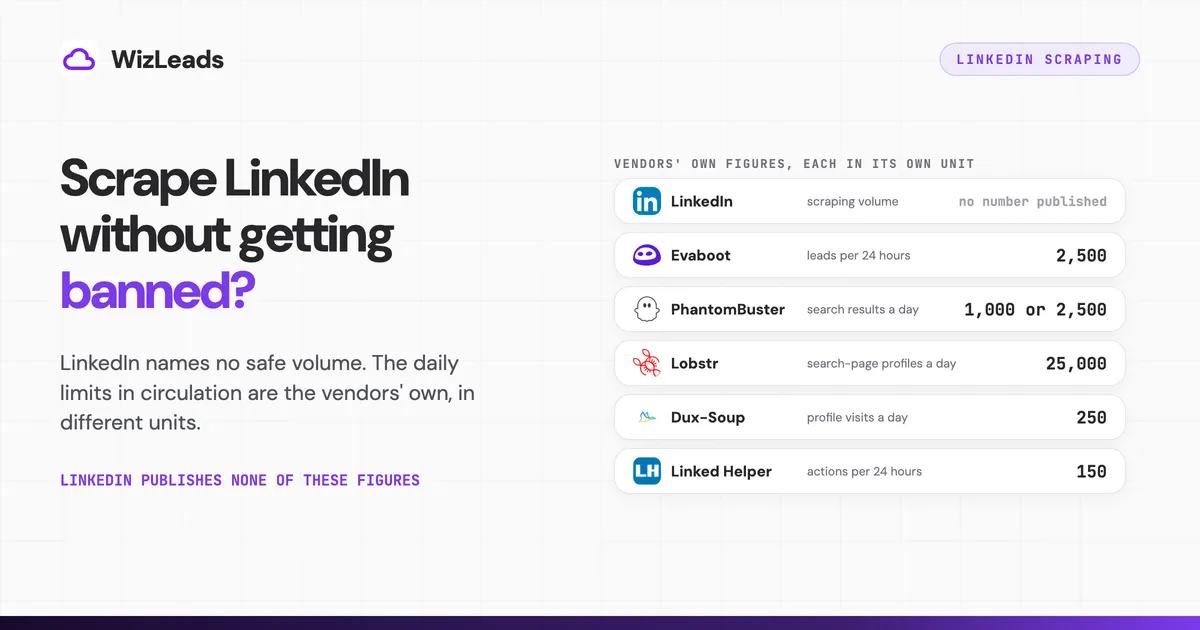
The daily figures that circulate as LinkedIn scraping limits come from vendors' help centres and blogs. The table gives each vendor's published figure and, beside it, what the same vendor says on another page. LinkedIn publishes none of them.
| Vendor | Published figure | The same vendor elsewhere |
|---|---|---|
| Evaboot | Help centre, daily-limit article: 2,500 leads or 1,000 accounts per 24 hours per Sales Navigator account, "our own limit, not a plan restriction". Safety page: this "makes sure your LinkedIn account is never restricted or banned" | Blog (published February 2025): "Sales Navigator users can only visit 150 LinkedIn profiles per day". The safety page says an export visits "each lead's actual LinkedIn profile" at up to 2,500 a day |
| PhantomBuster | Rate-limits page: 1,000 search results a day for new or infrequently used accounts (including Premium, under 2,000 connections) and for frequently used free accounts (over 5,000 connections). 2,500 for frequently used Premium accounts over 2,000 connections or Advanced Sales Navigator accounts. One launch a day | Search Export guide: "a maximum of 2,500 results per day" and, on the same page, "3 accounts = 3,000 results". Blog: Premium accounts get "200 pages/5000 results per day over 10 launches" |
| Lobstr | Store page, per account per day: "25,000 profiles from search pages (1,000 × 25), 3,000 with beautiful URLs, or 1,000 full profile visits". Its FAQ answers "Can you get banned for scraping LinkedIn Sales Navigator?" with "Not with lobstr.io" | Help centre: each synced account can run "up to 1,000 searches per day" and "up to 25,000 leads per day", and you "can safely use 100% of this capacity without worrying about bans". LinkedIn's prohibited-software page (a1341387) bars such tools. Blog: "Sales Navigator hard-caps you at 5,000 leads per account per day" |
| Vayne | Scraper page FAQ: "Up to 15,000 profiles a day with your own session", and "There is no daily limit in cookie-less mode" | The same page's headline says "Up to 15,000 profiles a day, with or without your own LinkedIn cookie". Its FAQ page says "Vayne only works with a paid Sales Navigator account" |
| Scrupp | Price page: "There is no daily limit from Scrupp". | The same FAQ says Scrupp "supports high-volume exports with daily limits and batching" |
| Dux-Soup | Support article: up to 250 recommended profile visits a day on Sales Navigator | Beginner guide: 500 visits a day is "the default setting". Limits guide: "LinkedIn allows" up to 2,000 profile views a day on Sales Navigator or Premium |
| Linked Helper | Help article: 150 actions per 24 hours by default, across all campaigns; about 200 search pages a day | The same article says the limits "have been tested on a free account, which was older than one year" |
Each vendor's own pages, as of October 2026.
Why the vendors cannot agree
PhantomBuster's account safety article explains the spread best of the vendor pages we read. It says "LinkedIn doesn't publish official automation limits". LinkedIn "doesn't behave like a simple counter" and "evaluates how your activity changes over time". Its own ranges "are based on aggregated account observations".
Dux-Soup's support article agrees. It says "No automation setting can guarantee that a LinkedIn account will not encounter restrictions".
The confident claims come with nothing to check. Lobstr's store page answers "Can you get banned for scraping LinkedIn Sales Navigator?" with "Not with lobstr.io" and publishes no ban count or method behind it. Evaboot's "never restricted or banned", on its safety help page, rests on one sentence. It says "This approach has been tested across numerous client accounts without any reported issues".
The units also differ, so many comparisons break. A search-page row and a full profile visit are different loads. Lobstr's own figures span a 25-fold gap between them.
PhantomBuster's rate-limits page says to halve its limits when email discovery is on, "because the automation has to open 2 pages per profile". Compare a vendor's number only with another number in the same unit.
What gets accounts restricted, according to the sources
LinkedIn names its triggers only loosely. On invitations, article a551012 says "If you send an excessive number of invitations and we suspect the use of an automation tool, we may suspend or restrict your account". The Sales Navigator page points at "unusual activity" and extensions "causing a high number of profile views". The account restrictions page adds that LinkedIn may restrict an account early "if we find signs that your account has been compromised or taken over by another person or entity".
The vendors are more specific, and their lists overlap. Evaboot's account safety article has five items:
- another automation tool the same day
- "Manually visiting hundreds of profiles the same day"
- a Sales Navigator licence bought from "a non-official, external provider"
- "a recently created or non-active LinkedIn account"
- "a fake or bought LinkedIn account"
PhantomBuster's safety article lists six factors LinkedIn "appears to consider":
- "Total activity across all automations"
- "Sudden increases after periods of inactivity"
- "Running multiple Phantoms at the same time"
- "Mixing manual and automated activity"
- "Account age and profile completeness"
- "Session instability or repeated login attempts"
The levers the sources support
Each lever below is vendor advice on how exposed your account is. LinkedIn confirms none of them, and none comes with a guarantee.
Whose account sends the requests
Start here. For ban risk, the tools fall into two models.
The first model runs your own session in the cloud. Evaboot and Scrupp are Chrome extensions that capture your LinkedIn session cookie. The scrape then runs in the cloud on your session and your Sales Navigator seat, and you can close the browser once an export starts. Scrupp's price-page FAQ says the extension reads your cookies.
Lobstr also syncs your account through a Chrome extension using session cookies. PhantomBuster's Sales Navigator Search Export takes your LinkedIn session cookie as an input. In each case the requests reach LinkedIn as your account.
The second model leaves your account out. Account-less tools run the search without your account connected. Vayne's cookie-less mode works this way, and its scraper page says "Your account is never connected".
WizLeads' account-less mode also runs without your account. This moves the requests off your account. It does not make the scraping permitted under LinkedIn's terms, because 8.2 covers information obtained "whether directly or through third parties".
One more clause belongs beside any tool that asks for your cookie. The first "Don't" in 8.2 bars using or attempting to use "another's account (such as sharing log-in credentials or copying cookies)". Read it before you share your session.
One account, one budget
LinkedIn counts your tools and your browsing against the same limits. Its commercial use reset page (a526164) warns about plug-ins. They "may run searches and view profiles in the background, which can cause you to surpass the limit without actually seeing any of the incremental warnings indicating that you're about to surpass it". PhantomBuster's rate-limits page says the same: "Platforms count all activity on your account toward the same limits, whether you perform actions manually or through PhantomBuster".
The vendors turn this into rules. Evaboot says "Don't use other LinkedIn scraping tools the same day that you use Evaboot". Vayne's FAQ says the same and adds a ceiling of 100 manual profile visits on a day you run it at capacity. PhantomBuster says "Divide the recommended limit by the number of Phantoms sharing that account".
The advice is consistent. Run one scraping tool per account per day, and read every vendor figure as the whole account's budget, your own browsing included.
They add one session rule. Evaboot's export help says "The one thing you cannot do is log out of LinkedIn before it finishes". PhantomBuster lists "Session instability or repeated login attempts" as a risk signal.
A second account of your own is not a way to raise volume. The User Agreement says each member "will only have one LinkedIn account, which must be in your real name". A colleague's seat is a different thing.
Account age and warm-up
Evaboot and PhantomBuster both list account age as a risk. PhantomBuster's rate table gives new or infrequently used accounts 1,000 search results a day. Frequently used Premium accounts over 2,000 connections, and Advanced Sales Navigator accounts, get 2,500.
Its safety article says "Start conservatively and increase activity gradually over several weeks". The LinkedIn help pages we read say nothing about account age.
IP addresses and proxies
Here the only guidance comes from vendors. Evaboot says "LinkedIn's main concern is the volume of activity rather than the originating IP address". None of the LinkedIn pages we read mentions IP addresses.
If your LinkedIn account is restricted
First work out which restriction you have. Each runs on its own clock, and LinkedIn may not say why. On invitation limits, its help page says "LinkedIn Support cannot disclose the type or reason for the restriction".
| Restriction | What LinkedIn says about timing | Source |
|---|---|---|
| Sales Navigator features ("unusual activity") | "generally lifted automatically after a 24-hour period"; contact LinkedIn if it lasts longer | LinkedIn Help a1644013 |
| Invitation limit reached | "typically lasts one week"; LinkedIn "cannot remove or shorten the wait period" | LinkedIn Help a550555 |
| Invitation restrictions | First restriction: "Wait a few hours". Several in a day: "Wait a few days". Too many outstanding invitations: "Wait for up to one month". "Most restrictions will automatically be removed within one week". | LinkedIn Help a551012 |
| Suspension for automated activity | Re-enabled "at the time specified on the suspension notification"; "Repeated suspensions may result in permanent restriction of your LinkedIn account". | LinkedIn Help a1340567 and a551012 |
| Automated inauthentic activity | "temporary or permanent restriction of your account" | LinkedIn Help a1340522 |
| Commercial use limit | Resets "at midnight PST on the 1st of each calendar month" | LinkedIn Help a564226 |
What to do, in order
- Stop the tool. LinkedIn's automated activity page (a1340567) asks you to "Review and disable the software or extension that automates activities". The account then comes back at the time on the notice.
- Wait out the stated clock. For Sales Navigator, contact LinkedIn if the restriction runs past 24 hours or you believe it was an error. Invitation waits cannot be shortened on request.
- Verify your identity if asked. LinkedIn restores restricted accounts through identity verification with Persona, its verification provider (a1342692). In Canada, the EU and the UK you can instead sign a printed Affidavit of Identity before a Notary Public. LinkedIn says the verification data is "generally permanently deleted within 14 days of submission".
- Do not file repeat appeals. 8.2 bars misusing the appeals process, "including by submitting duplicative, fraudulent or unfounded reports, complaints or appeals". LinkedIn's contact form for a second look at an automation suspension "is being gradually rolled out and is currently available only to some LinkedIn members".
- Decide how long to stay off. The vendors disagree here too. Evaboot's help centre says "Ease off extractions for a few days". PhantomBuster's safety article says "Wait at least one to two weeks before resuming".
What LinkedIn does to scraping operations
LinkedIn has also gone after scraping companies in court.
On 24 January 2025, LinkedIn's VP of Legal, Sarah Wight, announced a federal lawsuit against Proxycurl and its founder in a LinkedIn post. It alleged "the unauthorized creation of hundreds of thousands of fake accounts and scraping of millions of LinkedIn member profiles". The docket for LinkedIn Corporation v. Nubela Pte. Ltd. shows a judgment entered on 25 July 2025.
On 28 July LinkedIn announced the resolution in its newsroom. Wight wrote in a second post that Proxycurl must "permanently delete all LinkedIn data obtained through unauthorized means and stop accessing LinkedIn unlawfully". She added that the court entered these requirements as a permanent injunction.
The hiQ case is usually cited by its April 2022 appeal. There the Ninth Circuit's opinion affirmed a preliminary injunction. It says the court "did not resolve the companies' legal dispute definitively".
The case ended on 8 December 2022 with a consent judgment of $500,000 against hiQ. It also set a permanent injunction covering automated access "whether logged in to a LinkedIn account or not".
The injunction names hiQ and the people Rule 65(d)(2) reaches: its officers, agents and anyone acting in concert with it; other scrapers are not named. The rest of the hiQ timeline is in the LinkedIn scraping guide. None of this is legal advice. LinkedIn's terms are one of four legal rulebooks that bear on scraping.
Where WizLeads fits
WizLeads scrapes Sales Navigator searches in two modes. Account-less mode runs without your LinkedIn account connected and without an active Sales Navigator seat. It costs 2 credits per result, so the $39 Freelancer plan's 10,000 credits cover 5,000 results before any email enrichment. You still need a Sales Navigator search URL to start, so someone with Sales Navigator access has to build the search.
Connected mode costs 1 credit per result and runs on your own LinkedIn account through the WizLeads browser extension. It reaches saved lead and account lists and 1st-degree filters. LinkedIn's prohibited-software rule applies to it exactly as quoted above.
Account-less scraping is not unique to WizLeads. Vayne's pricing page lists "Sales Navigator cookieless (on request)" and marks it Included on every plan. Its scraper page says "Both modes are available on every plan". WizLeads' account-less mode is available now.
Vayne also splits searches above Sales Navigator's 2,500-result cap. WizLeads' Smart Link Splitting checks the lead count and splits the link into chunks of 2,000 results or less, so no results are lost past that cap. It needs the Agency plan or above.
LinkedIn's Service Terms say you may use Sales Navigator "solely for sales, prospecting, or other business development purposes". That makes this a prospecting workflow, not a candidate-sourcing one.
The Sales Navigator scrapers comparison has prices, plans and features for the tools named here. The LinkedIn scrapers comparison lists the wider category.
If your own LinkedIn account matters more than the data, choose a tool that does not connect it. The requests then do not come from your account, though LinkedIn's terms still cover data obtained "through third parties". If you do connect it, keep to the one-account budget above.