WizLeads


TL;DR
Bulk email verification is 5 steps: clean the file, split it to your verifier's limits, run it as one batch job, sort the results, and send in stages. Verifiers differ on upload caps, duplicate billing, unknown billing and how long they keep your file, so the Step 2 table puts six side by side. A verifier catches dead addresses while they still bounce, but it cannot be relied on to clear spam traps.
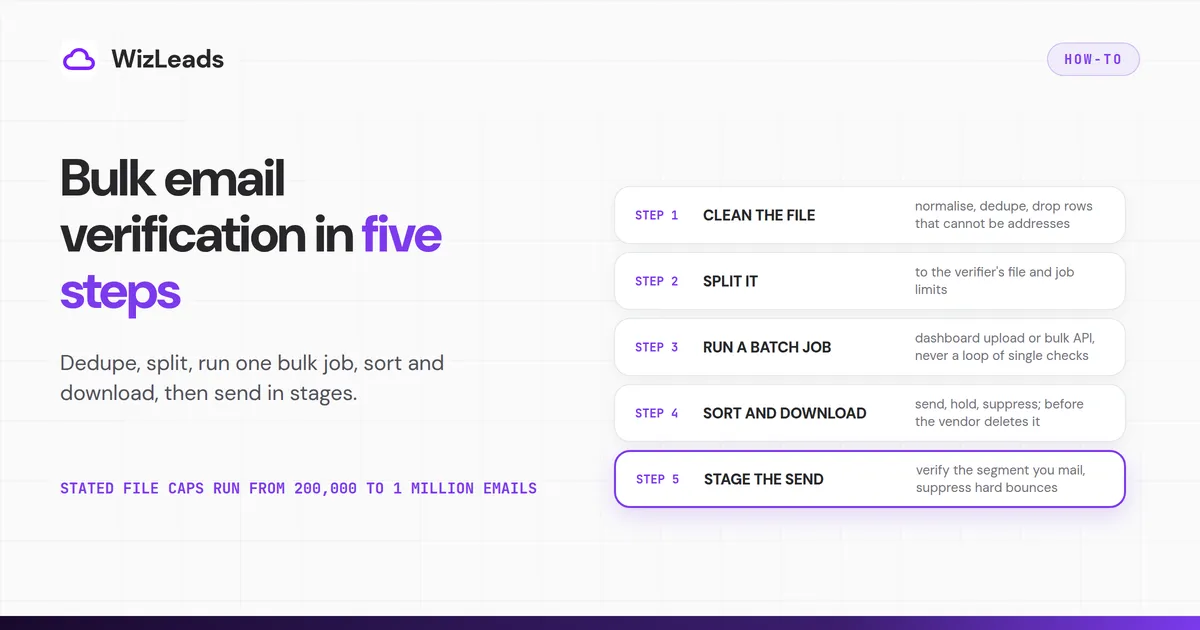
What bulk email verification is, and the five steps
Bulk email verification means handing a verifier your whole list as a file or a batch job, instead of checking addresses one at a time. The checking is the easy part. On a big file the money and the mistakes sit around it. You can pay twice for duplicates, hit a vendor's file cap, get billed for unknown results one vendor charges and another does not, or lose results to a deletion schedule.
When we searched Google in the US for bulk email verification, most pages that ranked were verifier tool pages and ranked lists of tools. None of the six articles we read put upload caps, duplicate billing and deletion windows side by side. The work runs in five steps:
- Clean the file: normalise it, dedupe it and drop rows that cannot be addresses.
- Split it to your bulk email verifier's file and job limits.
- Run it as a batch job, never as a loop of single checks.
- Sort the results into send, hold and suppress, and download them before the vendor deletes them.
- Stage the send and suppress hard bounces for good.
Any bulk email checker with a file upload and a batch API fits these steps. WizLeads has both, a dashboard CSV upload and a batch API, and the last section lists what its API documents.
Step 1: Clean the file before you pay to verify it
Every row you upload costs a credit or a slot in a job, so remove what you can first.
Normalise, then dedupe. Two rows that differ only in case or spacing are usually one mailbox, and a plain dedupe misses them.
- Lowercase the domain every time. RFC 5321 says mailbox domains are not case sensitive. It says the local part is case sensitive but discourages relying on that. Lowercasing it to find duplicates is a convention, not a guarantee.
- Fold dots and plus tags only on gmail.com. Google's Gmail help says dots do not change a gmail.com address and that a plus tag reaches the same inbox. For Gmail used through work or school, the same help says dots do change the address. Folding them on a company domain can merge two people.
- Dedupe across files, not only inside one. The table in Step 2 shows why. MillionVerifier bills the same address again when it sits in two files, and NeverBounce's own pages disagree on whether duplicates are removed.
ZeroBounce's file API page adds a safety net. By default it removes duplicates, and it returns a 400 error when that would remove more than half the lines. A list merged from several overlapping exports can trip it.
Drop rows that cannot be an address. NeverBounce's upload help page lists what its indexing strips: blank cells, incomplete addresses and header rows. It also warns that an address wrapped in punctuation, such as <johndoe@example.com>, may be read as invalid. Strip angle brackets and quotes before you upload.
Set your role-address rule first. Whether you mail info@ and sales@ is your call, but make it before the upload. A row you delete after verification is a credit spent for nothing.
Step 2: Split the file to your bulk email verifier's limits
Each bulk email verifier sets its own upload cap, duplicate rule, unknown billing and deletion window. The table lists six, from each vendor's own help, pricing or policy pages.
| Vendor | Upload limit | Duplicates | Unknown results | Results deleted |
|---|---|---|---|---|
| ZeroBounce | 1 GB and 500 columns in the dashboard; none on the file API | Removed, not billed | Never charged | 30 days after upload |
| MillionVerifier | 1 million emails and 100 MB; XLSX 150,000 rows | Billed once in a file, again across two files | Credit-back, which its Terms call discretionary | 30 days |
| NeverBounce | No upload cap stated; API jobs in 1 million chunks | Its own pages disagree | One credit per verification, no exception stated | 90 days after upload |
| DeBounce | 200,000 emails per file | Removed, never billed | Every standard check billed; catch-all check extra | 7 days after upload or validation, whichever is later (its Terms say one month) |
| Kickbox | Up to 1 million addresses | Not stated on its upload page | Free | 90 days |
| Clearout | 1 million emails per upload | Not billed within one list | Not billed; catch-all billed | 30 days |
Each cell comes from the page named below, and prices stay out of the table on purpose.
ZeroBounce's upload help page lists .txt, .csv, .xls and .xlsx files, with a limit of 1 gigabyte and 500 columns. It says duplicate, uni-code and malformed addresses are removed and not billed. Its file API page says there is no limit on file size, rows or files while your credits cover the file. ZeroBounce's pricing page says it never charges for unknown results and erases uploaded data 30 days after upload unless you delete it first.
MillionVerifier's upload help page sets 1 million emails and 100 MB per file, with XLSX capped at 150,000 rows. It bills a duplicate once inside a file, but the same address in two files is billed twice.
MillionVerifier contradicts itself on unknowns. Its results help page says it does not charge for risky results such as catch-all and unknown.
MillionVerifier's Terms were published on 19 October 2026 under a new operator, Southern Vector Limited of Christchurch, New Zealand. They call any credit-back for these results a discretionary goodwill programme that can change or end. The Terms also say uploaded and result files are normally deleted after 30 days. They let the operator treat an account as inactive after 12 months with no credits bought or used.
NeverBounce says three things about duplicates. Its help centre says they are not automatically removed or merged. Its developer docs say a list is deduped before verification, and the Growth card on its pricing page says duplicates are free.
NeverBounce's billing help says one credit is one verification and names no exception for unknown results. Its data help page says uploaded data is deleted 90 days after upload. Its upload help page names no file cap. Its API usage guidelines tell developers to split databases of millions into 1 million email chunks, one job per chunk.
DeBounce's file-types help article, dated 1 January 2022, sets 200,000 emails per file. The FAQ on its contact page gives the same 200,000 per list. Its pages disagree on deletion. Its data-retention policy deletes lists and result files 7 days after upload or validation, whichever is later.
DeBounce's Terms of Use say lists are removed one month after the list is validated. Its pricing page says duplicates are never billed. Its billing help words the catch-all check two ways, "10 credits per email" in one place and "10 additional credits per email" in another.
Kickbox's upload docs cap a list at 1 million addresses. Its Security and Privacy doc gives the 90-day deletion window, and its pricing page says unknown results are free. Clearout's verifier page gives 1 million emails per upload and deletion after 30 days. Its pricing guide says unknown results and duplicates inside one list are not billed, while catch-all results are.
Use the table to size your chunks:
- Split under the tighter of two limits: the file cap and what the vendor handles well. MillionVerifier's upload page says it verifies at most 2 files at a time when each holds more than 1,000 emails. Its XLSX cap sits far below its per-file cap, so export CSV.
- Buy the credits first. ZeroBounce's file API rule holds while credits cover the file, so check the price per 10,000 and at volume in a comparison of email verification tools before you buy.
- Dedupe across your chunks yourself. Splitting one list into files can bill the same address twice.
- Keep a stable row ID in every chunk. Results come back file by file, and the ID joins them to your CRM export.
- Do not over-split on NeverBounce. The same usage guidelines say a list of fewer than 1 million emails should go in as one job. They also say more than 10 jobs for every 100,000 items an hour can get the account locked.
Step 3: Run it as a batch job, never as a loop
The tempting shortcut is a loop that sends every address to the single-check API. Vendors warn against it in their own docs. NeverBounce's usage guidelines also tell developers not to use single verification on an existing list one address at a time. They say the account may be locked and API access disabled.
Reoon's API docs say its single endpoint is not for bulk verification. ZeroBounce's real-time batch page sends anything over 200 addresses to its bulk file endpoints. A list goes in as a dashboard upload or a bulk API job, and either way you get a results file back.
How long a big list takes depends on the vendor and on your domains. ZeroBounce's pricing FAQ says it cleans 100,000 addresses in 45 minutes, which is the vendor's own claim. MillionVerifier's speed help page warns that a file drawn mainly from 1 or 2 domains may be slowed down by 90%. An account-based list built from a few target companies is that file, so plan for the slow end.
Run the first chunk before the rest. Open its result file, check that your columns survived and that the unknown share looks sane, then release the others. If a chunk looks wrong, you can stop it. MillionVerifier's upload page says stopping a file returns results for the verified emails, marks the rest unknown and adds those credits back.
Step 4: Sort the results, then download all of them
Verifiers name their result codes differently, but the decision is the same three buckets.
- Send: addresses the verifier calls valid.
- Hold: unknown, catch-all and risky results. Re-run unknowns in a later pass, and decide catch-alls by what a bounce costs you against what the deal is worth.
- Suppress: invalid and disposable addresses, for good.
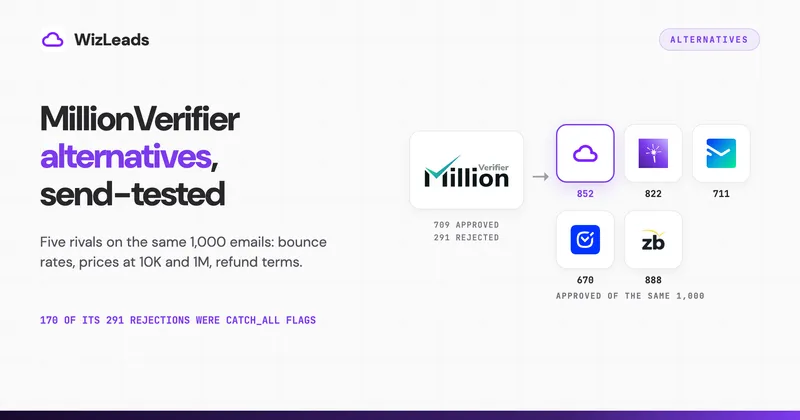
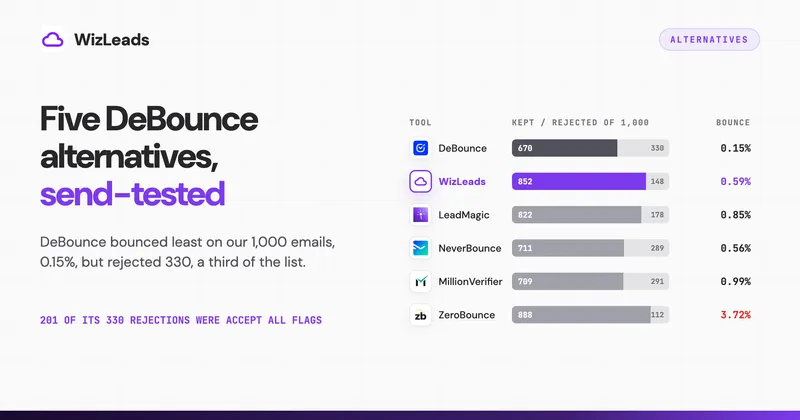
Catch-alls decide how much of a bulk list you keep. In the email verification benchmark we ran, six verifiers screened 1,000 real-estate decision-maker emails sourced from Apollo, and we mailed every address at least one of them approved. WizLeads flagged 212 of the 1,000 as catch-all (21.2%).
| Tool | Kept | Bounced | Bounce rate | Rejected |
|---|---|---|---|---|
| WizLeads | 852 | 5 | 0.59% | 148 |
| NeverBounce | 711 | 4 | 0.56% | 289 |
| MillionVerifier | 709 | 7 | 0.99% | 291 |
| ZeroBounce | 888 | 33 | 3.72% | 112 |
| LeadMagic | 822 | 7 | 0.85% | 178 |
| DeBounce | 670 | 1 | 0.15% | 330 |
The bounce rate is bounces divided by addresses kept. Labels such as unknown or catch-all sit inside a tool's rejections, never on top of them. MillionVerifier flags catch-alls without saying whether they are valid or invalid; its 170 catch_all flags stayed unresolved in our run. What differed most between tools was how many addresses each set aside, so set your catch-all policy before you pick a verifier.
A vendor's guarantee covers one bucket only. NeverBounce's help page on downloading results says its Deliverable download is the segment backed by its 3%-or-less bounce guarantee. Mail anything outside that download and the promise does not apply.
If you keep the catch-alls, send them as their own small segment after the clean batches, from infrastructure you can afford to risk. Track that segment's bounces apart, so they cannot hide inside a good campaign's average. If you drop them, accept the smaller list.
Download the full results file the day the job finishes, invalid rows included, because those rows become your suppression list. The deletion column in the Step 2 table is your deadline. Of the six, DeBounce's retention policy gives the shortest window, 7 days, although its Terms of Use say one month. Plan on the 7 days, since the policy also says deleted results cannot be recovered.
Step 5: Stage the send and suppress bounces for good
A verdict is a snapshot of one moment. Lists decay as people change jobs, so verify the segment you are about to mail, not the file you built last quarter.
Mail a first slice of the freshly verified list, read its bounces by sending domain, then release the rest. If one domain's bounces climb, pause it and find the cause before you resume. Your sending platform sets its own bounce limit, so look it up before the first slice goes.
Spamhaus's sender guidelines say to suppress hard bounces immediately and to carry the suppression list across when you move to new infrastructure. They also say list validation does not clean spam traps and is no replacement for permission. Spamhaus runs blocklists, and its guidelines are written for permission-based mail. Read them as a blocklist operator's baseline, not as a cold-send safe harbour.
Verifiers' own pages say much the same about spam traps. MillionVerifier's help says verifiers cannot confirm and remove spam traps. DeBounce's guarantee says it gives no guarantee of finding them, although its homepage says it removes spam traps. Reoon's product page says it matches known traps but cannot detect all of them.
Verification catches dead addresses while they still bounce, so keep every hard bounce on one permanent suppression list. Spamhaus's guidelines, citing M3AAWG's spam trap best practices, say mailboxes inactive for more than 12 months can be repurposed as traps. A list that has sat for a year is a rebuild, not a re-verify.
Check that the list is allowed
Vendors' own terms differ on lists you did not collect yourself. Kickbox's Master Services Agreement bars using the service on addresses obtained from a third party without the recipients' knowledge and consent. It lets Kickbox suspend or limit the service.
MillionVerifier's Terms allow addresses obtained from a third party, including a data provider, and require no consent unless the law does. It may ask for evidence of the source. Reoon's product page markets verifying scraped, purchased or exported lists.
Read the terms of the tool you pick before you upload a purchased or scraped file. That includes a free web checker, which puts a copy of your list on someone else's server.
Where WizLeads fits
WizLeads' Verify Email costs 0.5 credit for every email processed, whatever the result, so unknown and error results are billed too. On the Freelancer plan, $39 a month for 10,000 credits, that is 20,000 verifications. A 100,000-row file uses 50,000 credits, so check your balance before you submit it.
For a file, POST /email/verify-email-batch takes a CSV, a task name and a column_mapping that names your email column. It performs catch-all validation, and the response returns a task_id, the row count and credits_blocked. A GET /tasks/{task_id} call reports the task status and links the result CSV, which is final once the task is Done, Failed or Aborted. If credits are short, the API answers 402, so top up before you submit.
Pick the limit that binds first
If your file sits under every cap, the deletion window is the limit to plan around. If it is over one, the upload cap decides your chunks. If it was merged from many exports, duplicate billing is the cost to watch. Find your vendor's row in the Step 2 table, clean the file, run one chunk, and mail a first slice.