WizLeads


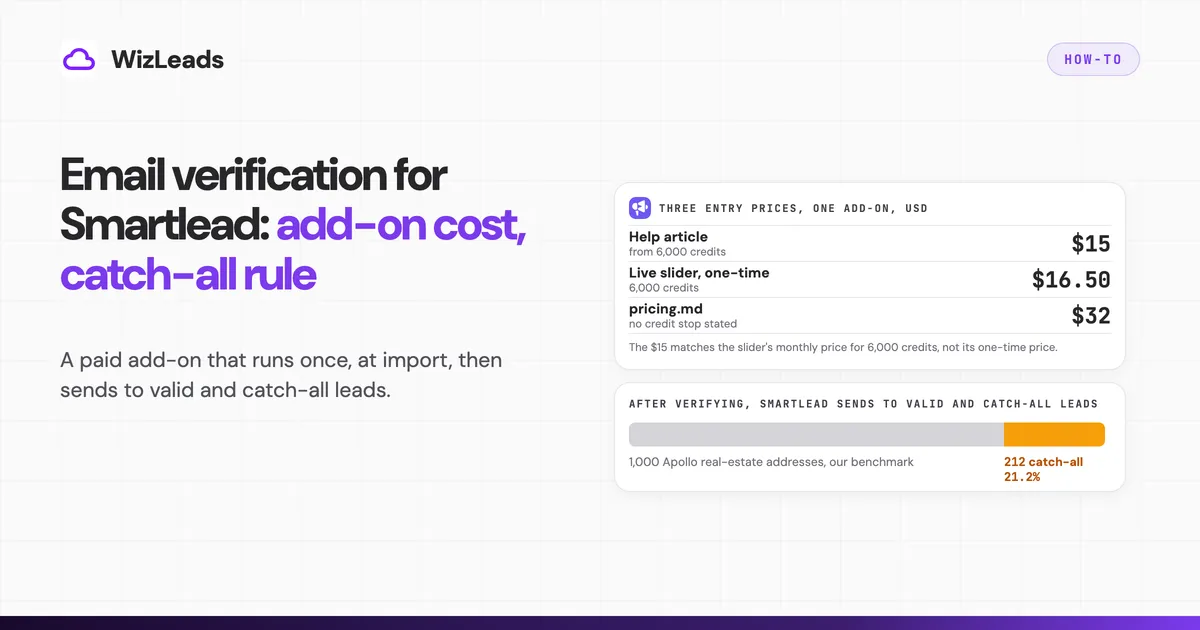
Smartlead email verification is an add-on you buy on top of any plan, and it runs once: when you import a CSV, before the campaign launches. Smartlead's help centre says that after verification it sends only to valid and catch-all leads, and that you cannot verify once a campaign is live. For a list you will mail this week, the add-on is the quickest route. Verifying before import with a separate tool makes sense when you want your own rule for catch-alls, one set of verdicts across every tool you use, or the option to re-check a list after launch.
Below: how the built-in check works, what the credits cost (Smartlead quotes three entry prices, a discount label that does not match its own numbers, and in two blogs says verification is included), the catch-all advice Smartlead gives in three versions, the bounce auto-pause you have to switch on yourself, and how to bring in a list you verified elsewhere. WizLeads is the verifier used in the upstream steps.
How Smartlead email verification works
Smartlead's help article on verifying a lead list describes "an in-built Email Verification add-on" that identifies invalid and unknown emails. You start an email campaign, pick your CSV, map the fields, click Save & Next, and on the popup click "Launch Verification & Proceed". When it finishes you get a notification, a report, and a verified list you can download from the Import Lead tab. We did not run an import inside a Smartlead account, so confirm the popup appears in your version of the flow.
The same article sets two rules. First, "You cannot verify leads once a campaign is live," and it suggests setting up a new campaign instead. Second, "If you launch the campaign after verification, Smartlead will send emails only to valid and catch all leads."
Smartlead's email verifier page says the check flags invalid, temporary, catch-all and role-based addresses, using a DNS lookup, an SMTP connection, a mailbox ping, a reputation check against spam-trap databases and an inbox simulation using warm IP addresses. It describes four result segments (Safe, Risky, Invalid, Unknown), and the standalone tool is free for 10 verifications a day. We have not tested any of this. The help article words results differently (invalid and unknown in one place, valid and catch all in the send rule), so read your own report before you build filters on verifier status labels.
Four things the pages leave open or contradict:
- The provider is not named. Smartlead's blog on verification tools refers to "a leading email verification service", and none of the pages we read says which one.
- The accuracy claim has three figures. The verifier page says "99% accurate verification" in one place and a "99.2% accuracy rate" in its FAQ, with no method or denominator for either. Smartlead's bulk verification blog lists the built-in check at "93-95%", with no method shown beside the table. Our benchmark did not include Smartlead's verifier, so we have no measured number to set against any of them.
- Manual or automatic. That same blog says verification "runs automatically when you import a lead list", while the help article has you click "Launch Verification & Proceed".
- The API pointer and the reference do not meet. Smartlead's leads documentation tells you to "use the email verification API before adding leads", yet we found no verification endpoint among the 241 pages in its API reference sitemap.
What Smartlead verification costs
Smartlead's pricing page sells verification credits in eight pack sizes, one-time or monthly. The slider opens on 12,000 credits one-time, at $33.00. The table reads every slider position under both toggles (USD, US location, as of October 2026) and adds a unit cost per 1,000 credits.
| Credits | One-time | Monthly | One-time per 1,000 | Monthly per 1,000 |
|---|---|---|---|---|
| 6,000 | $16.50 | $15.00 | $2.75 | $2.50 |
| 12,000 | $33.00 | $30.00 | $2.75 | $2.50 |
| 24,000 | $64.90 | $59.00 | $2.70 | $2.46 |
| 48,000 | $127.00 | $114.00 | $2.65 | $2.38 |
| 96,000 | $242.00 | $220.00 | $2.52 | $2.29 |
| 192,000 | $458.00 | $417.00 | $2.39 | $2.17 |
| 480,000 | $1,100.00 | $1,000.00 | $2.29 | $2.08 |
| 960,000 | $2,030.60 | $1,846.00 | $2.12 | $1.92 |
These are pro-rata unit costs, not bills. The Smartlead pages we read do not say what one verification credit buys, or whether invalid and unknown results use one. If one credit verifies one address, the columns are also per 1,000 addresses, and that "if" is Smartlead's to settle.
The pages also contradict each other on price, and on whether you pay at all.
Three entry prices. The help article says the add-on starts "from 6000 credits for $15 USD". The live slider shows $16.50 for the same 6,000 credits one-time. The pricing.md file says "Pricing starts at $32", and the page's raw HTML carries a $32.00 placeholder before the script runs. The $15 matches the slider's monthly price, not its one-time price. We used the slider, and you should confirm at checkout.
"Save 17%". The toggle reads "Monthly (Save 17%)". Across the eight packs, the monthly price is 9.0% to 10.2% below the one-time price. We cannot tell where 17% comes from. Smartlead's pricing-plans article gives "Yearly: save 17% across all plans, billed annually", and Pro is $94 monthly against $78 on the yearly cards (17.0% lower). So 17% looks like the yearly plan discount; that the label was reused on credit packs is our inference.
Add-on or included. The pricing page, pricing.md and help articles 196 and 439 treat verification as a paid add-on. Two Smartlead blogs say otherwise. The verification-tools blog says Smartlead users get verification "included as part of their outreach automation", and the bulk verification blog says "Smartlead's built-in verification is included in your subscription". We followed the pricing page, where credits are sold, and cannot tell you which statement matches your account.
Two other points change what the cost means. The monthly option is a subscription, since Smartlead says credits can be bought "one-time or as a monthly subscription", so for a one-off list the one-time column is the one that applies. And "verified prospect emails", the $59-a-month add-on on Base and Pro, cover leads sourced through SmartProspect. They are a separate allowance, not verification credits for your own CSV.
One 10,000-address job at list prices:
| Route | Bill | Credits left over | Pro-rata for 10,000 |
|---|---|---|---|
| Smartlead 12,000-credit pack, one-time | $33.00 | 2,000 | $27.50 |
| Smartlead 12,000-credit pack, monthly | $30.00 | 2,000 | $25.00 |
| WizLeads Freelancer (0.5 credits per email) | $39.00 | 5,000 | $19.50 |
| LeadMagic Essential (0.25 credits per validation) | $99.00 | 2,500 | $49.50 |
| NeverBounce pay as you go, 10,000 pack | $50.00 | none | $50.00 |
Of the five routes in this table, Smartlead's bill is the lowest, assuming one credit per address. Cheaper options exist outside it: Reoon charges $11.90 for 10,000, Truelist $14 and DeBounce $25 on its pricing page, all below the five. WizLeads is lower than Smartlead per 1,000 pro-rata, but Freelancer credits also cover scraping and email finding, so its unit cost flatters it if you buy the plan for verification alone. LeadMagic's Essential plan is $99 for 5,000 credits, so 10,000 validations use 2,500 of them. NeverBounce's help page says "1 Credit = 1 Email Verification" with no exception stated for unknown or accept-all results. The table shows the smallest pack or plan that covers 10,000 for each.
The catch-all rule: what Smartlead sends after verification
The help article's send rule is "valid and catch all leads", so Smartlead mails catch-all addresses along with the clean ones. We found nothing in it about unknown results and will not guess.
Smartlead's help centre also gives the opposite advice. The Mailreef section of the SmartSenders FAQ says: "You should verify all emails before you send. Do not email Catchalls or Risky emails as they will likely bounce." That section sits under mailbox provisioning, but the wording is not limited to those mailboxes, and the same page recommends running Apollo emails through a third-party verifier and names NeverBounce. A third version sits in the bulk verification blog: "exclude catch-all addresses or limit them to 5% of your campaign".
The verifier page describes its catch-all handling as "lower confidence scores for catch-all addresses, separate segmentation for testing". That is flagging. It does not say the tool resolves a catch-all to valid or invalid, and we do not claim either.
In our verification benchmark, WizLeads' classifier flagged 212 of 1,000 Apollo-sourced real-estate addresses (21.2%) as catch-all. If a fifth of an import is catch-all, the send rule mails all of it, and a catch-all domain can accept a message at the server and reject it later, so those messages can come back as bounces.
Policy can fix this inside Smartlead. Split catch-alls into their own campaign with a small share of your sending volume and a tight bounce threshold, and keep the main campaign for addresses that verified clean.
Smartlead bounce rate: the auto-pause you switch on yourself
Smartlead's High Bounce Rate Auto Protection works only if you enable it: "If enabled, this feature automatically pauses your email campaign when it reaches a predefined bounce rate." You set the threshold per campaign at setup. Its examples are 5 and 3: "if you set it to 3, the campaign will automatically stop if the bounce rate reaches 3%." The article states no default threshold and no minimum number of sends before the check runs. The API field is bounce_autopause_threshold, a string on the update-settings call.
A campaign you never configured is therefore not covered by this feature. With the send rule above, the Smartlead sequence is: verify at import, mail valid and catch-all leads, and pause on bounces only if someone set a number.
As for the number, Inboxpolicy's guide to acceptable bounce rates says no mailbox provider publishes a bounce threshold. The limits that exist are your sending platform's, such as Mailgun restricting at 5% and Postmark suspending above 10%, according to that guide. Pick a threshold low enough to fire before the damage compounds. We set out bounce limits platform by platform, Smartlead's included.
Verifying before import with an external verifier
Smartlead's built-in check is fine for a small list that goes out soon. Three reasons to verify upstream anyway:
One policy across tools. If the same list feeds another sequencer or a CRM, a single verifier gives every tool the same verdicts and the same meaning of catch-all. Smartlead's categories apply only inside Smartlead.
Flags before the list exists in Smartlead. An upstream check lets you split catch-alls and gateway-protected addresses into their own files, and see a list's invalid share before it touches a campaign.
Re-checking after launch. Smartlead's help centre says it cannot verify a live campaign. A list you verify outside can be re-verified any time and imported into a new campaign, which is what the help article tells you to do anyway.
The batch route uses WizLeads' verify-email-batch endpoint:
- Prepare a CSV with a column of email addresses, then POST the file to
https://api.wizleads.io/email/verify-email-batchas multipart form data, with your key in thex-api-keyheader. The fields aretask_name,column_mapping(for example{"email":"email_column"}) andfile. - Read the response. It returns a
task_id, the number ofrowsandcredits_blocked. The API documentation's example is 500 rows blocking 250 credits, which is 0.5 per row. - Poll the task with
GET /tasks/{task_id}. The CSV download link appears only when the task reaches a terminal state: Done, Aborted or Failed. - Mind the rate limit. The API allows 10 calls per second across all endpoints, returns 429 above that, and may ban the user and IP for an hour after excessive calls. One batch call stays far below it, but a loop of single-address calls can hit it.
For a handful of addresses, GET /email/verify-email?email=... returns status, provider and catchall for one address. Billing is the same on both routes: 0.5 credits per email processed, regardless of the result, so unknown and error results cost the same as valid ones. A 10,000-address job is 5,000 credits. For larger files, a bulk job beats a loop, and verifying lists at scale has the file limits.
Importing a verified list into Smartlead
The lead object in Smartlead's API reference has no verification-status field, so an outside verdict cannot be written into a status. The verification-tools blog says Smartlead-verified leads get a green tick in All Leads and can be filtered by verification status; that filter covers Smartlead's own check, and custom variables are the substitute for an outside one. The file you import is the filter: split the verified CSV by result before you upload, and carry the extra signals as custom variables.
| WizLeads result | What to do in Smartlead |
|---|---|
status valid, catchall NO | Import to your main campaign |
status valid, catchall YES | Import to a separate catch-all campaign |
status invalid | Do not import |
status unknown or error, or catchall UNKNOWN | Hold, re-check later, keep out of the main campaign |
provider starting SEG_ (the API documentation's example is SEG_Mimecast) | Keep as a custom variable so gateway-protected leads show in your reports |
The table is our suggested handling, not a Smartlead or WizLeads rule. The batch file's column layout is not in the API documentation, so open the downloaded CSV and check its headers before you build filters.
Smartlead CSV import. Smartlead's column-mapping article says Name, Email and Location map automatically, and other columns can be mapped manually as custom variables, "up to 40 per lead". Map catchall and provider as custom variables when you import the verified file.
Upload settings. Before leads are added, the new-flow article lists four checks: the Global Block List, the Unsubscribe List, the Community Bounce List and Existing Campaign Leads. Two help articles describe the Community Bounce List in opposite directions. Article 442 says it "automatically removes emails that are known to bounce" and is recommended for deliverability. Article 409 words the option as "import leads that have bounced across the entire userbase" and recommends keeping it enabled "to avoid missing any leads". Read the label in your own interface before you decide.
API import. The add-leads call, POST /campaigns/{id}/leads, takes a maximum of 400 leads per request, so 10,000 rows is 25 requests. It validates against block lists and duplicates and returns added and skipped counts. The custom-field limit is stated three ways: 40 per lead for CSV, 200 key-value pairs per lead on the add-to-campaign call, and "unlimited" on the leads overview.
If you verified upstream, skip "Launch Verification & Proceed" unless you want a second, paid opinion.
Verifier integrations that connect to Smartlead
Smartlead's integrations page names 35 integrations in its HTML. Anymail Finder is described as verifying prospect emails before they enter your campaigns, and LeadMagic is listed. ZeroBounce, NeverBounce, MillionVerifier, DeBounce and Bouncer are not among those names.
LeadMagic says in its guide to Instantly, Smartlead and lemlist verification that you add your Smartlead API key, run finder and validation, and push to a campaign. Its pricing page says "Failed lookups are free" and "Charged only when we return a result", and its Terms, rewritten on 19 October 2026, defer to the pricing page on what each action costs.
MillionVerifier documents its own Smartlead integration. You connect with a Smartlead API key, import a list, pay one credit per email, and then unsubscribe or delete the results you select. When our benchmark ran, 170 of MillionVerifier's 291 rejections were catch_all flags with no verdict.
Where WizLeads fits
WizLeads verification costs 0.5 credits per email processed. In our April 2026 test, it classified catch-all emails as valid or invalid, though the API can also return unknown or error. The test ran on 1,000 Apollo-sourced real-estate addresses across six tools, and we mailed only the 904 addresses that at least one tool approved, so rejections are counts, not graded decisions. WizLeads kept 852, 5 of those bounced (0.59%), and it rejected 148. DeBounce had the lowest bounce rate at 0.15% and NeverBounce was second at 0.56%, so WizLeads came third; NeverBounce rejected 289 against WizLeads' 148. Smartlead's verifier was not in the test, so it says nothing about how the two compare. The method and full table are in the verification benchmark.
The guarantee covers standalone verification: if your bounce rate exceeds 2% on emails WizLeads marked as valid, it refunds 100% of your credits (credits, not cash, and subject to an infrastructure diagnosis). The free tier is 500 credits once, which is 1,000 verifications, enough to run a real list through the batch route first.
WizLeads is one option among several; the best email verification tools list ranks the field.
The cost comparison above uses WizLeads' published pricing.