WizLeads


TL;DR
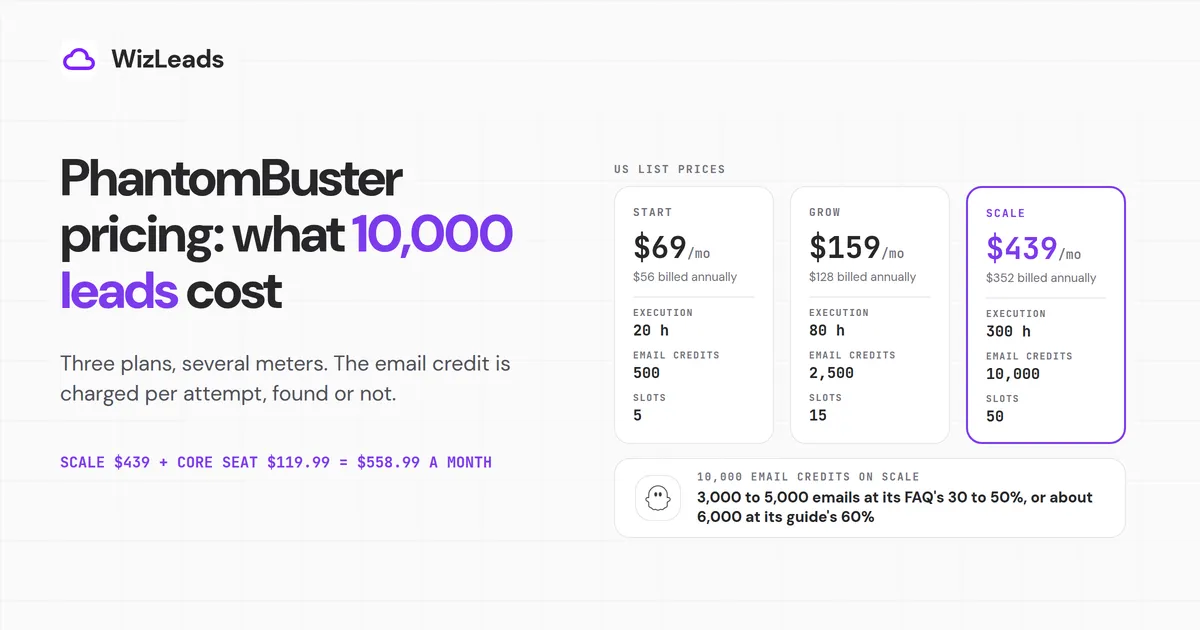
PhantomBuster costs $69, $159 or $439 a month for Start, Grow and Scale on monthly billing, or $56, $128 and $352 a month billed annually. The 14-day trial is free and needs no card. Each plan bundles execution hours, automation slots, email credits and AI credits. The email meter sets the cost of a lead list, because one credit buys one attempt whether or not an email comes back.
Priced on PhantomBuster's own numbers, 10,000 Sales Navigator leads with emails need Scale plus a Sales Navigator seat. They return about 6,000 emails at the 60% match rate in its plan-choice guide, or 3,000 to 5,000 at the 30 to 50% in the same guide's FAQ. Its recommended daily limits stretch the export over 4 to 10 days. The fee pays off when you use the wider catalogue of automations, and it is an expensive route for one Sales Navigator list with emails.
WizLeads, which publishes this blog, builds a tool that exports Sales Navigator searches with emails, so the last sections price the same job on it. We took every PhantomBuster figure from its own pages and did the arithmetic ourselves.
PhantomBuster plans and prices as of October 2026
| Plan | Billed monthly | Billed annually | Execution time | Automation slots | Email credits | AI credits |
|---|---|---|---|---|---|---|
| Trial (14 days) | $0 | n/a | 2 hours total | 5 | 50 total | 1,000 total |
| Start | $69/mo | $56/mo ($672/yr) | 20 h/month | 5 | 500/month | 10,000/month |
| Grow | $159/mo | $128/mo ($1,536/yr) | 80 h/month | 15 | 2,500/month | 30,000/month |
| Scale | $439/mo | $352/mo ($4,224/yr) | 300 h/month | 50 | 10,000/month | 90,000/month |
US prices from PhantomBuster's pricing page, read with the Monthly toggle clicked because the page opens on Annual. PhantomBuster's plan guide, which dates its own table "current as of May 2026", gives the same numbers.
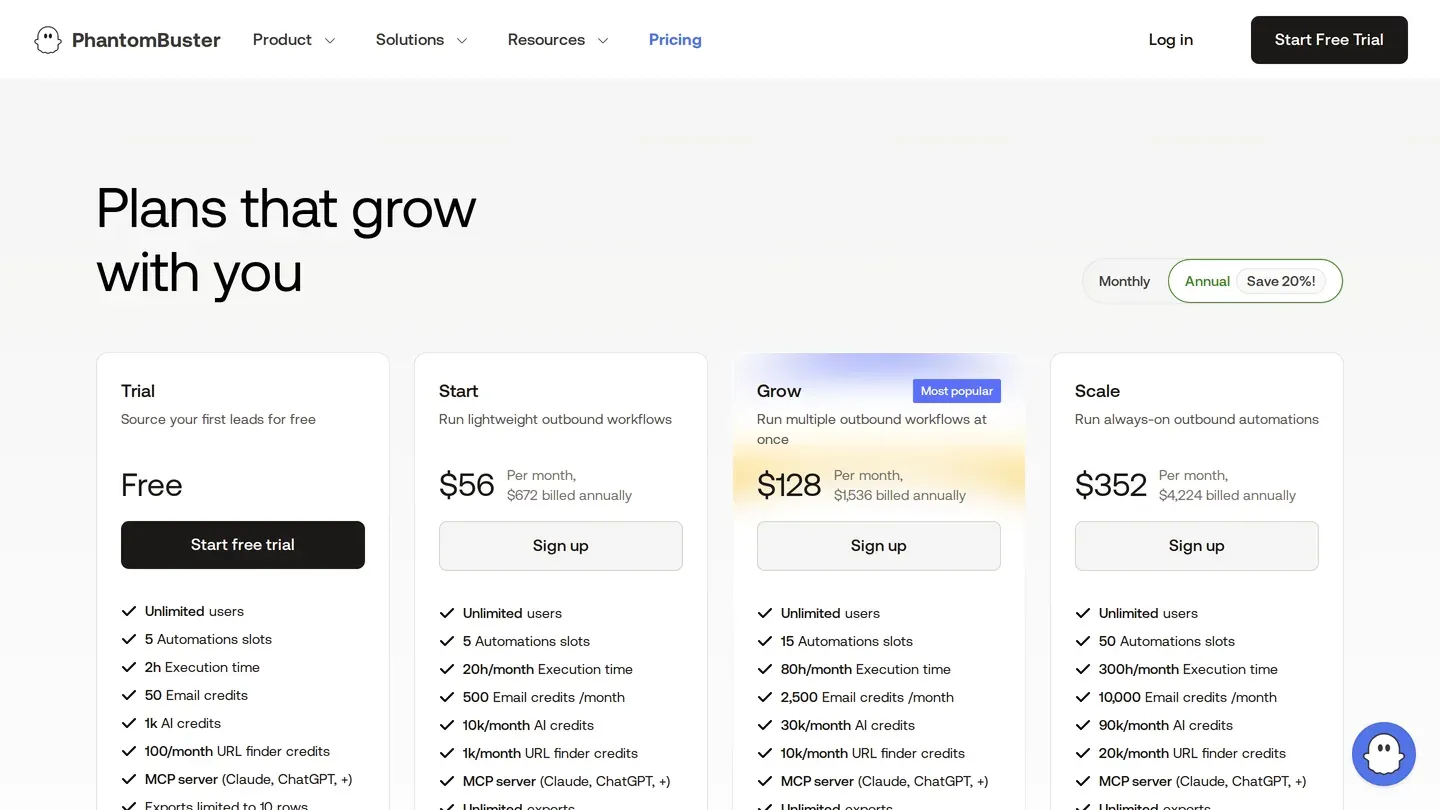
The plans also carry URL finder credits (1,000, 10,000 and 20,000 a month) and CAPTCHA credits (1,000, 5,000 and 30,000). Only Grow and Scale get priority support. AI credits pay for GPT steps at roughly 1 credit per 100 tokens on GPT-3.5 and 30 on GPT-4, according to PhantomBuster's AI credits guide. None of these three pools limits the job priced below.
European visitors see the same numerals in euros (Scale is 439€ a month from Germany). All prices exclude VAT. Your billing currency is set at your first payment and "cannot be changed later".
Plans are priced per workspace, not per seat. "Resources (execution time, slots, credits) are shared across all members in that workspace," so a new teammate adds neither cost nor capacity. The pricing page lists "Unlimited users" on every plan, while the plan guide says "All plans support up to 100 members per Workspace." If your team is near 100 people, ask which one applies.
The pricing page's meta description still reads "Plans start at $59", which matches neither rendered price. The $59 is the old Starter price, still shown under the retired Starter, Pro and Team names on Capterra's PhantomBuster listing.
The "Save 20%" works out to 18.8% to 19.8%
The annual toggle advertises "Save 20%". Set twelve monthly payments against each annual price and the real figure is a little lower on every plan:
| Plan | 12 monthly payments | Annual price | You save | Actual discount |
|---|---|---|---|---|
| Start | $828 | $672 | $156 | 18.8% |
| Grow | $1,908 | $1,536 | $372 | 19.5% |
| Scale | $5,268 | $4,224 | $1,044 | 19.8% |
The refund terms matter more than a gap of 1.2 points at most. PhantomBuster's refund policy gives monthly plans 14 days, and only if "no resources" were used. Annual plans get 30 days. If you used anything, "you are charged one month at the standard monthly rate and the rest is refunded".
PhantomBuster free plan vs the free trial
The free trial lasts 14 days, needs no card and caps downloads at 10 rows per file, according to PhantomBuster's trial guide. Without an upgrade, the workspace then drops to the free plan: "1 Phantom slot, 30 minutes of execution time per month, and 50 MB of storage". It has no email or AI credits. The pricing page shows a Trial card and no card for the Free plan.
The meters behind PhantomBuster credits and hours
Execution time
The pricing page FAQ defines execution time as "the total monthly time your automations can run", used "while Phantoms are actively working". A bigger plan buys more total hours, "not the speed of each run", and the hours reset on your billing date, per PhantomBuster's slots and execution time guide.
When the hours run out, the same FAQ says "Your automations will pause until your execution time resets or you upgrade your plan. No overage charges are applied automatically." PhantomBuster's pricing explainer adds that "Execution time and slots don't have mid-cycle top-ups."
Automation slots
The pricing FAQ calls slots "the number of automations you can run at the same time". The help centre is stricter. Every Phantom or Workflow on your dashboard "counts toward your slot limit, regardless of whether it has been launched or is currently running", and a Workflow can take up to three. Start's 5 slots fill quickly once you chain steps.
Email credits: one credit per attempt
The pricing page says only that each enrichment "consumes credits based on usage". The definition sits in the help centre: "1 credit = 1 attempt to find and verify an email for one profile" (Professional Email Finder guide), and "1 credit = 1 lookup, even if no match is found" (from the plan-choice guide).
The same guide says how many lookups come back. Its body says "A good match rate is around 60%, depending on how complete and accurate your input (name and company) is," while its FAQ gives a typical 30 to 50%.
The credits run on BetterContact's waterfall, which PhantomBuster says "queries 20+ data sources". You can also connect your own Dropcontact, Hunter or Snov.io key and spend that provider's credits instead.
Assign each plan's whole fee to its email credits and an attempt costs $138 per 1,000 on Start, $63.60 on Grow and $43.90 on Scale at monthly prices. Billed annually, the same attempts cost $112, $51.20 and $35.20. These are pro-rata unit costs, since the same fee also buys hours, slots and AI credits.
Running out: no rollover, no overage, and two answers on add-on credits
When a credit type runs out, PhantomBuster's credit-limit guide says "Phantoms that rely on it will stop running until your credits reset." Its email discovery guide says the Phantom "will still run and return any other lead data, but the email column will remain empty", with an error such as "No email discovery credits left". Read together, a Phantom that exists to find emails, like the Professional Email Finder, stops until the reset. One with an optional email step keeps running without emails.
The credit-limit guide also says leftovers do not carry over: "If you don't use them, they simply go unused and reset at the start of each billing cycle."
Whether you can buy more mid-cycle depends on which PhantomBuster page you read. The pricing explainer, last modified in July 2026, says "You can purchase add-on credit packs or upgrade to a plan with a larger monthly allocation." The credit-limit guide, updated in August 2026, answers the same question with "No. Credits can't be purchased separately."
Neither page publishes a pack price, so budget on the upgrade path. Upgrades "take effect immediately", and you pay "the prorated difference for the remaining days in your cycle", according to the plan changes guide. Above Scale there is no published price: the plan guide says to contact the Customer Care Team "for a custom solution".
What 10,000 Sales Navigator leads with emails cost on PhantomBuster
Take one job: export 10,000 leads from Sales Navigator searches and find a work email for each. The figures below come from PhantomBuster's own meters, estimates and recommended limits.
Step 1: export the leads (about 2.3 hours of run time, 4 to 10 days)
Sales Navigator shows at most 2,500 people per search, a cap PhantomBuster's Search Export guide repeats. So 10,000 leads means at least four searches. PhantomBuster estimates "~35 minutes per 2,500 results", which puts the export at about 140 minutes of execution time. Start's 20 hours carries that easily.
The calendar is the slow part. The Phantom needs "A connected Sales Navigator account" and your LinkedIn session cookie. PhantomBuster's rate-limit table recommends 1,000 results a day on a new or infrequently used account. It recommends 2,500 a day on a frequently used Premium account with over 2,000 connections, or on an Advanced Sales Navigator account, with one launch a day.
So the export takes 4 days at best and 10 in the lower tier. PhantomBuster's suggested way round the daily cap is more accounts ("3 accounts = 3,000 results"). Each extra account is another Sales Navigator subscription.
Step 2: find the emails (about 50 hours and 10,000 credits)
The Professional Email Finder takes "full names and company, OR first name, last name and domain" and estimates "~3 minutes per 10 people". So 10,000 attempts need about 50 hours of execution time. That is more than Start's 20 and inside Grow's 80.
The credits decide the plan. Scale is the only plan with 10,000 email credits a month. On Grow's 2,500 the same list takes four months ($636 at monthly prices). On Start's 500 it takes twenty.
The all-in-one Sales Navigator Search to Emails workflow is slower still. By default it spends 10 email credits a day, so 10,000 attempts take 1,000 days unless you raise that setting. With email discovery on, PhantomBuster also says to "only process half of the recommended limits", because each profile opens two pages.
The table runs those 10,000 attempts through both match rates in the plan-choice guide. WizLeads also uses 60% as its find rate when it sizes plans.
| Match rate | Emails found | Scale billed monthly ($439): per 1,000 found | Scale billed annually ($352/mo): per 1,000 found |
|---|---|---|---|
| 30% (FAQ range, low end) | 3,000 | $146.33 | $117.33 |
| 40% | 4,000 | $109.75 | $88.00 |
| 50% (FAQ range, high end) | 5,000 | $87.80 | $70.40 |
| 60% (guide body) | 6,000 | $73.17 | $58.67 |
Pro-rata unit costs with the whole plan fee assigned to email credits. At 30%, 7,000 of the 10,000 credits return no email, and the bill stays the same.
The full PhantomBuster cost of the job
Scale at $439 plus a Sales Navigator Core seat at $119.99, LinkedIn's US list price, comes to $558.99 a month at monthly list prices. Billed annually, $352 plus Core's $1,079.88 a year works out to $441.99 a month, a $5,303.88 commitment. PhantomBuster's rate-limit table puts Advanced Sales Navigator accounts in its 2,500-a-day column. Advanced lists at $159.99 a month, which lifts the monthly total to $598.99, and the Sales Navigator cost breakdown prices every plan.
The job needs about 52 hours of execution time, well inside Scale's 300. PhantomBuster's recommended daily limits set the calendar.
Per attempt vs per found: how other tools meter the same emails
A per-found meter makes the credit count equal the delivered count, so a miss costs nothing. The table sets PhantomBuster's Scale beside tools that bill that way, on the email meter only.
| Tool | Email meter | Per 1,000 emails found | Price basis |
|---|---|---|---|
| PhantomBuster Scale | 1 credit per attempt, miss included | $73.17 at 60%; $87.80 to $146.33 at 30 to 50% | $439/mo, at the two rates in its plan-choice guide |
| Wiza Email | billed on valid emails | $174 | $99 per user for 500, plus $0.15 each extra |
| Skrapp Professional | 1 credit per address returned | $12.90 | $129 for 10,000 |
| WizLeads | 3 credits per email found, miss free | $11.70 | Freelancer, $39 for 10,000 credits |
Pro-rata unit costs, except Wiza's, which is the actual monthly bill for 1,000 valid emails. Prices come from the Wiza, Skrapp and WizLeads pricing pages.
That $174 is on Wiza's monthly Email plan. On annual billing the same plan, at $83 a month billed $990 a year, lists "Unlimited email reveals". The WizLeads figure assumes a whole Freelancer plan spent on emails, and the combined job in the next section needs a bigger plan.
The same job on WizLeads
Scraping costs 1 credit per result with your LinkedIn account connected, or 2 in account-less mode. Account-less mode runs without your LinkedIn account or an active Sales Navigator seat, though you still need Sales Navigator access to build the search URL. It covers plain search URLs, while saved lead lists, saved searches and the 1st-degree filter need your own account connected.
Finding a work email costs 3 credits per email found and nothing for a miss, and it can run inside the same scraping task. The table applies the same match rates as above, because neither tool's rate on your list is known before you run it:
| Match rate | Emails found | Email credits | Job total, account connected | Job total, account-less |
|---|---|---|---|---|
| 30% | 3,000 | 9,000 | 19,000 | 29,000 |
| 50% | 5,000 | 15,000 | 25,000 | 35,000 |
| 60% | 6,000 | 18,000 | 28,000 | 38,000 |
Credit rates come from the WizLeads API documentation and plan sizes from its pricing page.
Every row's final bill fits inside the Agency plan's 40,000 credits at $99 a month, while Freelancer's 10,000 would not carry it. WizLeads holds 3 credits per row while a task runs and returns them for rows with no email, so a task needs 4 credits per lead on hand connected and 5 account-less.
The connected job fills Agency exactly. The account-less job needs 50,000 on hand, so run it as smaller tasks or add a 10,000-credit top-up for $50. In account-less mode the plan, plus any top-up, is the whole WizLeads bill, against $558.99 for PhantomBuster Scale plus a Core seat.
Agency also includes Smart Link Splitting, which checks the lead count and splits a link into chunks of 2,000 results or less, so no results are lost past the 2,500 cap. A 5,000-lead task takes 15 to 20 minutes. Unused credits roll over for one billing period, where PhantomBuster's reset every cycle. New accounts get 500 free credits once, enough to run a small search from your own Sales Navigator URL before you pay.
PhantomBuster's LinkedIn limits and LinkedIn's own rules
PhantomBuster presents every daily figure above as its own recommendation. Its rate-limit table says the limits "are based on aggregated observations and community experience" and should be treated "as starting guidelines". Its account-safety guide states "LinkedIn doesn't publish official automation limits."
The limits apply per LinkedIn account, so several Phantoms on one account share one budget: "Divide the recommended limit by the number of Phantoms sharing that account."
LinkedIn states its position on its prohibited software page: "we don't permit the use of any third party software, including 'crawlers', bots, browser plug-ins, or browser extensions that scrape, modify the appearance of, or automate activity on LinkedIn's website." Members who use such tools "risk having their accounts restricted or shut down."
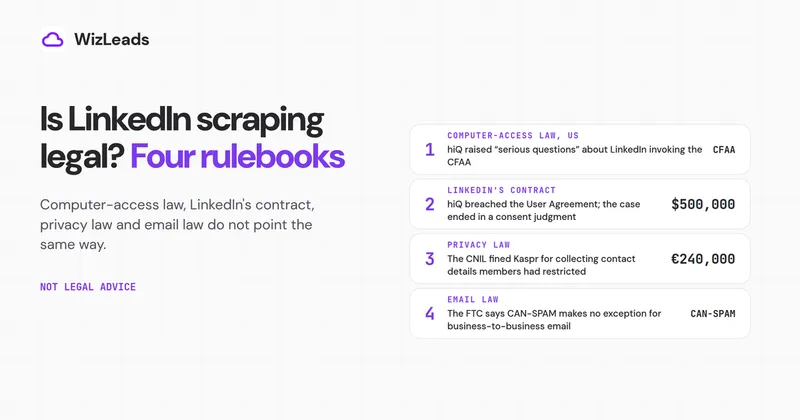
PhantomBuster's pricing FAQ describes its product as "built for compliant use" and says it "only works with publicly available data accessed through your own accounts." Both positions are public, and LinkedIn's page names no volume at which automation becomes acceptable. The court cases and contracts behind that gap are set out in the explainer on whether LinkedIn scraping is legal.
Which PhantomBuster plan fits your job
Pick by the job. Each plan's monthly email yield is shown at the 30 to 50% in PhantomBuster's FAQ and the 60% in its guide body:
- Start. Carries Sales Navigator exports. Email yield: 150 to 250 emails a month, or 300 at 60%.
- Grow. Carries extraction and outreach Phantoms side by side. Email yield: 750 to 1,250 emails a month, or 1,500 at 60%.
- Scale. Carries the 10,000-lead job above. Email yield: the Step 2 table.
PhantomBuster is the better pick when the job goes beyond one Sales Navigator list. Its pricing page counts "100+ automations & workflows", and its LinkedIn catalogue covers outreach (auto-connect invites and messages) as well as extraction. AI steps are paid from AI credits.
For chained actions across LinkedIn and other sites, that breadth is what the fee buys. If one job dominates your usage, the best LinkedIn scrapers list ranks twelve scrapers on account exposure, the 2,500 cap, email quality and cost.
WizLeads does not cover that ground. It scrapes Sales Navigator searches and lists and LinkedIn Company Followers and Group Members, and finds and verifies emails. It does not scrape free LinkedIn search, posts or engagers. For a Sales Navigator list with emails, the per-found tools in the Sales Navigator scrapers roundup are the ones to price against PhantomBuster's all-in figure.