WizLeads


TL;DR
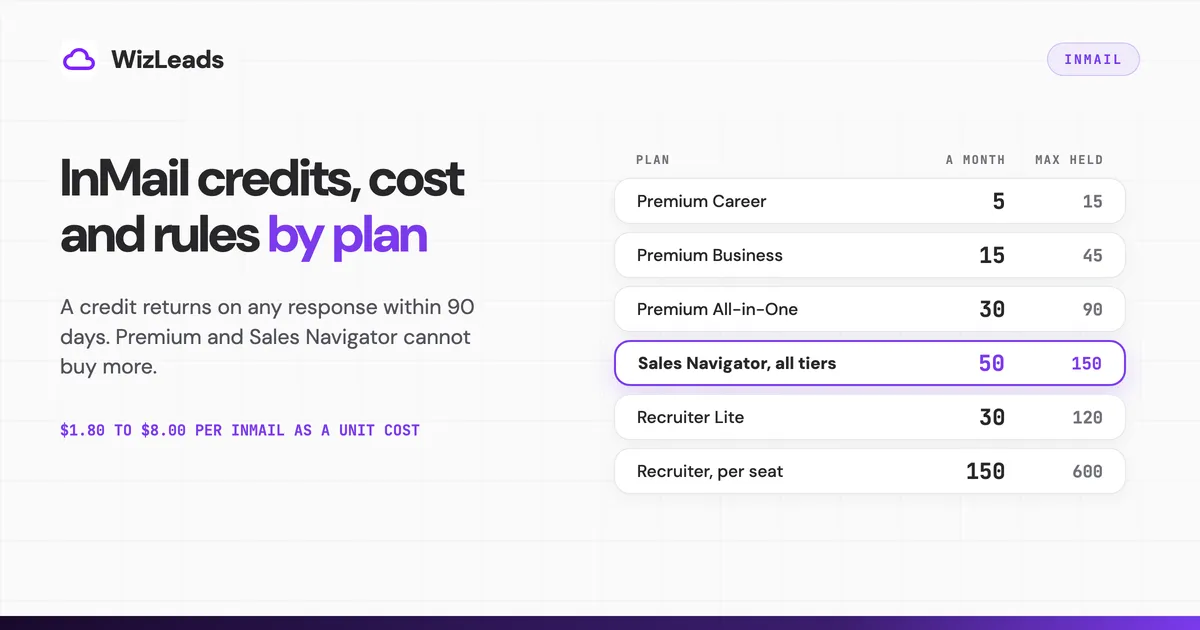
LinkedIn InMail is a paid message to a member you are not connected to. It comes from the monthly credits a paid plan gives you: 5 on Premium Career, 15 on Premium Business, 30 on Premium All-in-One, 50 on every Sales Navigator tier, 30 on Recruiter Lite and 150 per seat on Recruiter. A credit comes back when the recipient accepts, declines or replies within 90 days, and because LinkedIn sells no single InMails, the cost per message is the plan price divided by its credits, from $8.00 on Premium Career down to $1.80 on Sales Navigator Core billed annually. Spend credits on prospects who follow your company or changed jobs recently, send free InMails to Open Profile members, and reach everyone else by email, starting from the same search with a tool like WizLeads' Sales Navigator lead export.
Those allowances sit inside three rulebooks. Premium, Sales Navigator and Recruiter each set their own message length, renewal date, rollover cap and top-up options. Every rule below comes from LinkedIn's help centre, with LinkedIn's sales data kept apart from its recruiting data, because the two lead to different advice.
To send an InMail on Premium, open the member's profile, click More, choose Message and click Send. A Sales Navigator seat sends only from inside Sales Navigator.
What is InMail?
LinkedIn's InMail help page defines it as "a premium feature, and it allows you to directly message another LinkedIn member that you're not connected to." A free account can message only its connections. LinkedIn's messaging help page names Premium, Sales Navigator and Recruiter as the subscriptions that carry InMail, and lists Campaign Manager beside them for Sponsored Messaging ads.
The same page lists who you may be able to reach without a credit: 1st-degree connections, LinkedIn Pages, Premium members with Open Profile switched on, and, as a message request, members of a Group you share or your current coworkers. It adds that LinkedIn limits "how many messages a member can send in a certain time period", without giving a number.
Any member can also set "Allow others to send you InMail?" to No in their message settings, and then you cannot InMail them at all. InMail itself is LinkedIn's own feature, sold with Premium, Sales Navigator and Recruiter, but the label says nothing about whether a particular sender can be trusted.
InMail vs message vs connection note
| Route | Who it reaches | What it costs you |
|---|---|---|
| Message | Your 1st-degree connections | Free |
| Connection request note | Anyone you invite, within LinkedIn's invitation limits | Free members get a few notes a month (see below); Premium members get unlimited notes |
| InMail | Anyone who has not switched InMail off | 1 credit, returned on a response within 90 days |
| Open Profile message | Premium members with Open Profile on | Free, within a limit LinkedIn does not publish for Premium or Sales Navigator |
Sources: LinkedIn's help pages on messaging, InMail, Open Profile and invitations.
LinkedIn contradicts itself on the free allowance. Its newest page on invitations says "up to three connection requests per month", at 200 characters each, while two older pages, on the invitation limit and on InMail versus invitations, say five.
Open Profile: InMail without a credit
LinkedIn's Open Profile help page says the feature "allows anyone on LinkedIn to contact a Premium member for free, even if they're not in the sender's network." The Premium badge alone tells you nothing, because a member can show Premium without accepting Open Profile messages, and our guide to LinkedIn Open Profile covers who can turn it on and how to find those members.
In Sales Navigator, a message to a 1st-degree connection or an Open Profile goes out as a free InMail. It uses no credit, but LinkedIn counts it in your InMail response rate, so ignored free sends still pull the rate down.
Another Open Profile help page says LinkedIn limits "the number of Open Profile messages you can send in a given time period", and it gives no figure for Premium or Sales Navigator.
Recruiter's sending limits cap Open Profile messages at 350 per seat per calendar month, after which standard credits are used. For Recruiter Lite, that same page says "up to 100 Open Profile InMails per month" in its text and 50 in its table.
Sponsored Messaging is an ad, not InMail
LinkedIn announced on 2 December 2019 that Sponsored InMail is now Message Ad, and its message settings page calls Sponsored Messaging "a form of native advertising displayed in the context of your messaging experience". LinkedIn's ads help says these ads are charged per send, and its ads pricing page, which says costs come from the ad auction, lists no per-send rate. In the EEA and Switzerland, only members who opted in receive them.
How to send an InMail on LinkedIn
LinkedIn's help page on sending an InMail gives the Premium steps. Sales Navigator has its own, because a seat there can send InMails only from inside Sales Navigator.
On Premium, on desktop:
- Open the profile of the member you want to reach, or search for them and start a new message from the messaging page.
- Click More in their introduction section, then choose Message and their name from the dropdown.
- Type a subject, which is optional on Premium, and then your message.
- Click Send.
On mobile, tap Message in the introduction section instead of More, add the subject and the text, and tap Send.
On Sales Navigator, on desktop:
- Sign in to Sales Navigator, since LinkedIn.com cannot send it.
- Click Messaging in the top menu and then the Edit icon, or open the lead's Sales Navigator profile and click Message. If the profile is locked, use the button on it that opens the full profile first.
- Add a subject line of up to 200 characters and your message of up to 1,900.
- Optionally edit your signature or attach a file up to 200 MB.
- Click Send.
Check your balance in the compose window before you send. A member who has switched InMail off in their message settings cannot be reached this way at all, and Open Profile members get a free message from the same box.
After you send, a response within 90 days returns the credit, as the credit-back section below explains. A Sales Navigator reply lands in your Sales Navigator inbox, which is separate from your LinkedIn inbox.
LinkedIn InMail credits by plan
| Plan | Credits a month | Most you can hold | New credits arrive | Can you buy more? |
|---|---|---|---|---|
| Premium Career | 5 | 15 | First day of your billing cycle | No |
| Premium Business | 15 | 45 | First day of your billing cycle | No |
| Premium All-in-One | 30 | 90 | First day of your billing cycle | No |
| Premium Company Page | none listed | n/a | n/a | n/a |
| Sales Navigator Core, Advanced and Advanced Plus | 50 | 150 | 1st of each month, UTC | No |
| Recruiter Lite | 30 per licence, pooled across the contract | 120 per seat | When your billing cycle renews | Packs of 10, up to 70 extra per seat a month |
| Recruiter | 150 per seat, pooled across the contract | 4x the monthly allotment (600 on one seat) | First day of your billing cycle | Through LinkedIn sales |
Sources: LinkedIn's help pages on InMail, credits and renewal, Sales Navigator credits and Recruiter InMail, plus its free vs Premium comparison and Recruiter plan comparison. The 600 is our arithmetic from LinkedIn's four-times rule.
You can see your balance on the My Premium page and in the InMail compose window on Premium, and on the Sales Navigator Settings page in Sales Navigator.
No plan is unlimited: LinkedIn's InMail help page says it doesn't "offer a subscription plan with unlimited InMail message credits".
Upgrading within Sales Navigator buys no extra InMail, since LinkedIn's Sales Navigator credits page says "All Sales Navigator subscription types provide the same number of credits". Yet the Sales Navigator compare-plans page promises "the most InMails of any LinkedIn product" at 50 a month, while LinkedIn's Recruiter comparison says "Recruiter gives you the most monthly InMails", at a documented 150 per seat.
If you are weighing Premium Business's 15 against Sales Navigator's 50, the search tools matter more than the credits, which is the case we make in Sales Navigator vs Premium. The LinkedIn advanced search guide lists which filters each plan has.
Do InMail credits roll over?
On Premium, LinkedIn's InMail FAQ says "InMail message credits expire after 90 days", and the caps match that window exactly: 15, 45 and 90 are three months of 5, 15 and 30. Sales Navigator credits carry over to a maximum of 150 and "must be used within 90 days".
The recruiting products allow four months. Recruiter rolls credits over until they would exceed "four times your monthly recruiter allotment", and the excess expires. Recruiter Lite's 120 is four months of 30. LinkedIn's Recruiter Lite top-up page spells out what hitting the cap costs: with 115 credits left at renewal, "you'll only receive 5 InMails for your monthly allotment and the remaining 25 InMails will be skipped and be non-recoverable".
So on any plan, a full balance means credits are expiring. In Recruiter, refunds can briefly break the ceiling: LinkedIn's Recruiter InMail FAQ says returned credits "may temporarily push your balance above your limit" until the next refresh date.
Can you buy more InMail credits?
Only on the recruiting products.
- LinkedIn's page on sending InMail says of Premium: "It's not possible to purchase additional InMail message credits outside of the monthly allotment".
- The Sales Navigator credits page says "At this time, you can't purchase additional InMail credits".
- On Recruiter Lite, a Purchaser Admin buys packs of 10 in Product settings, up to 70 extra per seat a month and never above 120 per seat. Bought credits never expire but count toward the cap. LinkedIn's pages give no pack price.
- Recruiter's InMail FAQ says "Recruiter customers can contact us to purchase more credits".
Any top-up price you see quoted for Premium or Sales Navigator is not LinkedIn's, because LinkedIn sells none.
Cancelling, upgrading and switching products
Cancelling Premium zeroes your balance, and LinkedIn's credits and renewal page says credits are "not transferrable when upgrading your account". Sales Navigator applies the same rule when you cancel or change subscription type, so spend what you hold before either move.
Credits don't cross products either. Premium credits "can't be used to send InMail messages on Sales Navigator or LinkedIn Recruiter", says the InMail help page. On a Sales Navigator seat, InMails "can only be sent from Sales Navigator, not LinkedIn.com", per LinkedIn's Sales Navigator InMail page, and its sending guide adds that "your LinkedIn and Sales Navigator inboxes are separate".
How the InMail credit-back rule works
LinkedIn returns the credit when the recipient responds, and what counts as a response varies by product.
| Product | What returns the credit | Window | What does not |
|---|---|---|---|
| Premium | Accept, decline or reply, Quick Replies included | 90 days | A pending InMail |
| Sales Navigator | Any response: "Interested", "Maybe later", "Not interested" or an auto reply, credited immediately | 90 days | No response; deleting an unanswered InMail |
| Recruiter | Accept, decline or reply, Quick Replies included | 90 days | Pending messages; archiving |
Sources: LinkedIn Help on credits and renewal, Sales Navigator credits and Recruiter InMail.
A "Not interested" therefore costs you nothing. The credits you lose are the InMails met with silence, so your real cost per InMail depends on how many people ignore you.
LinkedIn sends the recipient an automatic reminder within three days of the InMail.
Whether the recipient opened it is less certain, because LinkedIn's pages contradict each other. Its delivery and typing indicators page says "Read receipts and typing indicators do not appear to senders of InMail messages." Its Sales Navigator help pages say the opposite: "You'll receive real-time read receipts for your Sent InMail messages".
We cannot say which governs, so treat a read receipt on an InMail as not guaranteed.
Deleting, second sends and declines
In Sales Navigator, you can edit or delete an InMail only within 60 minutes of sending it. The credits page warns that "if you delete an InMail that hasn't received a response, no InMail credit will be credited back to you".
A second InMail to the same person is where LinkedIn's pages conflict. The general credits and renewal page says "You can't send another InMail message to a member until they respond to the first message you sent", without limiting that to Premium. The Sales Navigator page says a second InMail before a response is allowed and "another InMail credit will be used".
A decline refunds your credit, but "you cannot send them another InMail message on the same thread", per LinkedIn's Sales Navigator response types page.
Recruiter adds follow-up InMails, which LinkedIn's Recruiter Lite InMail FAQ says Lite lacks. Each uses a credit up front. A reply to the first message cancels the follow-up and refunds both, a reply after the follow-up refunds one, and silence refunds none, according to the Recruiter InMail FAQ.
LinkedIn InMail cost per message
LinkedIn does not sell single InMails on Premium or Sales Navigator, so the LinkedIn InMail cost is the subscription. Dividing each plan's price by its monthly credits gives a unit cost you can compare. That is our arithmetic, not a price LinkedIn charges.
Your real cost can sit below the table for two reasons: the subscription buys other features, and every response returns a credit. It sits above the table when credits expire unused.
| Plan | Monthly | Annual | Credits a month | Unit cost per InMail, monthly billing | Unit cost per InMail, annual billing |
|---|---|---|---|---|---|
| Premium Career | $39.99 | $239.88 | 5 | $8.00 | $4.00 |
| Premium Business | $69.99 | $539.88 | 15 | $4.67 | $3.00 |
| Premium All-in-One | $89.99 | $899.88 | 30 | $3.00 | $2.50 |
| Sales Navigator Core | $119.99 | $1,079.88 | 50 | $2.40 | $1.80 |
| Sales Navigator Advanced | $159.99 | $1,799.88 | 50 | $3.20 | $3.00 |
US list prices as of October 2026, from LinkedIn's Premium Career, Premium Business, Premium All-in-One and Sales Navigator pricing pages. Unit cost is the price divided by monthly credits (for annual, divided by 12 first), computed by us. Advanced Plus is quote-only.
Sales Navigator Core billed annually has the lowest unit cost here. Advanced costs more per InMail than Core because it adds $40 a month and no credits, so buy it for its other features, since it adds no InMail.
Recruiter has no list price to divide: LinkedIn's Recruiter plan comparison says "Contact our Sales team". Recruiter Lite is $170 a month for one seat, a price we confirmed. LinkedIn's help page no longer prints it; for Lite it says only "Visit our LinkedIn Recruiter Lite page to sign up".
LinkedIn InMail character limits by product
| Product | Subject line | Body | Also |
|---|---|---|---|
| Premium | Up to 200 characters, optional | Up to 2,000 characters | |
| Sales Navigator | Up to 200 characters | Up to 1,900 characters, including a signature of up to 150 | Attachments up to 200 MB; no bulk sending, no templates |
| Recruiter and Recruiter Lite | Up to 200 characters, required | Up to 1,900 characters | Recruiter bulk-sends to up to 25 people at once; Lite cannot |
Sources: LinkedIn Help on sending in Sales Navigator and Recruiter InMail, plus its Premium InMail, Sales Navigator InMail and Recruiter plan pages.
LinkedIn's general InMail character limits page names no product and says 1,900 for every InMail. For Premium, our table follows the two Premium pages, which say 2,000.
Sales Navigator blocks bulk sending "to help maintain the quality and personalization of messages", so every InMail there goes out one at a time.
The LinkedIn connection request character limit is lower. LinkedIn's newest invitations page puts a free member's note at up to 200 characters, and its older page on InMail versus invitations says Premium notes can run to 300. For a plain message to a connection, LinkedIn's help pages publish no character limit at all; the limits in the table above are for InMail.
What LinkedIn says about InMail replies
LinkedIn's headline number keeps changing
LinkedIn has made three comparisons with email:
- In November 2022, a LinkedIn Sales blog post on InMail templates said "InMails drive 3X higher response rates than emails", without naming the data.
- In April 2023, a LinkedIn Sales Blog post opened with "InMails are 3x more likely to be accepted than a cold call, and 6x more likely than email" without a source; the study it then describes covers "every single Sales Navigator InMail sent in 2022".
- In 2026, LinkedIn's Premium Business page says "Premium InMail is 5.7x more effective in hearing back than cold email", citing "LinkedIn data (Mar. 2026)".
They measure different outcomes (response, acceptance, hearing back). None of the three says how the email side was measured: the 2022 post says "Data shows", the 2023 post gives no source for its 6x, and the 2026 page cites "LinkedIn data (Mar. 2026)". Treat all three as LinkedIn's claims about its own product.
What went with higher acceptance, according to LinkedIn
The April 2023 study is built on sales InMail. LinkedIn reports these lifts, ordered by size:
| Signal | Lift in InMail acceptance |
|---|---|
| The prospect follows your company on LinkedIn | 270% |
| You have a complete LinkedIn profile | 87% |
| You viewed their profile within 30 days before sending | 78% |
| They started a job at a new company in the past 90 days | 62% |
| They started a new role in the past 90 days, at any company | 51% |
| They posted at least once in the past three months | 45% |
Source: the LinkedIn Sales Blog post of 18 April 2023, by Paul Petrone and Carla Intal, covering every Sales Navigator InMail sent in 2022.
The same study found acceptance "consistent across all days of the week". Its prospect-side signals, including the strongest at 270%, are ones you can check before spending a credit: whether the prospect follows your company, changed jobs recently or posts.
LinkedIn's advice to sellers on length sits on its Sales InMail templates page, which says to aim for 50 to 75 words and, further down, to keep messages between 50 and 70. It also says mobile devices truncate subject lines between 30 and 40 characters.
What LinkedIn's recruiter data says
The usual advice to keep it short and avoid Fridays comes from a different dataset. LinkedIn's Talent Blog (19 May 2022) says it analysed "tens of millions of InMails sent by corporate recruiters around the world between May 2021 and April 2022", excluding staffing firms and counting responses within 30 days.
- InMails under 400 characters had a response rate 22% above the average for all InMails, and those over 1,200 ran 11% below. Yet only 10% of InMails were under 400 characters, and 46% ran over 800.
- InMails sent individually got response rates about 15% higher than bulk sends.
- Saturday sends ran 8% below average and Friday 4% below. 65% of responses arrived within 24 hours and 90% within a week.
The Friday and Saturday effect is recruiter data, while LinkedIn's sales data found no day-of-week effect on acceptance. The two studies measure different outcomes in different populations, so we would not carry the timing rule over to sales.
Recruiter's 13% floor and other sending limits
LinkedIn's InMail Improvement Period page says recruiters "must keep their InMail response rate at or above 13% on 100 or more InMail messages sent within every 14-day assessment period". Missing it disables bulk InMail for two weeks, after a two-week warning and a 7-day grace period. A reply, an accept and a "Not Interested" all count as responses.
Per LinkedIn's Recruiter sending limits, seats can send up to 1,000 InMails a day, capped at 200 in a new seat's first week. Once any admin on a licence InMails a candidate, the whole licence waits 24 hours before sending that candidate another unless they respond sooner. The Recruiter InMail policy also bans untargeted mass InMail, marketing campaigns and event invitations.
LinkedIn documents no response-rate threshold for Sales Navigator. It can restrict an account whose messages are marked as spam, and its Sales Navigator restrictions page says temporary restrictions "are generally lifted automatically after a 24-hour period".
When InMail is worth a credit, and when email is cheaper
If your Sales Navigator search holds 2,500 people, your 50 monthly InMail credits reach 2% of it, and you cannot buy more. Spend the credits where LinkedIn says acceptance runs highest: prospects who follow your company, changed jobs in the last 90 days or posted in the last three months. Send free InMails to Open Profile members, and reach everyone else by email.
WizLeads' people search takes a Sales Navigator search URL, or a saved list URL with your own account connected, and returns the leads as a CSV, up to 2,500 per people search. Scraping costs 1 credit per lead with a connected account or 2 in account-less cloud mode.
Work-email enrichment costs 3 credits per email actually found, and WizLeads' work-email enrichment says "If we can't resolve it, you're not charged." Open Profile detection adds 1 credit per lead and shows who can take a free InMail.
A 2,500-lead search in account-less mode costs 5,000 credits to scrape. At a 60% find rate, the top of its usual 50 to 60% range, you get 1,500 work emails, which add 4,500 credits. The 9,500 total fits the Freelancer plan's 10,000 credits at $39 a month; with Open Profile detection it becomes 12,000, which needs Agency at $99 for 40,000.
All in, scraping included, that is about 6.3 credits per work email found, or about 2.5 cents each as a unit cost on Freelancer, which compares with the per-InMail costs in the table above. The two buy different things: an address still needs a sending setup and a sequence behind it, and our guide to exporting Sales Navigator leads compares the ways to get a search out of LinkedIn, WizLeads among them.