WizLeads


TL;DR
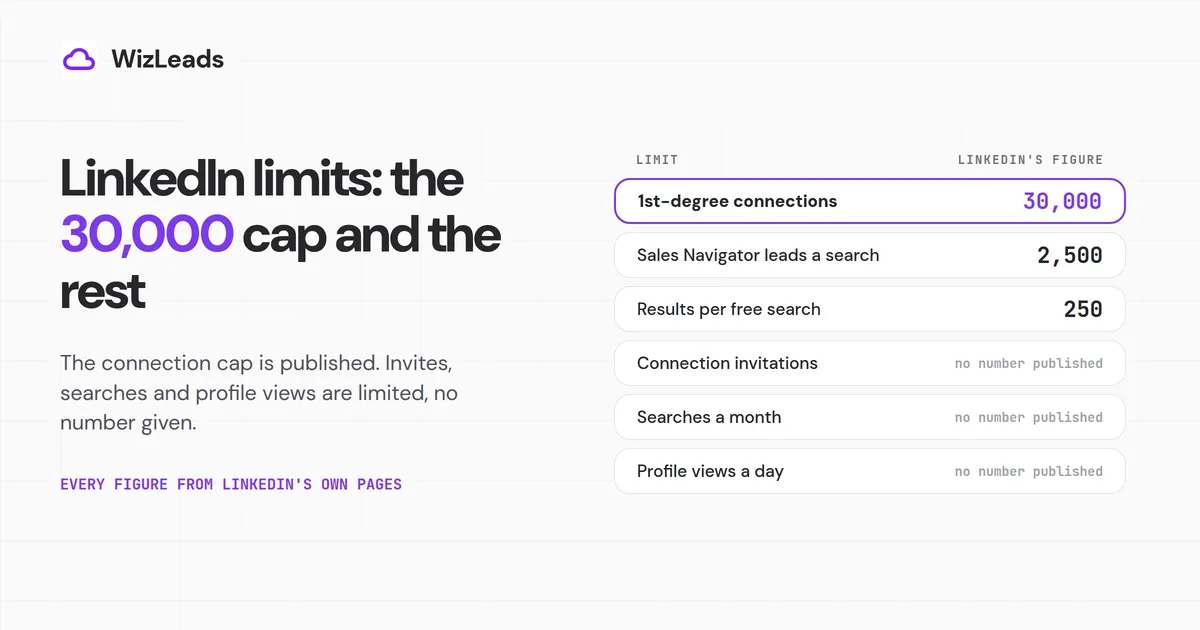
The LinkedIn connection limit is 30,000 1st-degree connections, and it is the only cap on connections LinkedIn publishes. The limit you are more likely to hit, on sending invitations, has no published number: LinkedIn says only that a restriction for reaching it "typically lasts one week".
Most LinkedIn limits work that way: it confirms the limit exists, says what happens at it and keeps the threshold to itself. A free search shows 250 results and Sales Navigator stops at 2,500 leads. The 100 to 250 invitations a week that other guides give appear on no LinkedIn page we read.
We took LinkedIn's figures from its own pages. Several of them disagree, and we name each one where they do.
LinkedIn's other limits at a glance
| Limit | LinkedIn's figure | LinkedIn's page |
|---|---|---|
| Connection invitations, per week or per day | A limit exists, no number published | Invitation limit reached |
| Pending invitations | A limit exists, no number published | Types of restrictions |
| Personalized notes, free account | 3 a month on the newest page, 5 on two older ones; 200 characters | Personalize invitations |
| Monthly searches (commercial use limit) | No number published; resets at midnight PST on the 1st | Commercial use limit |
| Profile views of non-connections | Daily limit, no number published | Profile view limits |
| Messages | A limit exists, no number published | Send messages |
The LinkedIn connection limit: 30,000
LinkedIn's network size page says "LinkedIn members can have up to 30,000 1st-degree connections." It names no plan that raises the cap, so the LinkedIn maximum connections figure is the same on free, Premium and Sales Navigator.
At the cap, two things change. Per the same page, "Follow will become the default option on your profile", and "You will not be able to accept or send new connection invitations unless you remove connections to keep network size under the limit."
Followers have no cap, but LinkedIn's pages disagree on how many people you can follow. The network size page says "the number of people who can follow you (and who you can follow) is unlimited". LinkedIn's newer follow and unfollow page says "Members can follow up to 5,000 people who aren't connections", which is the figure to use. At the 30,000 connection cap, people can still follow your posts, though they cannot connect.
Long before the cap, your profile stops showing the exact count. LinkedIn's page on connection counts says "Once a member accumulates more than 500 connections, 500+ will be displayed on their profile." And LinkedIn's Missing connect button page contradicts the network size page: among the reasons you won't see Connect on a member's profile, it lists "You have over 500 connections. By default, the Connect button will be replaced with Follow". Neither page mentions the other.
The LinkedIn weekly invitation limit
The limit most people run into is the LinkedIn invitation limit, which other guides call the LinkedIn connection request limit. LinkedIn's Invitation limit reached page says "All LinkedIn members, including those with Basic and Premium accounts, are subject to these limits."
Neither that page nor LinkedIn's Types of restrictions page gives a number for it. We searched the HTML of both for "weekly", "per week", "per day", "daily", 100, 200 and 250 and found no invitation count; where the pages mention weeks, it is for how long a restriction or a re-invite block lasts. LinkedIn has not published a number, or said whether it counts invitations by the day or the week.
LinkedIn does name the triggers. The restrictions page lists three. The first two: "You've sent many invitations within a short amount of time", and "Many of your invitations have been ignored, left pending, or marked as spam by the recipients." The third: if it suspects an automation tool, "we may suspend or restrict your account", and "Repeated suspensions may result in permanent restriction".
How long an invitation restriction lasts
LinkedIn gives three answers on three pages and does not reconcile them.
| LinkedIn page | What it says |
|---|---|
| Invitation limit reached | "This restriction typically lasts one week." |
| Types of restrictions | First restriction: "Wait a few hours, then try again." Multiple restrictions in a day: "Wait a few days, then try again." Too many outstanding invitations: "Wait for up to one month before attempting to send another invitation." Also: "Most restrictions will automatically be removed within one week." |
| Sales Navigator usage, limitations, and restrictions | "Temporary restrictions are generally lifted automatically after a 24-hour period." |
Both general pages mention a week, so plan around one. During a restriction, the Invitation limit reached page leaves you no options: "Withdrawing pending invitations will not remove the restriction. You cannot buy or acquire more invitations while restricted. LinkedIn cannot remove or shorten the wait period."
LinkedIn publishes no reset day or time for the invitation limit itself, and the guides that do disagree. Evaboot says it "resets 7 days after you send your first invitation", while Skrapp says it "operates on a rolling weekly schedule".
Pending and withdrawn invitations
Too many outstanding invitations is the one cause LinkedIn ties to a month-long wait, and LinkedIn gives no count for how many is too many. Withdrawing old ones has a cost as well: "After you withdraw an invitation, you won't be able to resend an invite to the same recipient for up to three weeks." Left alone, they lapse: LinkedIn's invitations FAQ says "Invitations expire after six months", after which "you can send a new one."
Skylead says "withdrawn invites don't count toward your weekly limit". The LinkedIn pages we read say only that withdrawing does not end a restriction in place, and nothing about how withdrawals count.
Does Premium or Sales Navigator raise it?
LinkedIn's pages point the other way. The restrictions page says "You can't buy or acquire more invitations while you've been restricted, or otherwise." Premium buys unlimited personalized notes, and LinkedIn's line on that ends "(connection request limits may still apply)". Sales Navigator's restrictions page lists "connection request invitations" among the things it may restrict, and gives no number either.
The weekly numbers in other guides
Ranking guides give these figures for the LinkedIn weekly connection limit. None appears on LinkedIn's pages about connection invitations.
| Guide | Weekly figure it gives |
|---|---|
| Skylead | "approximately 100"; 200 on Sales Navigator "according to some users" |
| LeadLoft | 100 to 200, which it puts at about 15 to 30 a day |
| Evaboot | 100 to 200 |
| Dux-Soup | 100 on a free plan, 250 on "a Premium Plan like Sales Navigator" |
| Skrapp | "100 invitations for all users", and on the same page, 100 to 200 |
Skylead's own Sales Navigator figure comes with a caveat: after the 200, Skylead adds "There's no official LinkedIn statement on this, however."
Personalized notes
LinkedIn's pages disagree on the free allowance. The newest, Personalize invitations to connect, says "You can add a personalized message to up to three connection requests per month", each "up to 200 characters". The older Invitation limit reached page says free members get "five connection requests per month", and an older page on InMail and invitations also says five, with no time period. LinkedIn has not said which is right.
Premium members "can send unlimited personalized invitations", per the newest page; only that InMail and invitations page gives their note length, 300 characters.
LinkedIn search limits: the commercial use limit
The LinkedIn search limits most people hit are the commercial use limit, a monthly cap on people searches and profile views. LinkedIn publishes no number for it, and it resets at midnight PST on the 1st of each month. Profile searches count toward it. Searching by name, browsing your 1st-degree connections and job search do not.
LinkedIn's commercial use limit page says that if you reach it, "your activity on LinkedIn indicates that you're likely using LinkedIn for commercial use, like hiring or prospecting."
LinkedIn publishes no threshold: "We are not able to display the exact number of searches or views you have left and we also cannot lift the limit upon request." The allowance "resets at midnight PST on the 1st of each calendar month", and the warning that you are close "may not display if you run through the full amount of searches or views too quickly."
| Counts toward the limit | Does not count |
|---|---|
| Searching for profiles on LinkedIn.com and mobile | Searching by name in the search box at the top of every page |
| Browsing profiles in People Also Viewed | Browsing your 1st-degree connections from the Connections page |
| Viewing member profiles on a Page's People tab | Searching on the Jobs page |
Browser plug-ins count too. LinkedIn's reset page warns that such tools "may run searches and view profiles in the background, which can cause you to surpass the limit without actually seeing any of the incremental warnings".
Upgrading raises the allowance, in the help centre's words: you can upgrade "to increase the number of profile searches and views" on Premium Business, Recruiter Lite or Sales Navigator, while "Our Premium DACH Essentials plans still include the commercial use limit." Cancelling Premium drops you back to the basic allowance, and "your limit will not be reset upon cancellation."
An older usage page lists Recruiter where the newer page says Recruiter Lite, and adds "Our Job Seeker plans still include the search limit." LinkedIn's Premium Business page says "Search for people and companies with no limits", where the help centre says "increase" and gives no number.
LeadLoft puts the limit at "typically 250 to 350 searches", and Evaboot says it limits searches "every week", where LinkedIn's page resets it monthly.
What to do when you hit the limit
When LinkedIn limits your searches this way, its help pages give four options. Asking LinkedIn to lift the limit is not one, because it says it cannot.
- Wait for the reset. The allowance returns on the 1st of the month, so the monthly limit for profile searches ends on its own.
- Search by name. Name searches in the box at the top of every page do not count toward the limit.
- Upgrade. LinkedIn lists Premium Business, Recruiter Lite and Sales Navigator as plans that raise your searches and views.
- Remove background plug-ins. If you use such tools, LinkedIn says "we suggest you discontinue their use".
Search result and profile view limits
LinkedIn search limits come in two kinds: the monthly limit for profile searches, which is the commercial use limit above, and a cap on results per search.
A free account gets "A maximum of 250 results per search or 25 pages of search results", per LinkedIn's search results page. The same page said 1,000 in a September 2025 capture, and Dux-Soup still lists "Free Plan = 1000 profiles shown per search". For Premium, LinkedIn promises an "Increased number of people searches for the Premium Business plan and above" with no per-search figure.
What is unlimited people browsing on LinkedIn? It is Premium's raised allowance of profile searches and views, not an absence of limits. LinkedIn's Cancel Premium FAQ lists "Unlimited people browsing (you may encounter the commercial use limit)" among the features you lose when you cancel, and, as with the Premium Business page's "no limits" above, no LinkedIn page puts a number on it.
LinkedIn contradicts itself here too. Its Sales Navigator search results limit page says its cap applies "both in Sales Navigator as well as LinkedIn.com", then gives only Sales Navigator's figures. The newer free-search page gives a lower figure for free LinkedIn.com searches.
Profile views carry a separate daily limit for people outside your network. LinkedIn's profile view page says reaching it signals commercial use such as "hiring, prospecting, or scraping", that you will "temporarily be unable to view profiles of members who are not your connections", and that "This limit is calculated based on your profile viewing activity on a daily basis." Evaboot's table gives 80 a day (150 for Premium) and 1,000 on Sales Navigator; LeadLoft says 500 on free and 2,000 on Sales Navigator or Recruiter.
Messages, InMail and Open Profile
LinkedIn's messaging page says "we limit how many messages a member can send in a certain time period". That sentence is the whole LinkedIn message limit as published: no number, and no exception for connections. Dux-Soup says "LinkedIn doesn't restrict how many messages you can send to your 1st-degree connections".
LinkedIn's InMail credits page gives monthly InMail credits of 5 on Premium Career, 15 on Premium Business, 50 on Sales Navigator Core and 30 on Recruiter Lite, and says "We currently don't offer a subscription plan with unlimited InMail message credits".
Open Profile lets members "contact a Premium member for free", but LinkedIn's Open Profile page adds "we limit the number of Open Profile messages you can send in a given time period", with no number for Premium or Sales Navigator. Skylead says paid subscribers get "800 free InMails a month" to open profiles; Evaboot's table says 200 a week.
Recruiter's limits page is the only LinkedIn page we found with daily or weekly InMail caps: 1,000 a day per seat, 200 in a new seat's first week, and 350 Open Profile messages a calendar month. It contradicts itself on Recruiter Lite's Open Profile allowance, 100 a month in the text and 50 in its table.
Sales Navigator limits
| Limit | LinkedIn's figure | LinkedIn's page |
|---|---|---|
| Search results | 2,500 leads across 100 pages, or 1,000 accounts across 40 pages | Search results limit |
| Leads per list | 1,000 per list, 10,000 leads in total | View and save leads |
| Saved searches | 50 lead searches and 50 account searches | Save searches |
| InMail credits | 50 a month on every tier, up to 150, used within 90 days | InMail credits |
| InMail length | Subject 200 characters, message 1,900 | Send an InMail message in Sales Navigator |
On a free trial, "certain features may be more limited than with a paid subscription", per the restrictions page. That search cap also limits what WizLeads' Sales Navigator scraper can return from one search, and it sets the size of any Sales Navigator export.
Follow, Page and Event invitation limits
LinkedIn publishes two follow limits: the 5,000 cap on following people who are not your connections, covered above, and a limit on inviting your connections to follow a Page. Admins share monthly credits that renew "on the first day of every month"; LinkedIn gives no number and says it is changing them (Page invitation limits). If you are not an admin, you can invite 30 connections a month to follow your employer's Page, and 50 a month to Pages with fewer than 5,000 followers where you are neither admin nor employee (Invitations to follow a Page).
Events carry the only weekly invitation figure we found on LinkedIn's help pages: "Organizers, Page admins, and attendees can send up to 1000 invitations per week" (Event invitation limits). That covers inviting connections to an Event, not connection requests.
Planning around the limits
- Keep pending invitations down. Too many outstanding invitations carry LinkedIn's longest listed wait, up to a month, and a withdrawn invitation locks that person out for up to three weeks.
- Spread your sending out and invite people likely to accept. Bursts of invitations and ignored or spam-marked ones are two of the three triggers LinkedIn names.
- For people you don't know, LinkedIn's own advice is "Use InMail and Groups to network with LinkedIn members you don't know."
- Budget searches by the month. The commercial use limit resets on the 1st, and plug-ins can spend it for you.
- Split a broad free search by location or company until each part fits under the free results cap. Each part is a separate search and counts toward the commercial use limit.
LinkedIn's prohibited software page says "we don't permit the use of any third party software" that scrapes or automates activity on LinkedIn, and it quotes the User Agreement, which bars attempts to "bypass or circumvent any access controls or use limits of the Services (such as search results, profiles, or videos)". Members who use such tools "risk having their accounts restricted or shut down," which matters for any LinkedIn scraping set-up that runs through your own account. Automation vendors publish their own sending limits, and the LinkedIn automation tools list puts those stated limits for 15 tools beside their prices.
Where WizLeads fits
WizLeads scrapes Sales Navigator searches into a CSV. It does not send invitations, messages or InMail.
Its account-less mode does not use your LinkedIn account. It needs no active Sales Navigator seat, though you still need Sales Navigator access to build the search URL, and it costs 2 credits per result.
With your own account connected, scraping costs 1 credit per result and runs through that account. Account-less mode covers plain search URLs only, so saved lead lists, saved searches and network filters such as 1st-degree connections need your account connected. In both modes WizLeads works within the Sales Navigator search caps above.