WizLeads


TL;DR
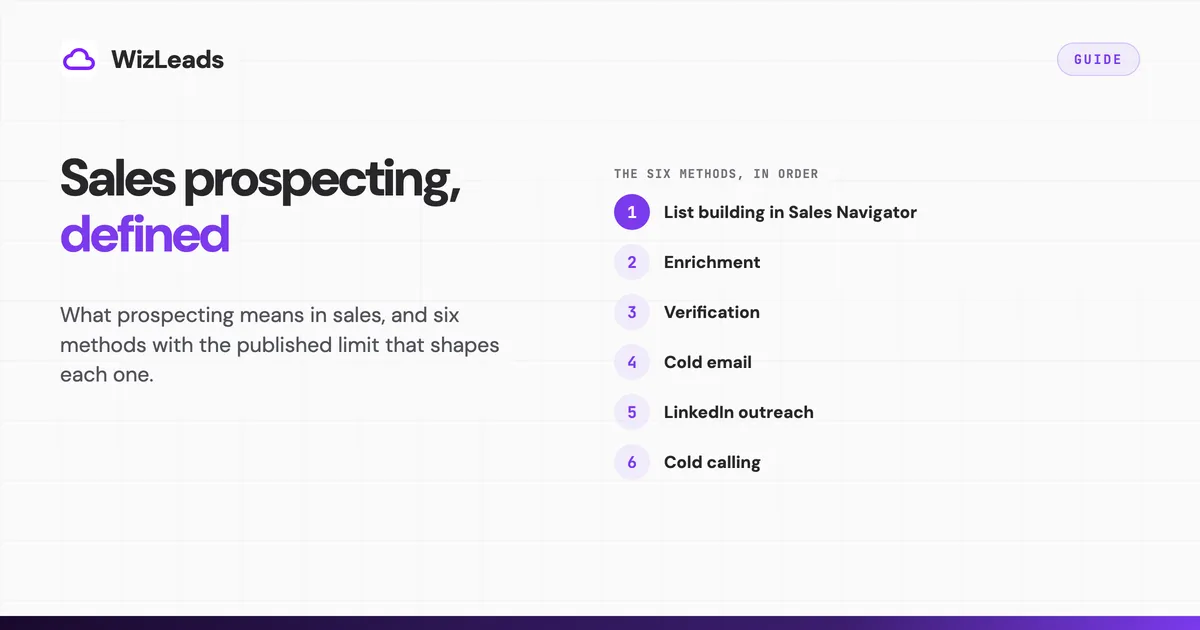
To define prospecting in sales: it is the work of finding people or companies that might buy and making first contact. Dictionaries mostly define the word as searching for gold, oil or minerals, and of the three we quote only Dictionary.com names customers in the definition. B2B teams run six methods in the order the work happens: build a list in Sales Navigator, enrich it with work emails, verify the addresses, then cold email, LinkedIn outreach and cold calling.
Each has a published limit. Sales Navigator shows at most 2,500 lead results per search, Gmail requires a spam rate below 0.30%, LinkedIn caps connections at 30,000, and calls fall under US and UK telemarketing rules. The call benchmark comes from a vendor measuring its own platform: Gong reports a 5.4% call connect rate.
Define prospecting: what the dictionaries say
The dictionary prospecting meaning splits in two. Three dictionaries give three different answers, so we quote them exactly instead of blending them.
| Dictionary | Entry | Covers sales? | Exact wording |
|---|---|---|---|
| Merriam-Webster | "prospecting" resolves to the verb "prospect" | No, mining only (noun "prospect" 6a names the buyer, a person) | "to explore an area especially for mineral deposits"; "to inspect (a region) for mineral deposits"; "broadly : explore". Noun 6a: "a potential buyer or customer" |
| Cambridge Business English | "prospecting" (noun) | No, mining only. One sense, labelled NATURAL RESOURCES | "the activity of searching for gold, oil, or other valuable substances on or under the surface of the Earth" |
| Cambridge Business English | "prospect" (verb) | Generic in its second sense, after a natural-resources sense; the entry's example is about clients | "to try to achieve, create, or find something"; example: "prospecting for new clients" |
| Dictionary.com | "prospecting" (noun) | Yes, definition 2 | 1: "the activity of searching for valuable natural resources, as gold or oil." 2: "the activity of searching for something, especially prospective or likely customers, clients, etc." |
Merriam-Webster and the Cambridge noun entry stay with mining, with "explore" as Merriam-Webster's loose fallback.
Cambridge's Business English verb entry adds a generic second sense whose example is about clients, and Dictionary.com is the one entry that names customers in the definition of the activity itself. Every one lists the natural-resources sense first, which fits the idea that sales borrowed the word, though none of the three says so. Cambridge's own examples show the split in use: "prospecting for new clients" sits beside "prospecting for oil in the region". The picture carries over either way: you survey ground for signs of something valuable, then spend effort where the signs are strongest.
What is prospecting in sales?
LinkedIn's sales glossary calls it "a strategic process of identifying and connecting with potential buyers known as prospects" and places it as the first step in the sales cycle. Indeed's career guide gives a near-identical definition: any activities used to identify potential customers, as the first step in the sales process. Neither says where the step starts and ends.
Our working version runs from the moment you decide who fits (your ideal customer profile) to the moment a person is either qualified for a conversation or ruled out. Finding, researching and first contact sit inside that span. Discovery calls, demos and proposals come after it.
Outbound prospecting means you start the contact instead of waiting for an inquiry. Inbound prospecting is the reverse: following up people who already showed interest, such as a download or a demo request. B2B prospecting means the buyers are businesses, so the list is built around roles and companies.
Prospecting vs lead generation
Teams often use lead generation for programmes that bring contacts in (content, forms, ads) and prospecting for a seller going out to find them. That is a convention, and none of the dictionaries above draws the line. In practice the two overlap: a list built for a cold email campaign is lead generation in one team's vocabulary and prospecting in another's. We use the narrower sense here, the seller going out.
LinkedIn's sales glossary draws a related line between leads and prospects. It describes leads as people who have shown interest through an action such as a demo signup or a blog subscription, and prospects as "qualified leads who align with your ideal buyer, have the necessary budget, and are more receptive to an open line of communication". Lead prospecting, on that reading, is qualifying leads until each is either worth a conversation or ruled out. This guide covers the outbound side, where the seller builds the list before anyone has shown interest.
The six methods at a glance
These are the sales prospecting methods most B2B teams combine, in the order the work happens. The first three produce the list and make it safe to send to. The last three are the channels you use on it; a prospecting campaign is those channels run in sequence on the verified list, with phone numbers added first for calling. The sales prospecting techniques inside each one run into the limits below.
| # | Method | What it produces | What shapes it | Source |
|---|---|---|---|---|
| 1 | List building in Sales Navigator | People or companies matching your filters | A cap on results per search | LinkedIn help |
| 2 | Enrichment | A work email for each person | Tool-specific; the finder needs a name and a company website | Vendor docs, see below |
| 3 | Verification | Each address sorted valid or invalid | Your sending platform sets the bounce line; mailbox providers publish none | Platform policies |
| 4 | Cold email | Replies | Gmail's spam-rate ceiling and bulk-sender rules | |
| 5 | LinkedIn outreach | Connections and messages | A connection cap and a ban on automation software | LinkedIn help |
| 6 | Cold calling | Conversations and meetings | US TCPA and Telemarketing Sales Rule, UK TPS and CTPS | eCFR, ICO |
Method 1: build the list in Sales Navigator
Many outbound teams start with a filtered search, and Sales Navigator is where they run it because the filters follow how buyers are described: function, seniority level, job title, company. The ceiling is LinkedIn's own. Its help page says "You can view up to 2,500 lead results across 100 pages or 1,000 account results across 40 pages on your Sales Navigator search results page." A broader search shows only the first slice, so you build the list from several narrow ones.
Getting the results out of that view takes a scraper that reads Sales Navigator searches, and our post on Sales Navigator export limits works through the arithmetic of splitting a search.
One term to read before you buy. LinkedIn's Service Terms say a customer "may use the Sales Navigator Service solely for sales, prospecting, or other business development purposes", and that it must not be used for recruitment, talent sourcing or candidate identification. It is a prospecting tool by contract as well as by design.
WizLeads is one of the Sales Navigator scrapers we compared, and the one we build. It scrapes the results of a Sales Navigator search or list URL that you give it. You build the search in Sales Navigator first. Scraping costs 1 credit per result with your LinkedIn account connected, and 2 credits per result in account-less mode, which runs without your account or an active seat.
Saved lists, saved searches and filters tied to your own network, such as 1st-degree connections, work only in connected mode, because they belong to your account. Beside connected mode sits LinkedIn's rule. It says it doesn't permit third-party software, including "crawlers", bots, browser plug-ins, or browser extensions, that scrape or automate activity on its website, and that members who use them "risk having their accounts restricted or shut down". It names no safe volume.
Method 2: enrich the list with work emails
A search result gives you a name, a title and a company. Cold email needs an address, so enrichment is the step that turns a name and a company website into a work email.
The inputs decide what is possible. In the API reference for WizLeads' email enrichment, Find Work Email takes a first name (or a full name) and the company website, with last name optional. It has no LinkedIn-URL input, so it cannot start from a profile link alone. It costs 3 credits per email found, a miss costs nothing, and the reference says the emails it returns are valid and catch-all verified.
Repeat lookups of the same input within 72 hours come from cache and are not charged again.
Enrichment can also run inside the scrape, for people searches only. WizLeads holds 3 credits per row when the task starts and releases them for rows where no email turns up. The bill is still 3 credits per email found, but the balance you start with must cover the whole hold.
Method 3: verify before you send
Verification is the gate between a list and a sender. Your sending platform counts every bounce, so the useful fact is who sets the line.
No mailbox provider publishes a bounce threshold; the documented limits sit with sending platforms. Mailgun's Acceptable Use Policy sets bounces at 5% or below, and Instantly's help page says it auto-pauses at 5% by default after 200 sends, a threshold you can change or switch off. Postmark requires a bounce rate below 10%, per its servers FAQ.
So 5% is a platform's line, not Gmail's. Amazon SES's enforcement FAQ asks senders to keep bounces below 2%, and many operators use that as their line.
Catch-all domains accept mail for any address, so a basic SMTP check cannot settle them. Each verifier decides how to label those addresses, and our catch-all verification guide shows how that plays out.
WizLeads verifies an address for 0.5 credits, charged for every email processed whatever the result, and it classifies catch-all emails as valid or invalid.
Method 4: cold email
Google's sender requirements set the spam-rate line for mailbox placement. Per Google's guidelines, all senders need SPF or DKIM, valid forward and reverse DNS and TLS, and a spam rate below 0.30%, and Google asks senders to stay under 0.10%.
Bulk senders, defined as more than 5,000 messages a day to Gmail accounts, also need SPF and DKIM together, DMARC, From alignment and one-click unsubscribe.
The reach has a limit. Google's Workspace page says the guidelines "don't apply to messages sent to Google Workspace accounts", and that enforcement applies "only when sending email to personal Gmail accounts". Much B2B cold email lands in Workspace mailboxes. Treat Google's numbers as a hygiene floor.
Replies keep arriving after the first message, so plan a sequence of several emails rather than a single send.
Method 5: LinkedIn outreach
LinkedIn gives you three ways to contact someone you are not connected to. They are a connection request, with or without a note; an InMail, which spends InMail credits; and Open Profile, which is free to send. We have no acceptance or reply rate to give you, because we found none from a primary source that we could verify. What follows is what LinkedIn itself says.
- Connection cap. LinkedIn's help centre says that at 30,000 connections you cannot send or accept new invitations until you remove some.
- No weekly number. LinkedIn's invitation help page says that if you reach the limit your account "may be temporarily restricted from sending invitations", which "typically lasts one week", and it gives no count. Any weekly figure you read is a third party's claim.
- Notes. LinkedIn contradicts itself on personalized notes for free accounts. The "Personalize invitations to connect" help page says up to three connection requests per month can carry a message, and "Invitation limit reached" says five.
- Open Profile. The Open Profile help page says it "allows anyone on LinkedIn to contact a Premium member for free". The Service Page help page lets Service Providers enable it from their Service Page with no Premium requirement. The two do not agree.
- Automation. The rule for scraping applies here too: LinkedIn's help page on third-party software says software that automates activity on its website is not permitted.
LinkedIn's restriction page lists invitations that were ignored, left pending or marked as spam among the reasons for a restriction, and suggests InMail and Groups for people you don't know. That is a reason to keep the list tight. On the data side, WizLeads flags Open Profile members in its people export through an is_open column, and Open Profile detection costs 1 extra credit per lead.
Method 6: cold calling
Gong publishes the call data we use here. Its analysis of 300M+ cold calls, recorded on its own platform, reports two rates with different bases. The connect rate, measured out of dials, is 5.4% on average and 13.3% for the top quartile. The set rate, measured out of conversations, is 4.6% on average and 16.7% for the top quartile.
Because one is out of dials and the other out of conversations, Gong multiplies them. It assumes 200 dials a week, 800 a month, and gets about 2 meetings a month for the average rep and 18 for a top-quartile rep. That is Gong's illustration of one rep's month and no measured per-dial rate.
The law differs by market and is worth checking before anyone dials. In the US, calls between a telemarketer and a business are exempt from most of the Telemarketing Sales Rule under 16 CFR 310.6(b)(7). The exceptions are the requirements of 310.3(a)(2) and (4) and calls to induce the retail sale of nondurable office or cleaning supplies. The TCPA rule at 47 CFR 64.1200 bars autodialed or prerecorded calls to cell numbers without prior express consent.
In the UK, the ICO says you must not make marketing calls to numbers on the TPS or CTPS unless the person has specifically consented. None of this is legal advice.
Calling needs a phone number, and the WizLeads people export has no phone column, so the call list needs a second lookup before the scripts in our cold calling breakdown help. WizLeads' Find Mobile Number lookup works from a LinkedIn profile and costs 100 credits per number found, charged only when a number is found. On Freelancer that is about $0.39 per number, pro-rata.
What a first run costs on WizLeads
As of November 2026, the Freelancer plan is $39 a month for 10,000 credits, so one credit is $0.0039 at the pro-rata rate. These are costs per result, before any find rate.
- 1,000 leads scraped account-less: 2,000 credits, $7.80. Connected, the same 1,000 leads take 1,000 credits, $3.90.
- 1,000 work emails found: 3,000 credits, $11.70.
- 1,000 verifications: 500 credits, $1.95.
Say you scrape 1,000 people account-less with email enrichment switched on in the same task. The launch hold means you need 5,000 credits on hand: 2,000 for the scrape plus 3,000 held for emails.
Start with the first three methods, because every later one depends on the list and the verified addresses they produce. Add cold email once the addresses are verified, and add LinkedIn outreach and calling only when you can stay inside the limits above. A new account gets 500 free credits one time, enough to test a small list before you pay.