WizLeads


TL;DR
- To verify emails in Clay, open the Work Email waterfall's Full configuration and pick a Validation Provider. Clay adds a validation column after each provider step.
- Clay's lesson names ZeroBounce as the default validator and says catch-all emails count as valid by default. Decide that rule before you run a table.
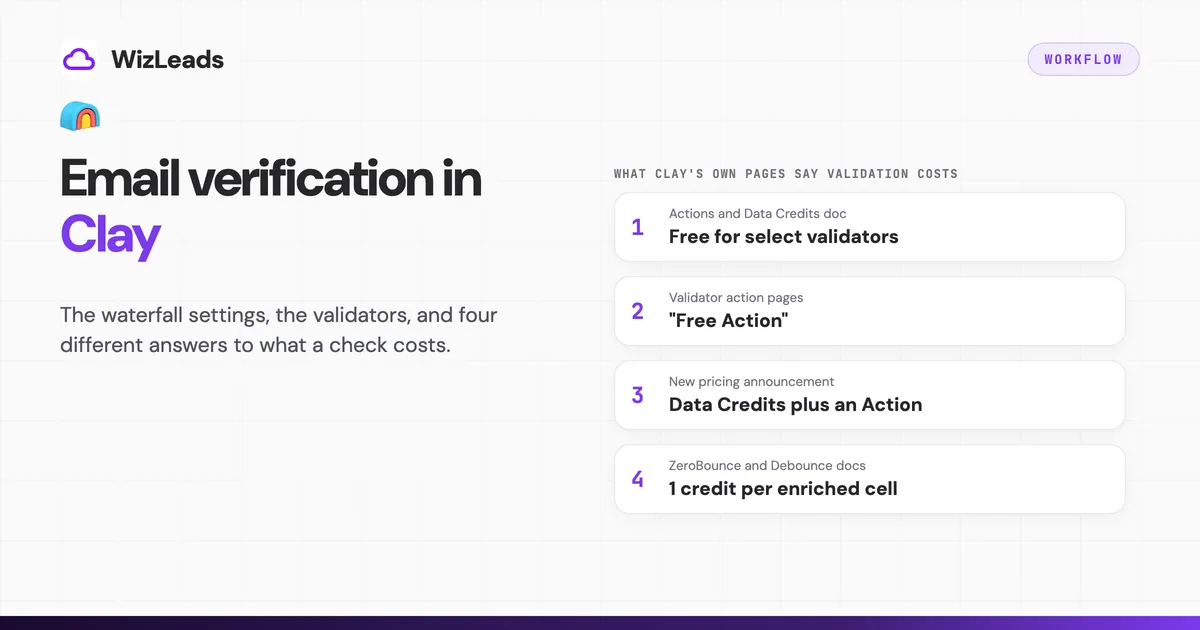
- Clay's pages disagree on what a validation costs. Some say free, others say Data Credits plus an Action. Read the cost beside the option and run 10 rows first.
- An outside verifier needs an HTTP API column, which starts on Growth. On Free and Launch, export the email column to CSV, which costs nothing.
Clay verifies emails with the Validation Provider you set in the Work Email waterfall's Full configuration. Clay's lesson names ZeroBounce as the default and says catch-all emails count as valid. Per Clay's statuses doc, there are five statuses: Valid, Invalid, Catch-all, Unknown and Role-based. Clay's pages disagree on the cost, so run 10 test rows and read what they charged.
Most Clay tables hold two jobs: verifying the addresses a waterfall finds, and verifying a list you already imported. Three choices matter in both. They are the validator, the catch-all rule and the meter.
For a verifier Clay does not list, near the end we walk through calling WizLeads' verification API over HTTP. You call WizLeads from an HTTP API column that you set up yourself, as a separate column after the waterfall.
How does email verification work in Clay?
A Work Email waterfall asks providers for an address one after another and stops at the first valid result. Clay's doc puts the billing side this way: "You only pay credits for the provider that finds a match" (Clay's Work Email waterfall doc). When you set a Validation Provider, Clay adds a validation column after each provider step. Each address a provider returns gets its own result.
Clay's statuses doc lists Valid, Invalid, Catch-all, Unknown and Role-based. Unknown means Clay could not verify the address, often because of a temporary mail-server problem. Retry those rows before you delete them.
Clay's lesson on enriching people data says ZeroBounce is the default validator and that Clay considers catch-all emails valid by default. Clay's ZeroBounce doc says the same about ZeroBounce's catch-all label. A Valid cell in a default table can therefore hold an address on a domain that accepts all mail.
How do you set up verification in the Work Email waterfall?
These steps follow the order of Clay's doc.
- Add enrichment, search "Work Email" and choose Full configuration. The validation settings live there. Quick setup is where the Infer Email toggle sits.
- Map the inputs. Company Domain is the primary input. A LinkedIn URL improves accuracy. The fallbacks are Full Name plus Company Name, or Full Name plus Personal Email.
- Order the providers. Clay charges only the provider that finds a match, so put the cheapest hit first.
- Set the Validation Provider. It is optional, and an empty field means no validation column. The next section lists your choices.
- Decide "Require validation success?". With it on, the waterfall accepts an email only when the validator confirms it as valid. With it off, the waterfall may accept an email where validation was inconclusive. For a send list, we would turn it on and check the test rows.
- Pick a validation strategy. Clay names Conservative, Balanced, Aggressive and Advanced. Balanced includes catch-alls. Conservative is described as the safest approach, including all verified email types. Clay's tip on the duplicate threshold describes a catch-all email "failing conservative validation", which suggests Conservative rejects catch-alls, but the doc never says so outright, so test it.
- Set "Threshold for duplicate results". The default is 0, which turns it off. Clay says to use 2 or higher so the waterfall stops once the same invalid email appears that many times.
- Switch off "Hide provider columns?" while you test, so you can see every validation column. Switch on "Output name of successful provider?" to see which provider won.
- Save, run 10 rows and read the charge before you run the table.
Infer Email is a free first step that builds first.last@domain.com from the name and domain. If the guess passes validation, the waterfall stops without calling a paid provider, and a failed guess costs no credits. Clay's own test on a software-industry dataset got a valid email from the default pattern "roughly 31% of the time". That figure is Clay's claim about one dataset, not a rate for your list.
Which validators does Clay list, and how do you pay?
Clay lists 17 vendors that validate emails. Table 1 covers the 11 you are most likely to meet. The plan column is what Clay's own action page shows.
| Validator | How you pay | Plan shown | Worth knowing |
|---|---|---|---|
| ZeroBounce | Clay credits or your own key | All plans | Clay's lesson names it the default |
| Debounce | Clay credits or your own key | All plans | Has a "Safe to Send" option |
| Findymail | Clay credits or your own key | All plans | Verify Email action |
| Hunter | Clay credits or your own key | All plans | Doc says 2 credits per cell on Clay's account |
| Kitt AI | Clay credits or your own key | All plans | Two actions: Verify Email and Verify Deliverability |
| Snov.io | Clay credits or your own key | All plans | |
| Enrichley | Clay credits or your own key | All plans | |
| LeadMagic | Labelled "Free Action" | All plans | Its integration doc says 1 credit per cell |
| Enrow | Labelled "Free Action" | All plans | |
| Icypeas | Labelled "Free Action" | All plans | |
| NeverBounce | Your own key required | All plans | Auto-update every 24 hours by default |
Six more validators need your own key: Instantly (Launch and up), Listmint (All plans), MillionVerifier (Growth and up), No2bounce (Launch and up), BounceBan (Launch and up) and Signaliz (Growth and up). MillionVerifier, No2bounce, BounceBan and Signaliz are typed as HTTP API actions. Clay's pricing page gates HTTP API integrations to Growth, yet its pages label No2bounce and BounceBan Launch and up. Check the gate on the action itself before you plan around it.
Your own key changes the meter. Clay's pricing page says each run with your own key counts as one Action and uses no Data Credit, and it lists bring-your-own-key as included on every plan, Free included. Clay's NeverBounce and Debounce docs say API key use is only available on paid plans, and Clay's doc on saving credits marks own keys as a paid feature. If you are on Free, test a key on one row before you build around it.
Your real choice is smaller than the list suggests. ZeroBounce is the default and sits on every plan. Listmint is the one whose Clay doc describes catch-all handling as automatic. The key-only validators suit you if you already pay for the account and want Clay to spend Actions only.
What does a validation cost in Clay?
Clay bills with two meters, Data Credits and Actions, and a validation can touch either or both. Clay's pages give at least four different answers, and the doc that explains the meters is one of them. We do not print a Clay cost per 10,000 validations because we cannot tell which answer applies to each validator.
| Where | What it says | What it implies |
|---|---|---|
| Actions and Data Credits doc | "select validator providers are free in Clay under new pricing"; its worked example shows validation at 0 Data Credits | Free for some validators |
| LeadMagic, Enrow and Icypeas action pages | "Free Action" | Free for those three |
| March 2026 pricing announcement and Clay's FAQ | A valid or invalid result through Clay's marketplace uses Data Credits and an Action; an own-key run uses an Action only | Both meters, per validation step |
| ZeroBounce, Debounce, Findymail, LeadMagic and Hunter docs | 1 credit per enriched cell on Clay's account (2 for Hunter) | A flat credit |
| Work Email waterfall doc | The validation step "does cost Clay credits" but is cheaper than a waterfall without it | A cost, size unstated |
Clay's FAQ also says each validation step of the waterfall consumes Data Credits, unless you use API keys, and an Action. That sits against the "free" line in Clay's Actions and Data Credits doc.
LeadMagic contradicts itself: its action page says Free Action, while Clay's LeadMagic doc says Validate Email costs 1 credit per enriched cell. ZeroBounce's own Clay doc says a validation costs 1 Clay credit on Clay's key, which matches the per-cell docs and not the free lines. Clay's pricing change took effect on 11 March 2026, and Clay's ZeroBounce and Hunter docs still name legacy plans. Clay does not reconcile these pages, so we pick no side.
Two reads hold on every page. A run on your own key is one Action and no Data Credit. A call that returns no result charges neither meter, because Clay's pricing page says you are not charged Data Credits or Actions for it.
Clay's Actions doc says you will see the exact cost "next to each enrichment option in the product". Use that. Add the validator, read the cost on the option, run 10 rows and compare the Data Credits and Actions used with it. Include a few Unknown and Catch-all rows in that test, and check Clay's plan prices, top-ups and rollover for what a credit costs you.
How should Clay treat catch-all addresses?
Pick the rule before you run, because Clay's default picks it for you.
In our benchmark of 1,000 real-estate decision-maker emails sourced from Apollo, WizLeads' classifier counted 212 as catch-all (21.2%). Your list will differ, but a catch-all share that size is why the default matters. In Clay you have four routes.
- Keep the default. Catch-alls count as valid and coverage is highest. The bounce risk sits with you, so send those rows at lower volume.
- Turn on "Safe to Send" in ZeroBounce. The Clay control reads "Only mark 'Safe to Send' emails as valid". Catch-alls then stop counting as valid, and you lose the share of them that are real mailboxes. Debounce has the same toggle, but its Clay doc says it removes "risky" results and never mentions catch-alls. Test it on rows first.
- Use a validator that resolves them. Listmint's Clay doc describes automatic catch-all verification and four results: valid, catch_all_valid, invalid and catch_all_invalid. Catch-all addresses arrive already sorted into valid and invalid.
- Run a second pass on catch-alls only. Filter the table to rows that say Catch-all or Unknown and send just those to a verifier that resolves them. The HTTP section below shows how.
The waterfall's strategy setting adds a fifth route. Balanced counts catch-alls as accepted. If your rule is to exclude them, do not assume Conservative does that. Check it on test rows.
How do you verify a list that is already in your Clay table?
A list from Apollo, a CRM or a CSV already has an email column. The job is one validator column and no waterfall.
- Add enrichment, search for the validator by name and map the email column as the input.
- Turn Auto-run off while you build. Clay's doc says Auto-run re-runs a column whenever its inputs change, and its credit-saving doc says to test about 10 rows first.
- Run 10 rows and read the charge. Then run the table.
- Filter on the status column in a duplicated view. Send the Valid rows, hold Unknown and Catch-all rows for your catch-all rule and suppress Invalid.
- Check Auto-update before you leave a big table alone. The ZeroBounce, Debounce, NeverBounce and LeadMagic docs say it runs every 24 hours by default and can be switched off. Clay's Actions and Data Credits doc lists automatic refreshes and re-run columns among the causes of unexpected Data Credit use, so switch it off unless you want the table re-checked.
If you want a conditional second pass, use "Add run condition" on the second validator column so it runs only where the first status says Catch-all or Unknown.
On Free or Launch, export instead
Clay's Actions doc says exporting to CSV uses no Action or Data Credit, and it lists importing first-party data as using no Action. Export the email column, verify it outside Clay with any bulk verifier and import the verdicts back into Clay. The next section shows one route for that.
How do you call an outside verifier from Clay's HTTP API?
Clay's HTTP API enrichment lets you call a verifier Clay has no action for, but it is gated. Clay's pricing page lists HTTP API integrations as not included on Free and Launch, and included on Growth and Enterprise. On Launch or Free, use the CSV route above.
WizLeads is the worked example. The recipe fits any verifier with a GET endpoint and a key header.
Setup, following Clay's HTTP API doc
- Add enrichment, choose HTTP API and use Configure for a manual setup. Generate builds the call with AI help instead.
- Method GET, endpoint
https://api.wizleads.io/email/verify-email, query parameteremailset to your email column. - Header
x-api-key. Save it in an HTTP API (Headers) account under Settings, Connections. Clay's doc warns that credentials typed into the Headers field are visible in plain text to anyone with access to the column. - Field paths to return:
status,catchallandprovider. - Rate limiting. WizLeads' API reference tells Clay users to set Request Limit to 10 and Duration to 1000 ms.
- Add a run condition so the column runs only when the email cell is not empty. Test on one row, then 10.
Keep the call in its own column after the waterfall. A separate column keeps the two bills visible apart.
What comes back
WizLeads' API reference documents a 200 response with status (valid, invalid, unknown or error), provider (for example Google, Microsoft or SEG_Mimecast, and sometimes null) and catchall (YES, NO or UNKNOWN). WizLeads classifies catch-all emails as valid or invalid. The table below maps those fields to rules you can build as formula columns.
| Field | Value | Rule to build in Clay |
|---|---|---|
status | valid | Send |
status | invalid | Suppress |
status | unknown or error | Hold, re-run once later, then decide |
catchall | YES | Apply the catch-all rule you chose above |
provider | Google, Microsoft, SEG_Mimecast | Split sending by provider; a SEG_ value marks a secure email gateway |
What it costs, as unit costs
WizLeads charges 0.5 credits for every email processed, whatever the result. At the Freelancer list price of $39 for 10,000 credits, that is 20,000 checks, or $19.50 per 10,000 emails. Clay counts each HTTP API call as one Action, so 10,000 rows use 10,000 of the 40,000 Actions a month on Growth's entry tier with monthly billing (annual billing lists 480,000 a year). New WizLeads accounts get 500 free credits once, which covers 1,000 verifications.
Three limits to plan around
- Speed. At 10 requests per second, 10,000 rows take at least 16.7 minutes. That is a floor from the setting, not a measured run.
- A shared budget. The limit covers all WizLeads endpoints on your account, so two Clay tables, or Clay plus another tool, draw on one allowance. WizLeads' reference says excessive calls may lead to a 1 hour ban on both the user and the IP.
- Errors. Clay's error table maps a 429 to "Configure rate limits in your enrichment". A whole column failing at once can mean a 429, or a 402, which WizLeads returns when credits run out.
The batch route for Free and Launch
WizLeads also has a batch endpoint that verifies an uploaded CSV at the same per-email billing. Export the column from Clay, upload it with a column mapping for email, and download the results as CSV from the task. Then import the verdicts back into Clay.
Which setup should you start with?
On Free or Launch, set the waterfall's Validation Provider to ZeroBounce (or confirm it is the one shown), turn on "Safe to Send" if you want catch-alls out, and run 10 rows to learn the real charge. For a list already in your table, add a validator column and run 10 rows, or export the email column and verify it outside Clay. On Growth, add an outside verifier as a second column when catch-alls are a large share of your list. To pick that verifier, our email verifier comparison sent mail through 6 of 14.