WizLeads


TL;DR
Lobstr is cheaper on most Sales Navigator jobs, but not on the headline one. For 2,500 leads with an email found for 1,500, Lobstr costs $100 on one plan, or $40 if you pay for Starter twice across a billing reset, and Evaboot costs $99. Leads without emails are $20 on Lobstr, while Evaboot has no leads-only export and charges a credit per lead either way. Both tools scrape on your own Sales Navigator seat, and WizLeads' account-less scraping mode skips the seat for searches you can already build a URL for.
Lobstr (lobstr.io, the scraping platform, not the LOBSTR crypto wallet) and Evaboot work the same way underneath. Each captures your LinkedIn cookie with a Chrome extension and runs the scrape in its own cloud, on your Sales Navigator seat, so LinkedIn's rule on scraping tools applies to both. Lobstr adds phone numbers. Evaboot adds credit rollover and email finding for a file you already hold.
None of the five top results we read for "lobstr vs evaboot" prices both tools on one current job. Lobstr's own blog posts on Evaboot alternatives (November 2025) and on the best Sales Navigator leads scrapers (September 2026) do price Evaboot. They use old prices and say Evaboot supports one Sales Navigator account, which Evaboot's pricing page ("Unlimited SN accounts") contradicts. We use both vendors' pricing and help pages as of October 2026 and name both sides where a vendor's own pages disagree.
Lobstr vs Evaboot at a glance
| Lobstr | Evaboot | |
|---|---|---|
| Monthly plans (USD) | Free $0 for 100 credits, Starter $20 for 10,000, Pro $100 for 100,000, Team $500 for 1,000,000 | $9 for 100 credits, $29 for 400, then Scale at $49 for 1,000, $99 for 3,000, $149 for 6,000 or $299 for 15,000, then Custom |
| Yearly | $16, $80 and $400 a month on the Yearly toggle (20% off) | no yearly price shown |
| What a credit buys | 1 per lead, 9 more per email found and validated, 300 per phone number | 1 per lead or account, verified email included |
| Unused credits | no rollover at renewal; a manual reset carries credits 30 days | roll over while you stay subscribed |
| Connection | Chrome extension captures your cookies, scrape runs in the cloud | same |
| Per day, per Sales Navigator account | 25,000 leads (store page, help centre) or 5,000 (blog) | 2,500 leads or 1,000 accounts |
| Past 2,500 in one search | automatic split on one dimension, no recursion | first 2,500 only, split by hand, MCP can split |
| Phones | 300 credits per number found | none, points to Datagma |
| Your own file | not offered | Email Finder accepts a file of up to 2,500 rows |
Lobstr pricing vs Evaboot pricing on the same jobs
The meters are written differently. Lobstr's pricing page lists four plans. Its Sales Navigator scraper, described on its product page, charges 1 credit per profile, and email enrichment costs "9 credits per profile enriched. No email = 0 credits."
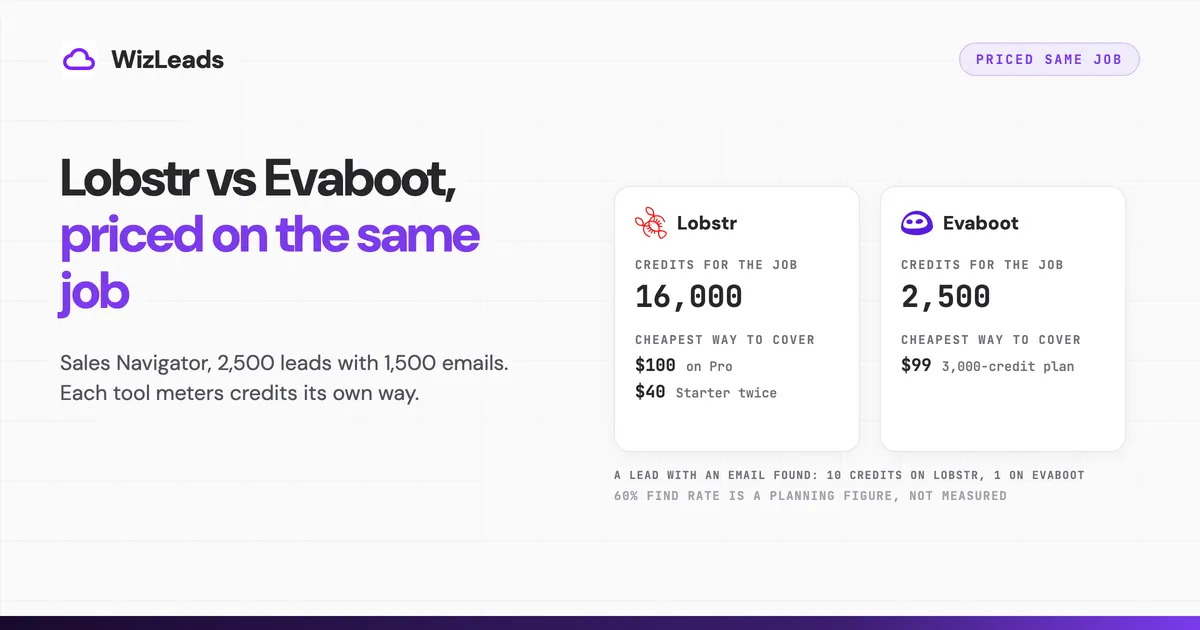
Evaboot's pricing page says "1 lead exported = 1 credit, and its verified email is included: every export finds emails for every lead. A lead we find no email for still costs 1 credit, and so does an account." A lead with an email found is therefore 10 credits on Lobstr and 1 on Evaboot. Our two jobs use a 60% find rate as a planning figure, which is not a measured rate for either tool.
| Job | Lobstr credits | Lobstr cheapest way to cover | Evaboot credits | Evaboot cheapest plan |
|---|---|---|---|---|
| A: 2,500 leads, 1,500 emails | 16,000 | $40 (Starter twice) or $100 (Pro) | 2,500 | $99 (3,000-credit plan) |
| B: 10,000 leads, 6,000 emails | 64,000 | $100 (Pro) | 10,000 | $299 (15,000-credit stop) |
| 2,500 leads, no emails | 2,500 | $20 (Starter) | 2,500 | $99 |
| 10,000 leads, no emails | 10,000 | $20 (Starter) | 10,000 | $299 |
| Job A, first month with a Core seat | $159.99 (Starter twice) or $219.99 (Pro) | $218.99 |
Prices are monthly list prices as of October 2026, from the two pricing pages and LinkedIn's compare-plans page. The seat row adds LinkedIn's US$119.99 a month for Core, and the Sales Navigator cost guide prices the higher tiers.
Job A on Lobstr is 2,500 + 1,500 x 9 = 16,000 credits, and Starter holds 10,000 for $20. Without a reset the covering plan is Pro at $100, which is $1 more than Evaboot's $99. Job B on Starter would need seven charges, $140, so Pro at $100 is cheaper there.
When you run out, Lobstr's help page on resetting the billing cycle says the reset charges the plan price again in full and adds a fresh allocation. Unused credits carry over, "spent last and expire after 30 days". Two Starter charges in one 30-day window give 20,000 credits for $40.
Evaboot charges an export as a whole. Its credits help page says "You pay for a complete export". So Job A needs the 3,000-credit plan's balance on hand, and the 1,000-credit plan cannot run it in parts. The 500 credits left over roll over while you stay subscribed.
Leads only, and the price per lead
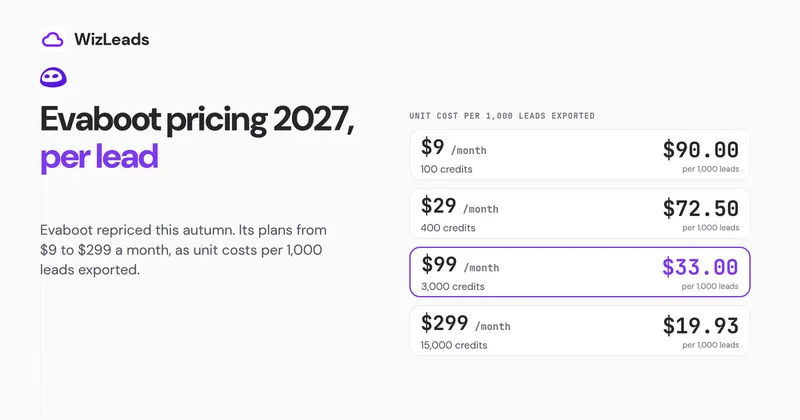
Evaboot's credits help page also says there is no option to export leads without emails, so a leads-only job costs the credits of a job with emails. Lobstr is $2.00 per 1,000 leads on Starter and $1.00 on Pro. Evaboot's lead price, email included, runs from $90.00 per 1,000 on its $9 Starter down to $19.93 on its $299 stop, and $33.00 on the $99 stop that covers Job A. These are pro-rata unit costs.
Emails close the gap at Starter rates. At a 100% find rate a lead with its email is 10 Lobstr credits, $0.020 on Starter and $0.010 on Pro, against $0.020 at Evaboot's $299 stop.
Rollover, cancelling and free plans
Lobstr's pricing FAQ answers the rollover question with "Not yet" and says credits refresh every month. Evaboot's pricing page says "credits roll over" while you stay subscribed, and its help article on cancelling or pausing lets you pause for one to three months.
Evaboot's pages disagree on what happens after you cancel. Its pricing FAQ says you can "keep using your credits until the end of your billing period". Its help article says "Cancelling takes effect when you confirm it, not at the end of the billing period" and that credits stay usable for 30 days from the day you cancel. The buy-once answer on the pricing page gives a third wording, "1 month to use your credits".
Evaboot shows no yearly price, yet its FAQ describes yearly subscriptions that cannot be cancelled early. Lobstr's free plan gives 100 credits a month, with exports capped at 30 rows per request. Evaboot gives one-time trial credits, once per person and per company, according to its help article on multiple freemium accounts.
How the meters treat emails and misses
On a miss, both tools keep the lead credit. Lobstr's email help page says the 9 enrichment credits "are only consumed when an email is successfully found and validated", and the profile credit is always charged. Evaboot charges its 1 credit whether or not it finds an email.
Lobstr labels each found email Valid, Risky or Unknown. Risky covers catch-all domains and role addresses, Unknown covers servers that did not respond or blocked the check, and the page says both can be used in outreach. It does not say whether a Risky or Unknown address counts as found and validated, so how those results are billed is not stated. Evaboot labels emails safe or riskier, and its email finder charges 1 credit per email found, safe or risky, in the standalone finder.
Neither tool is in our enrichment benchmark, so every accuracy figure here is the vendor's own. Lobstr's help page says Valid emails carry a "97%+ deliverability guarantee", and its product page says that keeps your bounce rate under 3%. The help page puts the find rate at 80%+ for large companies and startups, 30 to 50% for SMEs and 2 to 5% for freelancers.
Evaboot's email finder page claims a 60 to 80% discovery rate depending on your market, "97% deliverability on safe emails" and 83% on risky ones. Its finder help article gives riskier emails "a 0 to 25% chance of potential bounce". An 83% deliverability rate means up to 17% undeliverable, which sits inside that range, so the two statements are consistent. One is a point estimate and the other a range, and neither comes with a method.
Whose LinkedIn account does the work
Both tools run on your own account. Lobstr's product page says it "syncs with your Sales Navigator account using a Chrome extension" and uses session cookies. Evaboot's help article on connecting to LinkedIn describes the same cookie capture. Its export help page says you can close the browser once an export is launched, because "The export keeps running on our side", but logging out of LinkedIn first makes it fail.
LinkedIn's help article a1341387 says it does not permit third-party software, including "browser plug-ins, or browser extensions that scrape" or automate activity on LinkedIn, and that members who use such tools risk restriction or shutdown. LinkedIn names no safe volume, and the vendors go further than it does.
Evaboot's Sales Navigator scraper page says every export stays under LinkedIn's limits "so your Sales Navigator account never gets flagged". Lobstr's product page FAQ answers "Can you get banned for scraping LinkedIn Sales Navigator?" with "Not with lobstr.io" and publishes no ban count or method. Its account-bans help page says you can "safely use 100%" of its 25,000 leads a day. The same page warns that if two tools together exceed the allowed limit, "your account could get banned".
Limits: per day and per search
Lobstr's pages give two daily ceilings for search scraping. Its product page says, per account per day, 25,000 profiles from search pages, 3,000 with beautiful URLs or 1,000 full profile visits. Its account-bans help page says up to 1,000 searches and 25,000 leads a day, which agrees. Its blog post on the best Sales Navigator leads scrapers says "Sales Navigator hard-caps you at 5,000 leads per account per day", and LinkedIn names neither figure.
Evaboot's daily-limit help page says it exports 2,500 leads or 1,000 accounts per 24 hours per Sales Navigator account. It calls that its own limit rather than a plan restriction, and buying credits does not raise it.
On one seat, Job B takes the following time by our arithmetic on the vendors' numbers. At Evaboot's 2,500 a day it takes 4 days. At Lobstr's 25,000 it takes under half a day, and at its blog's 5,000 it takes 2 days. With Get Profile Details on, which its help centre caps at 1,000 a day, it takes 10.
Lobstr's product page also claims 100 leads per minute, which is 100 minutes of scraping for Job B. We timed neither tool.
Both limits are per Sales Navigator account. Evaboot's help page on exporting more than 2,500 leads a day says more accounts raise its capacity, and Lobstr says each connected account has its own independent daily limits. Lobstr does not say whether its email enrichment, which visits the company page, draws on the 1,000-visit cap.
For a search above LinkedIn's 2,500-result export cap, Lobstr's Split Search guide says it automatically creates one sub-search per value of a single dimension (seniority first, then industry, then function). It works best up to about 50,000 results. Its docs add "No recursion", so a sub-search still above 2,500 is paged to the cap and "anything beyond it is missed". It does not apply to saved searches or lead lists.
Evaboot's export help page says a search above 2,500 is truncated to the first 2,500 so you should split it. Its splitting guide says to use the Function or Seniority Level filter and export each chunk separately: "Split by filter, never by page". It adds that its MCP server "can split or narrow a search for you". How the MCP does that is not described.
Filter checks and data hygiene
Both tools flag leads that miss your search filters, so the check is not a reason to pick either. Lobstr's filtering guide says its scraper checks each lead against your industry, company size and seniority filters. It adds a match column and a reason column, and flags leads without removing them.
Evaboot re-checks every lead against your search filters, putting the verdict in the first column and the reason in the second. It does not list which filters it covers, and saved lists get no verdict. Its export help page says Sales Navigator returns leads that miss your filters, "commonly 20% to 30% of them".
What each offers beyond the export
Lobstr finds phone numbers, while Evaboot's pricing page points to Datagma for them. Lobstr's phone help page charges 300 credits per valid number, 301 with the lead. It says the numbers come through ContactOut. As pro-rata unit costs that is $0.60 on Starter, $0.30 on Pro and $0.15 on Team.
Lobstr's own pages disagree on what kind of number you get. The help page says "Personal phone numbers are not included", while the product page FAQ says it finds "one verified personal mobile number per profile, when available".
Evaboot finds emails for a file you bring and Lobstr does not. Evaboot's Email Finder takes a CSV or XLSX of up to 2,500 rows, while Lobstr's email help page says "lobstr.io does not offer standalone email enrichment".
A third option if the shared session is the problem
WizLeads' scraper addresses the one thing Lobstr and Evaboot share: your own seat and session doing the scraping.
In account-less mode, WizLeads scrapes a Sales Navigator search without your LinkedIn account or an active seat, at 2 credits per lead. It still needs a Sales Navigator search URL that someone with access has to build. Connected mode costs 1 credit per lead and runs on your account, which saved lists and 1st-degree filters need. LinkedIn's rule above then applies as it does to Lobstr and Evaboot.
Other tools do the same here: Vayne offers a cookie-less mode that needs no LinkedIn login, cookie or Sales Navigator seat, and Lobstr splits large searches too. On the Agency plan and above, WizLeads checks the lead count and splits the link into chunks of 2,000 results or less, so no results are lost past the 2,500 cap.
Work emails cost 3 credits each found, with misses free. The final bill for Job A is 7,000 credits connected or 9,500 account-less, inside the $39 Freelancer plan's 10,000. For Job B it is 28,000 or 38,000, inside the $99 Agency plan's 40,000. WizLeads holds 3 credits per row at task start and releases the credits for rows with no email when the task completes, so the balance must cover the hold.
Job A needs 10,000 on hand connected (exactly Freelancer) and 12,500 account-less, so account-less Job A needs Agency, or Freelancer plus a 3,000-credit top-up ($15 at $5 per 1,000, $54 in all). Job B needs 40,000 connected (exactly Agency) and 50,000 account-less, so run that in batches. On the final bill that is $39 and $99.
Lobstr is cheaper for scrape-only work: $3.90 connected and $7.80 account-less per 1,000 leads on WizLeads Freelancer against Lobstr's Starter rate above. On monthly billing at the top tiers, the email charge is $4.50 per 1,000 found on Lobstr Team against $4.99 on WizLeads Kingpin, and both fall to $3.60 on Lobstr's yearly and WizLeads' quarterly billing. Phones are 100 credits per number on WizLeads, $0.39 on Freelancer, which beats Lobstr's Starter rate of $0.60 and loses to its Team rate of $0.15.
WizLeads does not scrape posts, engagers, free LinkedIn or Premium search, or company employee pages. It scrapes Sales Navigator search and list URLs, sells LinkedIn Company Followers and Group Members scrapes, and saved lead lists need your account connected.
Verdict: which one should you pick
The criterion is cost on the job you run, then how predictable the meter is.
Pick Lobstr if cost decides it. It is much cheaper on leads-only jobs, costs $100 against Evaboot's $299 on Job B, and is the only one of the two that finds phone numbers. On Job A it wins only if you pay for Starter twice. Plan for a split that does not recurse, a daily-volume conflict between 5,000 and 25,000, and no stated billing for Risky and Unknown emails.
Pick Evaboot if you want one credit per lead with the email included, one stated daily limit and credits that roll over. It also has unlimited seats and an email finder for files you already hold. On Job A it is the cheaper single plan by $1, and Job B fits its 15,000-credit stop, with 5,000 credits left to roll over. You get no phone numbers.
If the price gap sends you looking wider, the Evaboot alternatives guide prices Evaboot against the other main options, and the Lobstr alternatives guide does the same for Lobstr.